
Description
This product is in an early alpha stage and it's purpose arose from new plane releases such as the ini-A350 which has a native MSFS2024 version that cannot use MSFS2020 liveries. This can also cover any future dual-release planes for both sims or future updates to planes that natively get compiled to 2024. You may have a custom livery for one of these planes that are not yet, or not going to be rebuilt for 2024 and this product can help.
basic rough draft tutorial:
Step 1: Build the folder structure per the 2024 paintkit for the desired product. I used the inibuilds A350 as an example, it's paintkit includes different folder structures for each product.
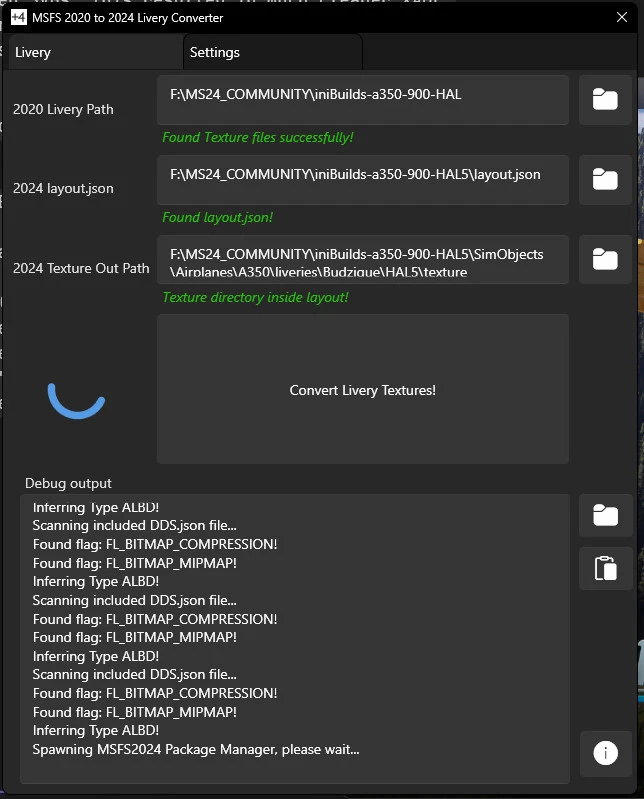
Step 2: From that folder structure in step one, note the directory for the layout.json and the directory for the texture files themselves and using the [...] button next to the first two fields in LiveryConverter2024.exe insert the folders for each. Example:
Project Directory: F:\MS24_COMMUNITY\iniBuilds-a350-900-HAL-005
Texture Directory: F:\MS24_COMMUNITY\iniBuilds-a350-900-HAL-005\SimObjects\Airplanes\A350\liveries\Budzique\iniBuilds-a350-900-HAL-005\texture
Step 3: using the [...] for the next two fields in LiveryConverter2024.exe insert the path to the MSFS2024 SDK (download using developer tools in MSFS2024) then the path to MSFSLayoutGenerator.exe (Found here). Examples:
MSFS2024 SDK Directory: C:\MSFS 2024 SDK
Layout Generator Directory: C:\LG
Step 4: Select the store which you purchased your game, (Steam or Microsoft Store)
Step 5: Click the "Upload MSFS 2020 Textures" and browse to the 2020 version of the Livery you're trying to convert and find it's textures, then select all DDS texture files from that 2020 livery and click "Open"
Step 6: An automated process will convert the DDS files first to PNG using Microsoft's texconv.exe (embedded in this project) followed by using the SDK (which will launch the simulator temporarily to have it convert the PNG files to 2024's native KTX2 texture format), then it will launch MSFSLayoutGenerator.exe to update the layout so your 'Project Folder' can be dropped directly in the Community folder of MSFS 2024
once again, it's an early alpha and your results may vary, please use the github page to report any bugs and I will work to address them
Convert a livery you want from DDS texture format to native KTX2 format
requirements: MSFSLayoutGenerator, MSFS2024 SDK
features automatic conversion, layout generation
Make your project file in the format of the msfs2024 style livery including layout.json and texture folder
set the relavant paths in LiveryConverter2024 and select the version of MSFS24
click "upload" on LiveryConverter2024
select all your images and the process will begin.
Work directory is %appdata%\com.budzique.livery-converter.app\
Source Code: https://github.com/jbud/LiveryConverter2024/
2020 to 2024 Livery Converter
The 2020 to 2024 Livery Converter is a tool designed to facilitate the conversion of aircraft liveries from DDS texture format to the native KTX2 format used in Microsoft Flight Simulator 2024. It features automatic conversion and layout generation, enabling users to create project files that adhere to the MSFS2024 standards, including layout.json and texture folders. Users will need MSFSLayoutGenerator and the MSFS2024 SDK, and can manage their conversion process through a user-friendly interface.


User Reviews
32 reviews
Version History
- Add BuilderLogError.txt opener to provide info on failures for Steam versions (Complete)


Comment Summary
User feedback on the 2020 to 2024 Livery Converter is mixed. Many users successfully converted their liveries, particularly textures, and found the tool very helpful for moving liveries from MSFS 2020 to MSFS 2024. However, a significant number of users report frequent errors, most notably failures related to 'fspackagetool.exe' and missing 'BuilderLogError.txt' files, especially for the Steam version of MSFS2024. Comments highlight that the program's instructions are unclear, causing confusion over correct setup steps, required folder structure, and use of the layout generator. Several users and the developer have provided partial workarounds, such as changing sim version settings or using older tool versions, but persistent Steam compatibility issues remain. There are also observations about color shifts or texture issues in converted liveries. Many users are requesting clearer instructions or a tutorial video. The developer notes limited time for updates and welcomes community contributions to further improve the tool.
Summarized on Nov 17, 2026
Log in to join the discussion
Log InComments140
Cheers!