

Description
This is a repaint for the excellent FlightFX P180 Avanti II. N9851 (s/n 1223) is a 2011 Piaggio P180 Avanti II. There are two versions of the livery, one with a painted registration number and the other one with a dynamic registration number.
Installation
Simply drag and drop the 'livery-ffx-p180-n9851' folder into your MSFS Community folder.
Credits
Livery created by Tim-HH using Adobe Substance 3D Painter and Adobe Photoshop.
FlightFX P180 Avanti II - N9851 (Dynamic Registration)
This add-on features a new repaint for the FlightFX P180 Avanti II, showcasing the dynamic registration N9851 (s/n 1223), a 2011 model. It includes two versions: one with a static painted registration and another with a dynamic registration number. Installation is straightforward, requiring a simple drag-and-drop into the MSFS Community folder. The livery was designed by Tim-HH utilizing Adobe Substance 3D Painter and Photoshop.

User Reviews
4 reviews
Version History
The livery is now compatible with the MSFS 2024 native version of the FlightFX P180 Avanti II. Many thanks to Waffler11 for letting me use his modified files, which greatly enhance the capabilities of the dynamic registration.
Related

FlightFX P180 Avanti II - N8GF (Dynamic Registration)
This add-on features a repaint for the FlightFX P180 Avanti II, specifically depicting the aircraft N8GF (s/n 1011), a 1991 Piaggio P180 Avanti. It includes two versions of the livery: one with a painted registration number and another with a dynamic registration number. Installation is straightforward, requiring users to drag and drop the provided folder into the MSFS Community folder. The livery was created by Tim-HH using professional design tools.
by TimHH
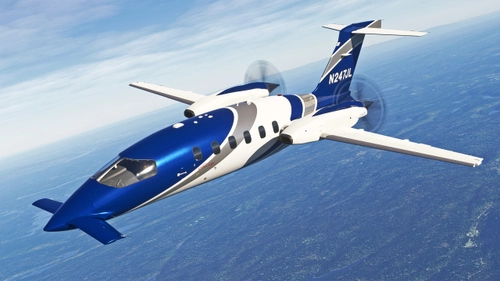
FlightFX P180 Avanti II - N247JL (Dynamic Registration)
This add-on provides a detailed repaint for the FlightFX P180 Avanti II, featuring the aircraft N247JL, a 2010 model operated by Lynk Air. It includes two livery options: one with a fixed painted registration and another with a dynamic registration number for increased realism. The installation is straightforward, requiring users to drag and drop the livery folder into their MSFS Community folder.
by TimHH
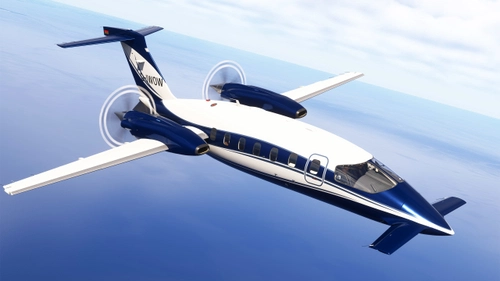
FlightFX P180 Avanti II - D-IWOW (Dynamic Registration)
This add-on features a repaint of the FlightFX P180 Avanti II, showcasing the 2018 aircraft D-IWOW (s/n 1120). It includes two versions of the livery: one with a painted registration number and another with a dynamic registration number. Installation is straightforward, requiring a drag-and-drop into the MSFS Community folder. The livery was created by Tim-HH using Adobe tools.
by TimHH

FlightFX P180 Avanti II - N180FB (Dynamic Registration)
This add-on provides a detailed repaint for the FlightFX P180 Avanti II featuring the livery of N180FB, a 2003 Piaggio P180 Avanti. It includes two variations: one with a static registration number and another with a dynamic registration number for more versatility. Installation is straightforward by simply dragging the livery folder into the MSFS Community folder.
by TimHH
Log in to join the discussion
Log InComments(8)
about 1 month ago
about 1 year ago
about 1 year ago
over 1 year ago
over 1 year ago
over 1 year ago
over 1 year ago
over 1 year ago