

Description
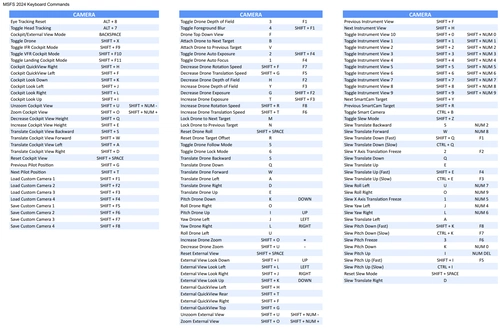
A keyboard specially designed for Microsoft Flight Simulator 2024, featuring shortcut keys with distinct colors.
Aircraft control keys such as throttle, propeller, brakes, and landing, along with functional keys like camera, map, and autopilot are neatly organized.
I hope this design will help players quickly get familiar and operate accurately, thereby enhancing the realistic flight simulation experience.
Note:
- This keyboard is designed for common commands only and may not include all available commands.
- If you prefer a full commands list, you can check out Default MSFS 2024 All Keyboard Commands.
- In the download file, you’ll find a JSON file that allows you to customize the keyboard to your preferences via this website.
I welcome your ideas and contributions and I hope you enjoy it.
Keyboard Layout with Default MSFS 2024 Commands
This add-on features a keyboard layout specifically tailored for Microsoft Flight Simulator 2024, highlighting shortcut keys in distinct colors for essential aircraft controls and functionalities. It organizes commands for throttle, propeller, brakes, camera, map, and autopilot in an easy-to-use format. A JSON file is included for users to customize the layout to their preferences. Please note that this layout covers only common commands and may not encompass all available options.
User Reviews
1 reviews
Version History
No version history available.
Log in to join the discussion
Log InComments(18)
12 months ago
And where is "Raw data"?
Thx a lot in advance.
12 months ago
On that site, go to the Raw data tab. There you’ll see an “Upload JSON” button — use it to upload the JSON file I already included in the package you downloaded. That will load the layout exactly as intended.
12 months ago
over 1 year ago
over 1 year ago
How can I customize on the web? I don't see how to upload the JSON file.
over 1 year ago
almost 2 years ago
almost 2 years ago
almost 2 years ago
almost 2 years ago
almost 2 years ago
almost 2 years ago
almost 2 years ago
almost 2 years ago
almost 2 years ago
almost 2 years ago
almost 2 years ago
Thank you.
almost 2 years ago