
Description
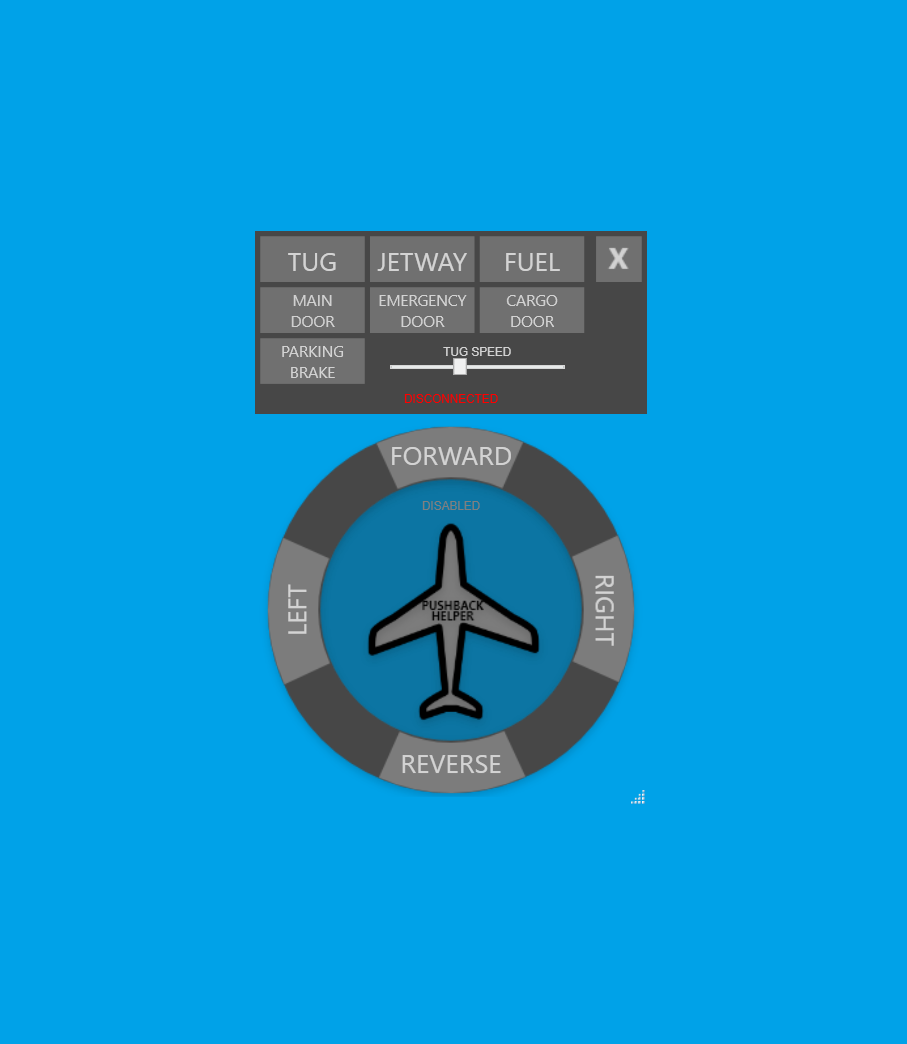
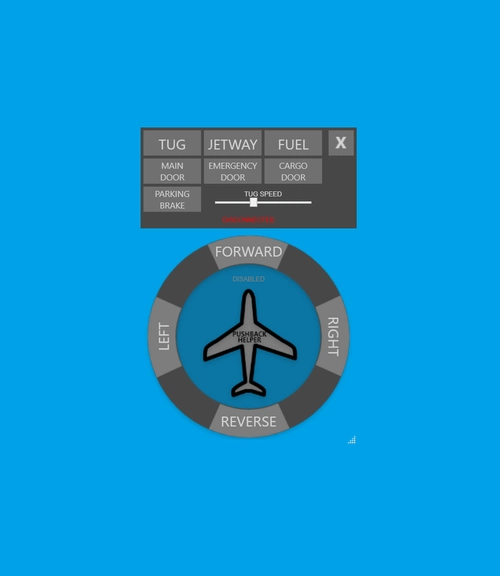
Pushback Helper is an application to make push back operations easier.
- No need to contact ATC for the jetway connection
- No need to contact ATC for using push back
- No need to contact ATC for calling fuel truck
- Open and close aircraft doors easily (A320, 787, 747 only)
Installation
Extract all files to any location and run PushbackHelper.exe. There is no need to put into the community folder location.
Auto-launch
If you wish to auto-launch the app upon the start of MSFS, follow these steps:
- Navigate to the MSFS installation folder and then subfolder LocalCache a) Typically C:\Users[YOUR USERNAME]\AppData\Local\Packages\Microsoft.FlightSimulator_\LocalCache b) This can vary depending on install drive or if you have the Steam version.
- In the LocalCache folder, find the exe.xml file and edit with your text editor of choice.
- Add the following snippet under the SimBase.Document tree, but substitute the path of where you installed MSFS Pushback Helper App.
    PushbackHelper
    False
    [PATH TO PUSHBACK HELPER EXE FILE]
- This is an example of an updated exe.xml file:
  Auto launch external applications on MSFS start
  exe.xml
  False

     PushbackHelper
     False
     C:\Users\alexj\AppData\Local\Packages\Microsoft.FlightSimulator_8wekyb3d8bbwe\LocalCache\Packages\community\msfs-pushback-helper-app\PushbackHelper.exe
Usage
- To show/hide UI press the Page Up key
- To connect or disconnect jetway simply click the Jetway button.
- To call the fuel truck simply click the Fuel button.
- To start or stop push back simply click the Tug button.
- The tug will wait in place until either Forward or Reverse is selected (remove the parking brake first or it will move slowly).
- Once moving, select Left or Right to steer the tug.
- There are indicators (3 dots) near the Left and Right buttons to show current rotation speed while turning.
- If you continue clicking the direction you are turning Left or Right, the rotation speed will increase.
- To decrease rotation speed, simply click the other direction button Left or Right
- When done, click Stop. Apply the parking brake. Click the Tug button again to remove the tug.
Special thanks to alex-johnson for his great work implementing v2.3 and v2.4 and v2.5 features.
Special thanks to aphalon for his great work implementing v2.6 features.
v2.6 Changes
- [FEATURE] Added multiple rotation speeds to left and right
- [FEATURE] Added indicators shows the current rotation speed to left and right
- [FEATURE] Adds more ground services
- [FEATURE] App no longer steals focus from MSFS so audio remains
- [FEATURE] App will auto exit upon exit of MSFS
- [BUGFIX] Adds better exception handling
- [FEATURE] Adds tug speed setting
- [FEATURE] Adds parking brake button
- [FEATURE] Door buttons added to open/close doors
- [FEATURE] Changed pushback method to new method with forward tug ability
- [FEATURE] Added ability to scale app size
- [BUGFIX] Fix crash on sim disconnect
- [FEATURE] Fuel button added to call fuel truck.
- [FEATURE] Jetway button added to manage jetway connection.
- [FEATURE] Close button added to exit application.
- [FEATURE] Moving UI is possible now. Just hold left click on the gray area between jetway and close buttons to move it.
- [FEATURE] When you close the application last location is being saved and restored when you start application.
- [FEATURE] MSFS connection status text moved to top of aircraft image and it is more readable now.
- [BUGFIX] Crash to desktop when click buttons before app connects to the sim is fixed.
- UI is recreated using WPF
- Shotcut key is defined. Press Page Up to show/hide UI. If you have multiple monitor you can move UI by pressing Shift + Windows + Left or Right arrow keys together.
Project link: https://github.com/metindikbas/msfs-pushback-helper-app
Pushback Helper
Simplify pushback operations with Pushback Helper. Connect jetway, use push back, and call the fuel truck without contacting ATC. Easily open/close doors on specific aircraft models.


User Reviews
140 reviews
Version History
[FEATURE] Added multiple rotation speeds to left and right [FEATURE] Added indicators shows the current rotation speed to left and right

Log in to join the discussion
Log InComments(412)
about 12 hours ago
Correct?
27 days ago
26 days ago
3 months ago
5 months ago
6 months ago
8 months ago
Tug randomly disconnects, the app shows active, but the directional buttons are greyed and the tug is physically gone. You can fix it by reconnecting tug, but it's just a bit annoying.
Just gonna rate 3/5 until a dedicated 2024 update drops. Will report on the Github.
8 months ago
11 months ago
11 months ago
Thanks
about 1 year ago
I experience the same. And most of the time, its not a huge problem. But sometimes when also the runway is not level, the plane keeps rolling backward. Which you have to counter by braking, which causes(atleast with me) an a320 to sit on his tail. Even with the settings disabled, MSFS registers this as a crash and you have to do all of this again.
Little bit extra contact which may not really help, but I want to point out that this behavior has actually lead to funny situations.
Can the developer reproduce? (apart from the crash part, that was just some context)
(still 5 stars since I have used this for 5 years with zero issues at all and thats very rare in FS land)
about 1 year ago
over 1 year ago
This comment has been deleted
over 1 year ago
over 1 year ago