
Description
Good Morning/Afternoon/Evening aviators,
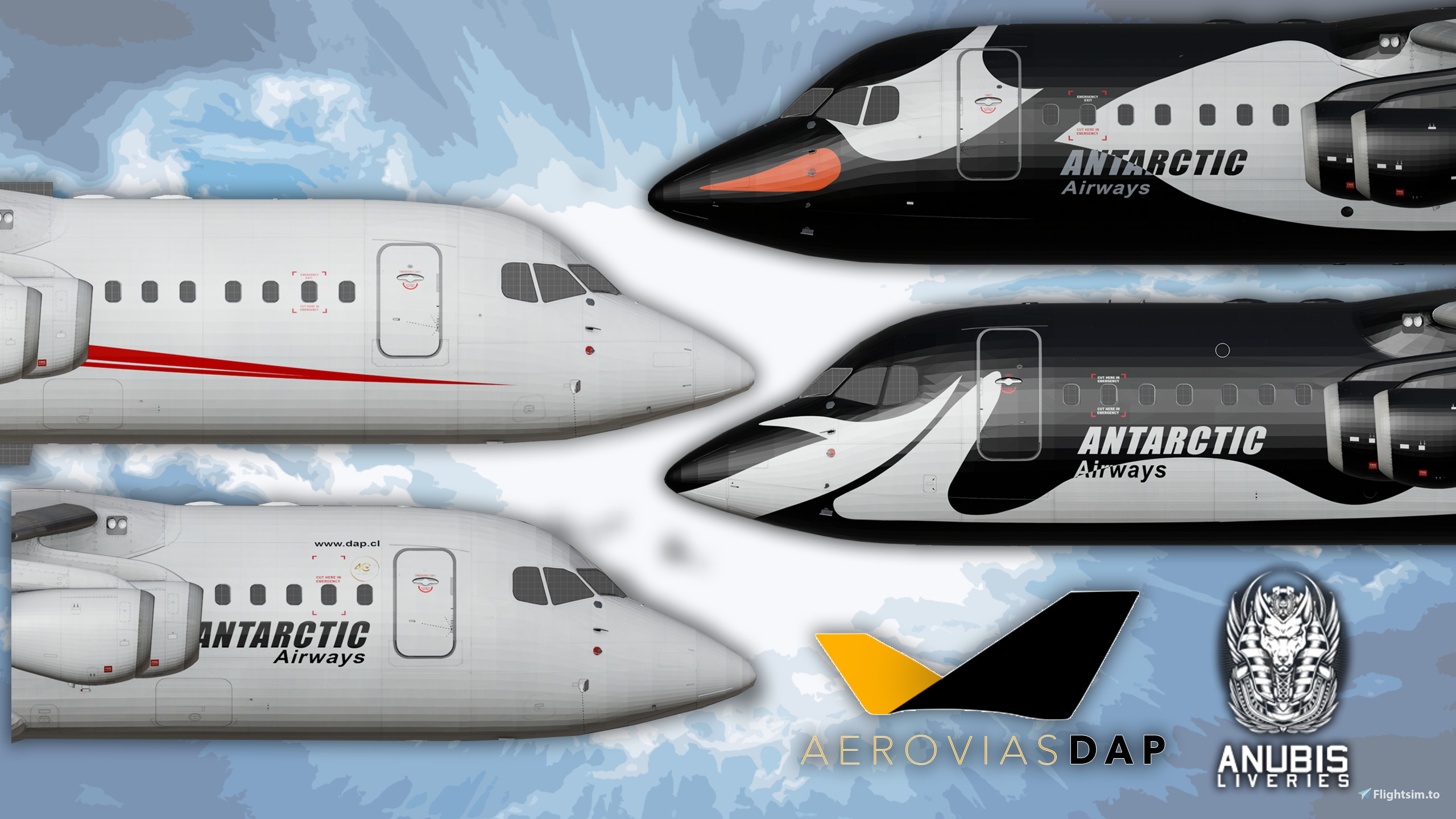
I have created a fleet pack consisting of the RJ fleet that Aerovias DAP/Antarctic Airways operate. Included is 6 aircraft in total.
Included:
CC-ANS - RJ85 - White (Logo + Titles)
CC-ARN - RJ100 - Chinstrap Penguin Livery
CC-ATI - RJ100 - Gentoo Penguin Livery
CC-DCU - RJ100 - White (Logo + Titles)
CC-DHS - RJ100 - White (Titles Only)
CC-DHU - RJ100 - White with Red/Grey Stripes (Ex Neptune Aviation)
FOR THE JUST FLIGHT RJ PROFESSIONAL ONLY. NOT FOR THE JUST FLIGHT THE 146 PROFESSIONAL.
MSFS 2024 Version here: https://flightsim.to/addon/108151/aerovias-dap-antarctic-airways-rj-fleet-msfs-2024-jf-rj-professional
Thanks for downloading!!!
Please join my discord server for updates/screenshots of in progress liveries and other information regarding my liveries such as release annoucements etc. https://discord.gg/9UV8jmSExH
________________________________________________________________
Installation:
Extract or Unzip the downloaded folder to a safe location.
Locate the extracted/unzipped folder. DO NOT COPY the folder called "Aerovias DAP RJ Fleet". Instead open this folder and inside you will find all six aircraft folders. Copy them into your MSFS community folder.
Enjoy!
____________________________________________________________________
Reuploading without the author's permission or using any PBR or cabin textures from this livery in another livery, is strictly forbidden and will incur serious actions. Please message me on here via DM or join my Discord channel if you have any queries.
Aerovias DAP/Antarctic Airways RJ Fleet | JustFlight RJ Professional
This add-on features a comprehensive fleet pack of six Regional Jet (RJ) aircraft operated by Aerovias DAP/Antarctic Airways, exclusively for the JustFlight RJ Professional model. The included aircraft comprise various liveries, including unique designs such as the Chinstrap and Gentoo Penguin. Notably, the pack includes both customized and standard liveries for different RJ variants. Ensure to follow the provided installation instructions for proper integration with Microsoft Flight Simulator.


User Reviews
1 reviews
Version History
No version history available.
Related

Aer Lingus EI-RJD RJ85 | JustFlight RJ Professional
This add-on features the Aer Lingus livery for the RJ85 aircraft, specifically designed for the JustFlight RJ Professional add-on. The model represents the EI-RJD registration, part of a previously operated fleet of four RJ85s in collaboration with CityJet. Installation instructions are included to ensure proper integration within Microsoft Flight Simulator. Future updates may include additional liveries if there is sufficient demand.
by CptAnubis

N1RJ VIP RJ100 | JustFlight RJ Professional
This add-on provides a fictional VIP livery for the JustFlight RJ100 aircraft in Microsoft Flight Simulator. It is specifically designed for the Just Flight RJ Professional and is not compatible with the Just Flight 146 Professional. The livery is available only for MSFS 2020, with compatibility for MSFS 2024 untested. Installation instructions and support information are provided for users.
by CptAnubis

CityJet Leinster EI-RJX | JustFlight RJ Professional
This add-on features a detailed 4K livery of CityJets Special Leinster Rugby design applied to the RJ Professional aircraft model, specifically for EI-RJX. It is intended exclusively for the RJ Professional version and not compatible with the 146 Professional model. The installation process is straightforward, requiring the placement of the livery folder into the MSFS community folder for use. Additional support and updates can be found on the authors Discord server.
by CptAnubis

Aer Lingus RJ Full Fleet Pack | MSFS 2024 | JF RJ Professional
This pack provides a selection of Aer Lingus liveries for the JustFlight RJ Professional in Microsoft Flight Simulator 2024. Included are four variations for the RJ85, featuring both standard and white liveries with options for clean and weathered appearances. The liveries reflect historical Aer Lingus branding on this aircraft type. Installation requires copying the provided folder into the community directory.
by CptAnubis
Log in to join the discussion
Log InComments(12)
6 months ago
6 months ago
6 months ago
10 months ago
10 months ago
10 months ago
11 months ago
about 1 year ago
almost 2 years ago
almost 2 years ago
https://www.youtube.com/watch?v=L2xNFLyykLY
almost 2 years ago
almost 2 years ago