
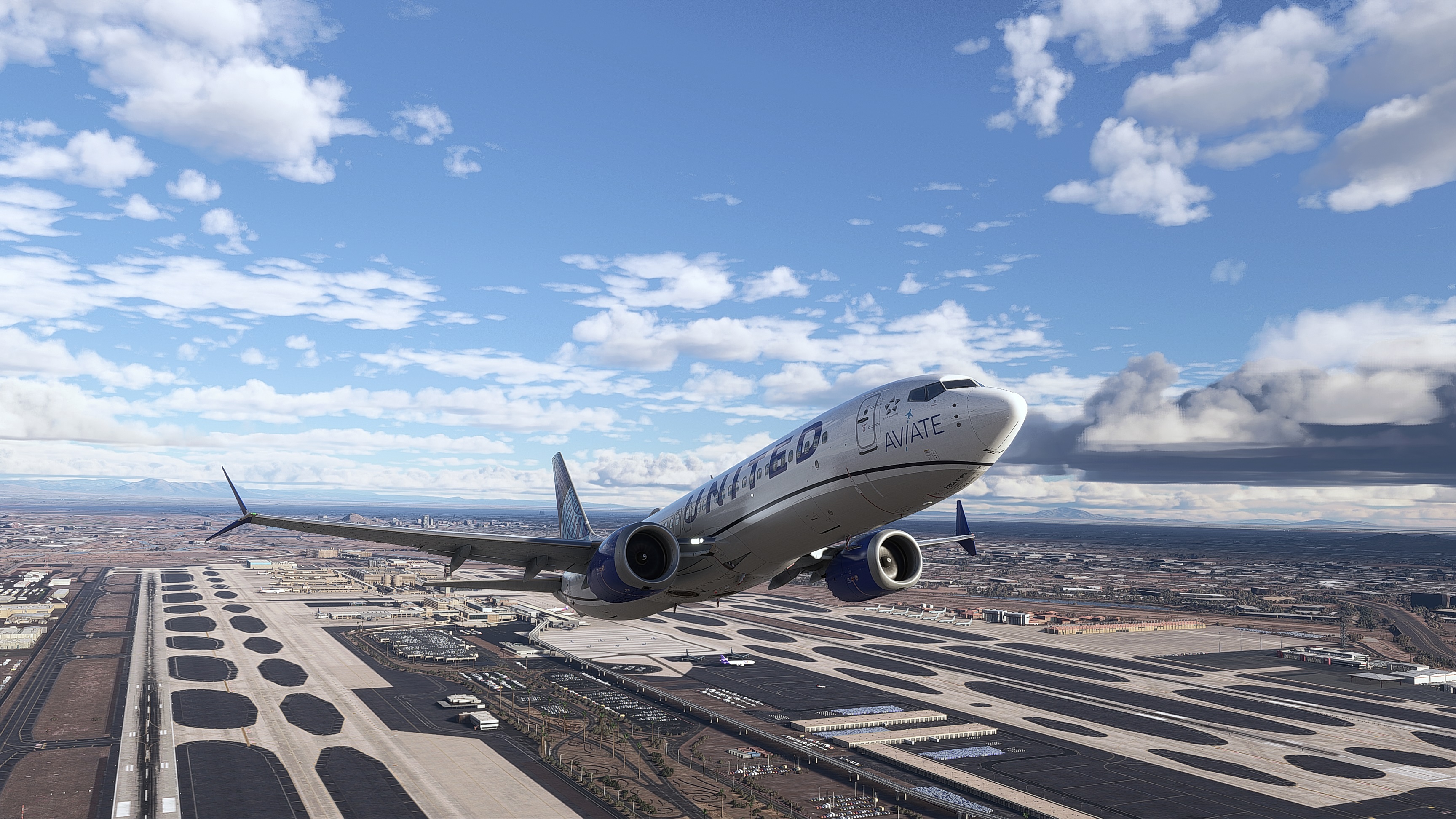
Description
REAL LIFE Reshade Preset
by TheOnlySkilled (youtube.com/@TheOnlySkilled) former known as LealeRyan
Our RESHADE preset offers the most realistic looking environment in Microsoft Flight Simulator 2020 that you will find. Ultimately, I made this preset to look as close to reality as possible based on real world pictures, physically outside researching using my own eyes, and my own designer/photographic understanding of real world lighting/effects. The goal of this preset is not for eye candy, so therefore there are no added extra effects for glamour. My goal is always to make the simulator to look as real as possible because we believe that "REALITY IS TRUE BEAUTY". We spent years on this long awaited prese, I apologize for the wait. We originally made it as an NVIDIA filters and was never satisfied so never released it. Then finally months ago, I decided to switch to Reshade and never looked back. We have the best results possible and I'm happy to finally share it with you!
VIDEO TRAILER - CHECK OUT our full flight previeving the filter, where we switch betweeen filter on and off to show the difference.
TRAILER #1
[MSFS2020 LIVE FLIGHT] 👨✈️REAL LIFE RESHADE PRESET V1 PREVIEW IN THE iFLY 738 MAX
TRAILER #2
coming soon...
Youtube Channel: www.youtube.com/@TheOnlySkilled
Donate: https://streamlabs.com/lealeryan
OTHER WORK:
- OFFICIAL YOUTUBECHANNEL: I will start LIVE streaming again End of October 2024 under our new Streaming name and logo. https://www.youtube.com/@TheOnlySkilled
- X-PLANE REAL LIFE PRESET: Here you can see the popularity of our past presets for other simulators.
https://forums.x-plane.org/index.php?/files/file/46434-real-life-v9-1141-xvision-1150-vulkan-preset-by-leale-ryan/&page=5&tab=comments
BONUS ITEMS:
- x3 Real Life Cloud presets that were used during promo screenshots
- As soon as MSFS2024 is released, we will create a preset version for that simulator as well. Depending on how different it is between sims, we should have it out shortly after the simulator is release.
- If we feel we can enhance this preset anymore, then we will continue to support and update it with new versions.
DISCLAIMER:
1. This preset was built perfectly to work at all times of day, especially night-time. You are more than welcome to tweak it based on your monitor colors settings and/or liking, however, please DO NOT distribute these settings to others on the public forums as your own.
2. REX Atmos was not accounted for while making this preset. We may make an additional preset down the line that works with Atmos, and/or create our own ATMOS preset to pair with it, if we decide to use Atmos at all. I believe we will wait for MS2024 release to see if it's even necessary to get Atmos.
3. Everyone who may use this preset will have different monitor brands and color settings. Results may vary.
4. Preset was created on a ASUS predator 4K 43" monitor via a built PC w/ a RTX4080 card. Please take this into account.
5. Reshade DOES NOT manipulate the actual simulator on an engine level so therefore these tweaks do not dynamically adjust the sim itself. This creates inconsistencies being many users. If we had this type of access to do this via a software like X-vision for X-Plane, then it would be easier for your sim to look exactly like my screenshots.
________________________________________________________
PC SPECS: (SELF-BUILT)
I9-10850k 4.9GHZ OC
Nvidia RTX4080 16GB VRAM
32GB RAM DDR4
1TB M.2 NVME (OS) / 1TB M.2 NVME (MFS2020)
________________________________________________________
VERSION 1.0 NOTES: These were the factors that were considered while making this preset.
________
- Major tweaks to sun lighting, removing that dull yellow look to the default
- Edited black levels, shadows and over Contrast for a truer more realistic look
- Added sharpness that can make the sim feel more solid and real, default sim is super blurry based off of most user settings
- Changed overall saturation/vibrancy and added a tint to correct the color of the sim to a more realistic feel
- Night time was taken into account when creating the preset, at default it is way too bright and the sky and stars are way too visible
- HDR effect added for a more in-depth feel to the sim, adds a hint of realism
- I have included a NON-HDR version for those who don't like HDR or the possible side effects of it
- I have included a NON-BLOOM version as well for those who don't like blooming or the possible side effects of it, like perhaps glowing screens at night
- I have included a NON-BLOOM/NON-HDR version as well for those who don't like either
SCREENSHOTS (DISCLAIMER: Picture Quality may have been downsized dramatically on flightsim.to):
All screenshots were taken at the times of day listed below along with our Bonus Real Life Cloud presets. This helps to keep consistency between all shots for an accurate "apples to apples" comparison. We chose some locations that were popular to help display what a beauty this preset can be.
TIMES RANGES OF SHOTS (shots included a default vs preset comparison for each)
1. 7:00-7:30pm
2. 10:30-50am
3. 1:30-2:00pm
4. 4:30-45pm
5. 5:50-6:00pm
6. 10:00pm
DISCORD PAGE (TheOnlySkilled): https://discord.gg/kKw3XSt
- DOWNLOAD, FLY, TAKE UR BEST SHOTS & POST IN OUR DISCORD Reshade Preset Channel for screenshots related to the filter.
- Let us know what you think about the preset and any suggestions here.
Donations Accepted! Please share your support for us. Many hours and months were put into this project.
- Donate @ https://streamlabs.com/lealeryan
RESOURCE CREDITS
-----------------
- All credits go out to the makers of RESHADE for all of their software and all included effects that made this preset possible.
REAL LIFE Reshade Preset for MSFS2020
The REAL LIFE Reshade Preset for Microsoft Flight Simulator 2020/2024 aims to create an exceptionally realistic visual environment by emulating real-world lighting and effects. Developed by TheOnlySkilled, this preset is based on extensive field research and a deep understanding of photographic principles. It offers multiple configurations, including options for HDR and bloom effects, to ensure optimal appearance at various times of day, while maintaining a commitment to realism rather than visual embellishment. Bonus content, such as real-life cloud presets, is also included with the add-on.


User Reviews
4 reviews
Version History
No version history available.
Log in to join the discussion
Log InComments(30)
about 2 months ago
10 months ago
10 months ago
over 1 year ago
about 1 year ago
over 1 year ago
xD
over 1 year ago
over 1 year ago
over 1 year ago
about 1 month ago
over 1 year ago
over 1 year ago
over 1 year ago
over 1 year ago
over 1 year ago
over 1 year ago