
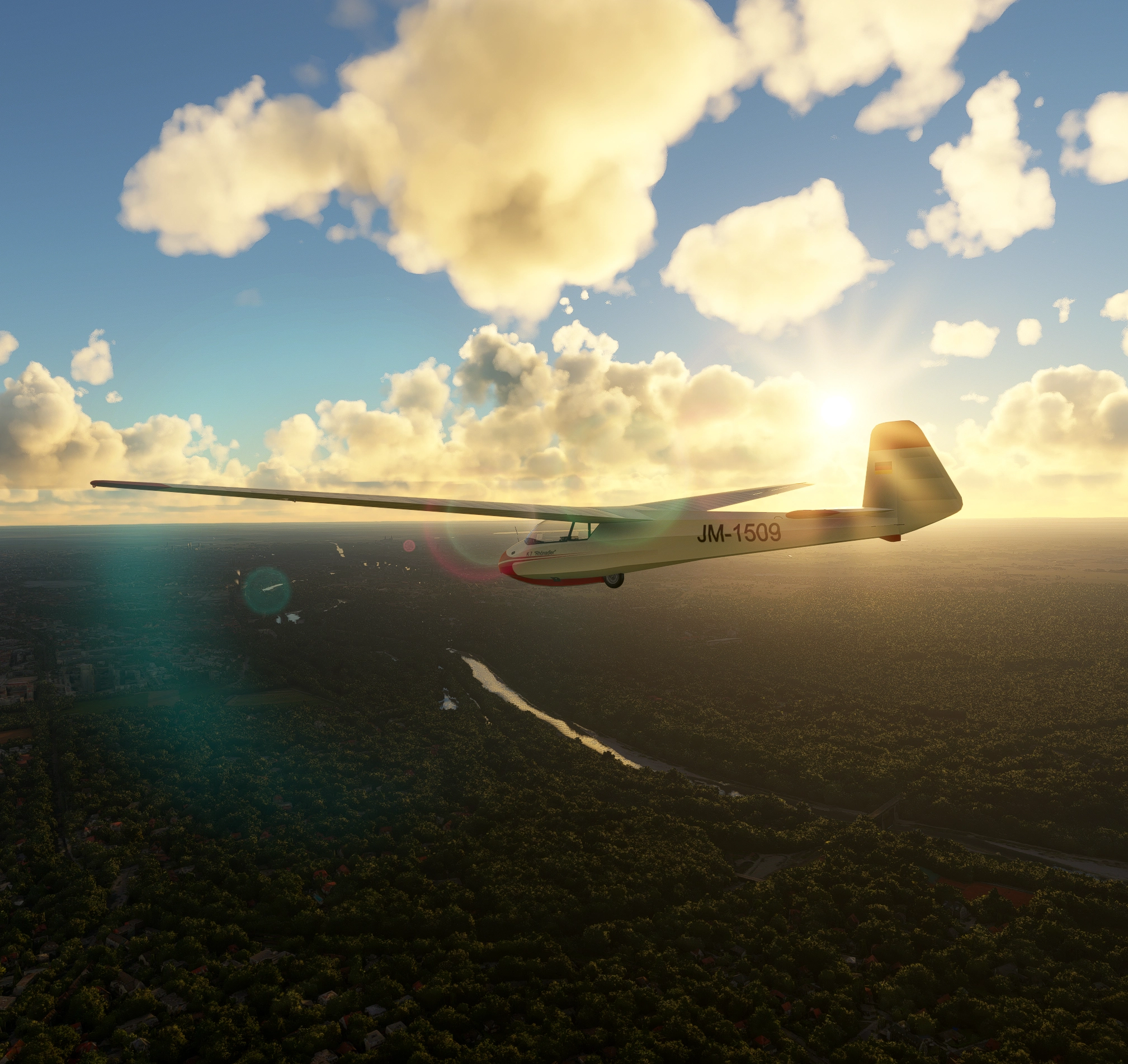
Description
Welcome to Merlinor's 160 Soaring Weather Presets for Microsoft Flight Simulator.
This set contains 160 soaring weather presets. 160 presets may seem like an overwhelming number of different presets at first glance, but don't worry: in the end, there are only 5 different cloud formations, each of which is combined with 4 different wind strengths. This results in 20 basic weather conditions. Each of them allows users of the sim to fly gliders anywhere on earth, in hilly or mountainous terrain as well as over flat land for extended cross-country flights. Pilots will always be able to find enough thermal to continue their flights over long distances, but I have designed the presets in such a way that this will not always be easy.
The names of the 5 cloud formations are: tiny Clouds, small Clouds, medium Clouds, blurred Clouds, strong Clouds.
The thermals at the clouds do not reach excessively high, so that the pilots need to make an effort to gain fresh altitude from time to time during long cross-country flights. In order to have the best thermal conditions, it is recommended to fly around midday on warm summer days.
The 4 wind strengths are: light wind, agitated wind, fresh wind, strong wind.
I roughly based the wind speeds on the scale for wind speeds of the German Weather Service. Each one enables flying over mountains as well as over flat land.
For each of these weather conditions, I have set up 8 different wind directions so that pilots all over the world can find a weather condition that suits the landscape of their home area.
These wind directions are: north (N), northeast (NE), east (E) southeast (SE), south (S), southwest (SW), west (W), northwest (NW).
The wind direction is the direction from which the wind is blowing
This variation of wind directions increases the number of different weather presets to 160.
For each preset, the SIM offers three different cloud layers, each of which I have embedded differently in the formations. It's similar with the winds: I've incorporated six different wind layers into each preset here.
We all know that the Microsoft Flight Simulator weather model doesn't fully reflect real-world conditions, because the SIM generates its weather effects in a different way than the real world. Thermals develop differently there than in the real world and winds behave similarly on the slope to a certain extent, but not completely realistically either. This inevitably leads to slightly different conditions in the weather of the SIM compared to the real world. For the motorized pilot, these differences are hardly noticeable, but for the glider pilot they do make a difference. He has to be more aware of these differences, since he is more dependent on the conditions in the atmosphere than the motorized pilot
When creating these weather presets for gliding, I have tried to compensate for these differences to real weather conditions as far as possible, but of course this cannot be achieved completely. However, I have tried to create conditions that are as close as possible to the real thing. But there remain differences: depending on the wind strength, thermals can be found more or less far away from the clouds in the direction of the approaching wind, and upwinds on the slope behave slightly differently to the natural world, both on the slope and over the ridges.
The SIM pilot must therefore take such altered patterns into account during his flights, because no weather preset can override them. However, he can still fly very well in the simulator if he adapts his flight behavior accordingly. "It's not the weather that has to adapt to the pilot, but the pilot to the weather," a flight instructor told me many years ago. This is still true today, especially here in the SIM.
With all the wind strengths and weather combinations contained in the presets, he can master routes of several hundred kilometers both over flat land and in the mountains. I have tested them all. Even with the toxic combination of "tiny clouds strong Wind", I have mastered routes of several hundred kilometers over flat land, and with different “strong Wind” Presets I have dealt with massive turbulence in the high mountains. In short, these weather presets can be used to create tasks with challenging weather combinations for experienced glider pilots, as well as easy-to-fly settings for less experienced pilots.
Installation note:
To use them together with the system-provided weather presets in the simulator's weather menu, the .zip file must be extracted into the folder named “... \Weather\Presets” provided for this purpose in your installation of Microsoft Flight Simulator. The presets are then saved there in the form of 160 .wpr files. Do NOT (!) install them into the community folder!
After that, you can select them in the simulator when setting up the flight conditions, just as you would any other weather preset. They are easily recognisable there and easy to distinguish from each other. Their designation always begins with the letters MER followed by the number of the preset and then the further details, for example: “MER 002 tiny Clouds light Wind NE”
The folders for the weather presets are located in different places in the MS Store version and in the Steam version of the Microsoft Flight Simualor:
The two installation paths are:
MS Store version:
C:\Users\Admin\AppData\Local\Packages\Microsoft.FlightSimulator_8wekyb3d8bbwe\LocalState\Weather\Preset
Steam version:
C:\Users\[Your Name]\AppData\Roaming\Microsoft Flight Simulator\Weather\Presets
Depending on your installation, you have to extract the .zip file to the appropriate folder.
I hope you will enjoy these 160 weather presets. Let me know how you like them, and if you notice any bugs, please post them in the chat below. I have gone through the presets several times, but as a creator one sometimes becomes a bit blinkered and overlooks even the most obvious bugs.
Best regards, Merlinor
160 Soaring Weather Presets
Enhance your gliding experience with 160 Soaring Weather Presets for Microsoft Flight Simulator. This set offers various cloud formations and wind strengths for diverse flying conditions, allowing pilots to navigate over different terrains. With detailed wind directions and realistic weather effects, these presets cater to both seasoned glider pilots and beginners looking for a challenge. Install them easily in the simulator to access a wide range of dynamic weather scenarios.


More Information
Version History
No version history available.
Comments(1)
Log in to join the discussion
Log In10 months ago
One question (for now :-) ) : with "Clear Skies" can we have blue thermals with your presets?