
Description
Installation:
In the zip file are 2 folders:
- Official: this folder contains a modified layout.json file which will disable the original stock traffic BGL.
- Community: this folder contains 2 package folders with corrected traffic BGL files (1 package for airliner traffic, and 1 package for GA traffic).
1.) Disable the original stock traffic BGL file:
- Locate the fs-base-ai-traffic folder in your Official package cache.
- Replace the layout.json file with the one from the Official folder in this zip.
- Note: a backup of the original stock layout.json file is also included here, just in case.
2.) Place the package folders containing the new BGL files into your Community folder (or enable them via your package manager of choice):
- offline_ai_traffic_airliner_fixed
- offline_ai_traffic_ga_fixed
Background:
Like others, I was experiencing CTDs with no error message when using Offline AI traffic, even at low settings.
Eliminating other possible causes did not help (Community folder = empty, SimConnect = no connections, unplugged device drivers = cleaned out, NVidia driver = best working version 446.14, hardware overclocks = none).
Like others, I noticed that these CTDs were semi-reproduceable, in that if I repeated the same flight (same flight plan and timings), then the CTDs would occur consistently at more or less the same spot.
This led me to believe that the stock Offline AI traffic BGL file must be at fault.
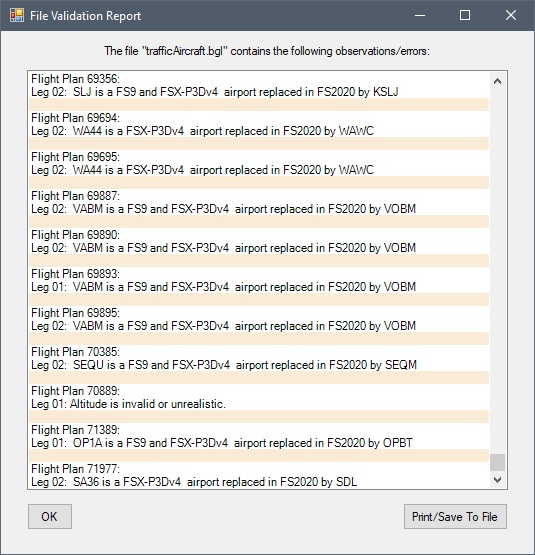
I used AIFP3 to validate the stock traffic BGL file, and sure enough it identifies hundreds of data issues in the AI flight plans, including legs with missing departure / arrival airports, legs with impossible flight plan altitudes, etc.
I corrected the data errors in the stock traffic BGL file. Due to its size, I split it into 3 separate BGLs: Airliners, GA Cessnas, GA Others.
I then disabled the original stock traffic BGL file, and used the corrected BGL files instead. Preliminary testing suggests that this has cured the CTDs when using Offline AI traffic on my system.
Note: this will only prevent CTDs caused by data errors in the original stock traffic BGL. It will do nothing to prevent CTDs which are due to other causes on your system.
In the zip file are 2 folders:
- Official: this folder contains a modified layout.json file which will disable the original stock traffic BGL.
- Community: this folder contains 2 package folders with corrected traffic BGL files (1 package for airliner traffic, and 1 package for GA traffic).
1.) Disable the original stock traffic BGL file:
- Locate the fs-base-ai-traffic folder in your Official package cache.
- Replace the layout.json file with the one from the Official folder in this zip.
- Note: a backup of the original stock layout.json file is also included here, just in case.
2.) Place the package folders containing the new BGL files into your Community folder (or enable them via your package manager of choice):
- offline_ai_traffic_airliner_fixed
- offline_ai_traffic_ga_fixed
Background:
Like others, I was experiencing CTDs with no error message when using Offline AI traffic, even at low settings.
Eliminating other possible causes did not help (Community folder = empty, SimConnect = no connections, unplugged device drivers = cleaned out, NVidia driver = best working version 446.14, hardware overclocks = none).
Like others, I noticed that these CTDs were semi-reproduceable, in that if I repeated the same flight (same flight plan and timings), then the CTDs would occur consistently at more or less the same spot.
This led me to believe that the stock Offline AI traffic BGL file must be at fault.
I used AIFP3 to validate the stock traffic BGL file, and sure enough it identifies hundreds of data issues in the AI flight plans, including legs with missing departure / arrival airports, legs with impossible flight plan altitudes, etc.
I corrected the data errors in the stock traffic BGL file. Due to its size, I split it into 3 separate BGLs: Airliners, GA Cessnas, GA Others.
I then disabled the original stock traffic BGL file, and used the corrected BGL files instead. Preliminary testing suggests that this has cured the CTDs when using Offline AI traffic on my system.
Note: this will only prevent CTDs caused by data errors in the original stock traffic BGL. It will do nothing to prevent CTDs which are due to other causes on your system.
MSFS 2020MSFS 2024
Offline AI Traffic - Stock Traffic BGL Fix
Fix the stock Offline AI traffic BGL file to prevent CTDs with this add-on. Exclusive packages for both airliner and GA traffic included. Detailed installation instructions provided for seamless implementation. Say goodbye to consistent crashes during Offline AI flights with this essential modification.
Downloads Stopped
The creator has temporarily stopped downloads for this addon. Please check back later.
Downloads2K
Version1.0
File Size20.54 MB
Published5 years ago
Updated5 years ago


User Reviews
4.2
10 reviews
5
50%
4
10%
3
0%
2
0%
1
0%
Version History
No version history available.
Log in to join the discussion
Log InComments(26)
about 4 years ago
still doesn't work
about 4 years ago
if i use the layout modified file, and i have both folders(offline_ai_traffic_airliner_fixed
and offline_ai_traffic_ga_fixed) into my community fodler , i only have airliners traffic, nothing GA traffic apperas
about 4 years ago
don't work after SU9
about 4 years ago
It does work after SU9, but after any update, you have to copy the modified layout.json file again into the official folder as the update replaced it.
about 4 years ago
did it and still doesn't work , i hace the modified layout file in my official folder
over 4 years ago
what does "offline_ai_traffic_airliner_fixed" do?
over 4 years ago
Can someone please create a step-by-step video tutorial on how to properly install this fix for general aviation aircraft.
over 4 years ago
Love this! This really helped get GA traffic back with AIG online traffic. Thank you so much for this.
over 4 years ago
Did you use only one of the files? Ive noticed my GA Traffic has disappeared and I use AIG, dont know why its not there anymore..
over 4 years ago
Yes, only one I think. I don't remember as I'm at work. There is a good guide somewhere on Avsim. Very helpful
over 4 years ago
I use the GA traffic in this to add GA to my AIG offline traffic. One thing I noticed though is that it seems there are a lot of duplicate flights. For instance, flying from KABY to KSAV I noticed that a lot groups of GA flights in the map. 3 and 4 planes flying the exact same routes next to each other at the same speed and altitudes. And yes, this is with the stock MSFS traffic disabled by exchanging the layout.json from this mod with the stock one. Has anyone else noticed this?
over 4 years ago
Thanks for your help on another forum site about this. It really added more GA planes to AIG airliners.
Thanks again.
almost 5 years ago
Is this addon now defunct?
about 5 years ago
It seems to work for me with SU5.
The strange thing was that I first had not significant more CTDs with SU5 at the beginning. Then I got a lot of them.
At that point it occured to me that I had forgotten to replace the file in the official folder after SU5. After I fixed that I had only one CTD (in about 5 flights) that seemed more related to my graphics card then to the sim.
But it is sad that this fix is not updated anymore. I guess Microsoft/Asobo changes the AI traffic espacially when airports are added or removed. So this fix may get into trouble when an AI plane wants to start from or land at an airport that isn´t there anymore...
about 5 years ago
Hi, can someone please confirm if this excellent Fix is working for SU5. I see many planes on the ground but I do not see movement of them on the runway or in a taxi. I don't see any traffic in the skies either.
over 5 years ago
over 5 years ago
over 5 years ago
over 5 years ago
Can you explain a little more how this works?
What AI settings do you need to make optimal use of Offline AI traffic?
My use case is I want to use AI traffic for doing some quick formation practice, approaches etc, but I'm unsure of how the traffic generation works in terms of times and places?
over 5 years ago