

Description
UPDATE 2025/01/09:
- Mobiflight Beta version (10.4.0.3) required! (coming this night)
- adjusted to new MF Beta & new miniFCU & miniEFIS firmware which brings backward compability to the old Profiles for the miniFCU
- I created 2 configs (miniFCU only, and miniFCU + miniEFIS)
- created & tested with Fenix A319/A320/A321 (v2.3.0.553+)
IMPORTANT:
- V16 only working with the new integrated beta MF-Firmware for the miniFCU & miniEFIS!!!!
- for flashing / resetting & usage i highly recommend to attach & power the delivered miniEFIS USB- power cable (otherwhise it may fail)
I programmed some additional new miniEFIS config features:
- holding the CHRONO button for 500ms will switch the EFIS from left<>right<>left, that includes all assingments
(buttons, switches, rotarys, chrono), display values, LED´s)
Note: for easier layer identification the right efis LED´s will flash after 2300ms for 200ms
- Ann-LT functionality for left & right EFIS (display & LED´s)
- ECAM/ND XFR (Alternate) by 6th hidden ND-Slot (after PLAN mode) to transfer the System/Status Display to the Capt ND or FO ND
Cheers vinKaiZen
FIRST TIME FULL INSTALLATION INSTRUCTION (UPDATED SINCE FENIX 2.3.0.553):
NEW: If using the miniFCU attach & power the delivered miniEFIS USB-power cable!
1) Ensure your miniFCU is fully regristered as USB-SERIAL CH340 in your windows device manager, otherwise check here: https://shop.minicockpit.com/a/help/article/57597
=> if it won´t register after driver installation or windows update, you may use another or the original USB cable (power+data transport cable required!)
2) Close the miniFCU DLS (data link software), it´s not needed and causes issues if used together with Mobiflight
Never mind: Here you will find a list of created Mobiflight MiniFCU profiles for many planes so far: https://github.com/Koseng/MobiFlight-miniFCU-Profiles
3) Download & install latest MobiFlight version, (see below) https://www.mobiflight.com/en/download.html
=> Extras => Settings: TICKED! "Automatically perform retrigger-action with "run" mode
Now your sim switches will sync with your set switches in the miniFCU
=> If not already done, ensure you installed the Mobiflight WASM module => Extras => MSFS2020 => Install WASM module
=> check in your MSFS community, you have got a "mobiflight-event-module" folder, otherwhise its installed on the false location and won´t work
NEW: 3.1) Update to latest Mobifight Beta Version (settings => General => Beta version => TICKED! => OK => Help => Check for Update
4) With a original or older miniFCU device, Mobiflight will now upgrade your firmware (do it) that it´s useable with Mobiflight
=> go though firmware updating messages, then in configured modules => right mouse click on "compatible" => "update firmware" => "minicockpit" => "miniCOCKPIT miniFCU"
5) Then "Upload" the boards default config (the upload button below the miniFCU picture on the right side!) and click "OK"
=> Note you can restore the Firmware anytime same way: right mouse click on miniFCU (configured modules) => "Reset board" to get it usage with miniFCU DLS
CONFIG INTEGRATION:
Now all is prepared and the next steps must be done everytime you upgrade a config:
7) Download & Extract my FENIX A320 - miniFCU+miniEFIS-V15.zip
8) Open the "FENIX A320 - FCU-V...mcc" config in Mobiflight (File -> Open -> select it)
9) Important or you won´t get Display values later:
=> Orphaned Serials found window opens => in the white field select my "miniCOCKPIT miniFCU/ SN-94G-809" serial that its blue marked -> "Assign"
=> then my serial will disappear and the config is adjusted to your serial => click "OK" => "Save" (otherwise you have to do it every time)
10) Since FENIX V2B2: Untick "scrolling accerlation" in the new Fenix EFB option!
11) Optional but recommended, on Mobiflight bottom right mouse click on fenix aircraft => link current config & "Auto load linked config"
12) Optional but recommended, on Mobiflight top, activate "AutoRun" (yellow pulp if activated)
Now you are ready to use and enjoy
HANDLING / USAGE NOTES & INFORMATIONS (UPDATED SINCE FENIX 2.0.0.392):
- Don´t worry about the red "!" circles if config is running in Mobiflight, these are programmed preconditions (logic) and normal
1) start msfs and stay in the main menu
2) start fenix app
3) start mobiflight & run the config (if not already)
4) start your flight & enjoy
Cheers, vinKaiZen
MiniCockpit Community Discord: https://discord.gg/63ypEhYkft
Mobiflight Discord: https://discord.gg/QjCQXSQs5K
List of all available Mobiflight miniFCU profiles: https://github.com/Koseng/MobiFlight-miniFCU-Profiles
Youtube: https://www.youtube.com/vinkaizen
Don´t miss my generic config for Asobo Planes:
https://de.flightsim.to/file/67143/generic-ap-asobo-planes-minicockpit-minifcu-mobiflight-profile-full-installation
Fenix A319 / A320 / A321 | MiniCockpit miniFCU + miniEFIS | MobiFlight Profile | Full installation
Enhance your experience with the Fenix A319, A320, A321 add-on featuring MiniCockpit MiniFCU, MobiFlight Profile, and native displays. Follow the detailed installation instructions for full functionality and seamless integration with Mobiflight. Enjoy a realistic cockpit setup with optimized configurations and essential handling tips provided by vinKaiZen. Join the MiniCockpit Community Discord and Mobiflight Discord for additional support and resources.


User Reviews
7 reviews
Version History
UPDATE 2025/01/07: - created & tested with Fenix A319/A320/A321 (v2.3.0.553+) - Mobiflight Beta version (10.4.0.3) required! - I created 2 configs (miniFCU only, and miniFCU + miniEFIS) - adjusted to new MF Beta & new miniFCU & miniEFIS firmware which brings backward compability to the old Profiles for the miniFCU
Related
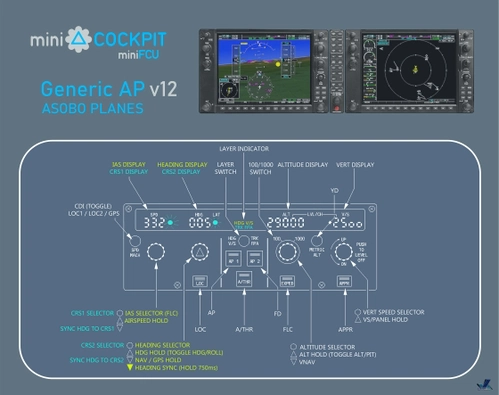
Generic AP Asobo Planes | MiniCockpit miniFCU+miniEFIS | MobiFlight Profile | Full installation
Enhance your cockpit experience with this MobiFlight configuration file designed to support the miniFCU + miniEFIS with displays on generic Asobo Planes. Follow step-by-step installation instructions for seamless integration and enjoy a personalized flying experience tailored to your preferences. Stay updated with the latest changelogs to ensure optimal performance and functionality. Cheers to a smoother flight experience! 🛩️
by vinKaiZen

Fenix A319 / A320 / A321 | WinWing MCDU (CPT+FO+ECAM+TRANSPONDER) | MobiFlight Profile
This add-on features a Mobiflight Profile for the WinWing MCDU, designed specifically for the Fenix A319, A320, and A321 in Microsoft Flight Simulator. It provides enhanced functionality, including easy switching between Captain and First Officer MCDUs, as well as access to the ECAM and Transponder layers. The setup includes visual indicators for active layers and controls, facilitating a more immersive experience while flying. Compatible with both MSFS 2020 and 2024, it aims to enhance the realism of cockpit management.
by vinKaiZen
Log in to join the discussion
Log InComments(61)
9 months ago
Thanks!
8 months ago
about 1 year ago
any solutions? maybe a new profile somewhere i havent seen?
12 months ago
Issue was, he missed my installation step 5)
"5) Then "Upload" the boards default config (the upload button below the miniFCU picture on the right side!) and click "OK"
https://cdn.flightsim.to/images/26/fenix-a320--minicockpit-minifcu--mobiflight-profiles-237711-1704660595-oetQE.gif?width=1400
over 1 year ago
over 1 year ago
over 1 year ago
over 1 year ago
12 months ago
Issue was, he missed my installation step 5)
"5) Then "Upload" the boards default config (the upload button below the miniFCU picture on the right side!) and click "OK"
https://cdn.flightsim.to/images/26/fenix-a320--minicockpit-minifcu--mobiflight-profiles-237711-1704660595-oetQE.gif?width=1400
over 1 year ago
over 1 year ago
over 1 year ago
-if do t work try reset, then reflash again. Dont forget to upload (right side!!) afterwards
almost 2 years ago
over 1 year ago
Please read feature list:
Short chrono Push (500ms:
Switches efis from capt FO capt
(If FO side is active LEDS are blinking)
Also see my video:
https://youtu.be/aVPhz7_BFio
over 1 year ago
almost 2 years ago
over 1 year ago
almost 2 years ago