
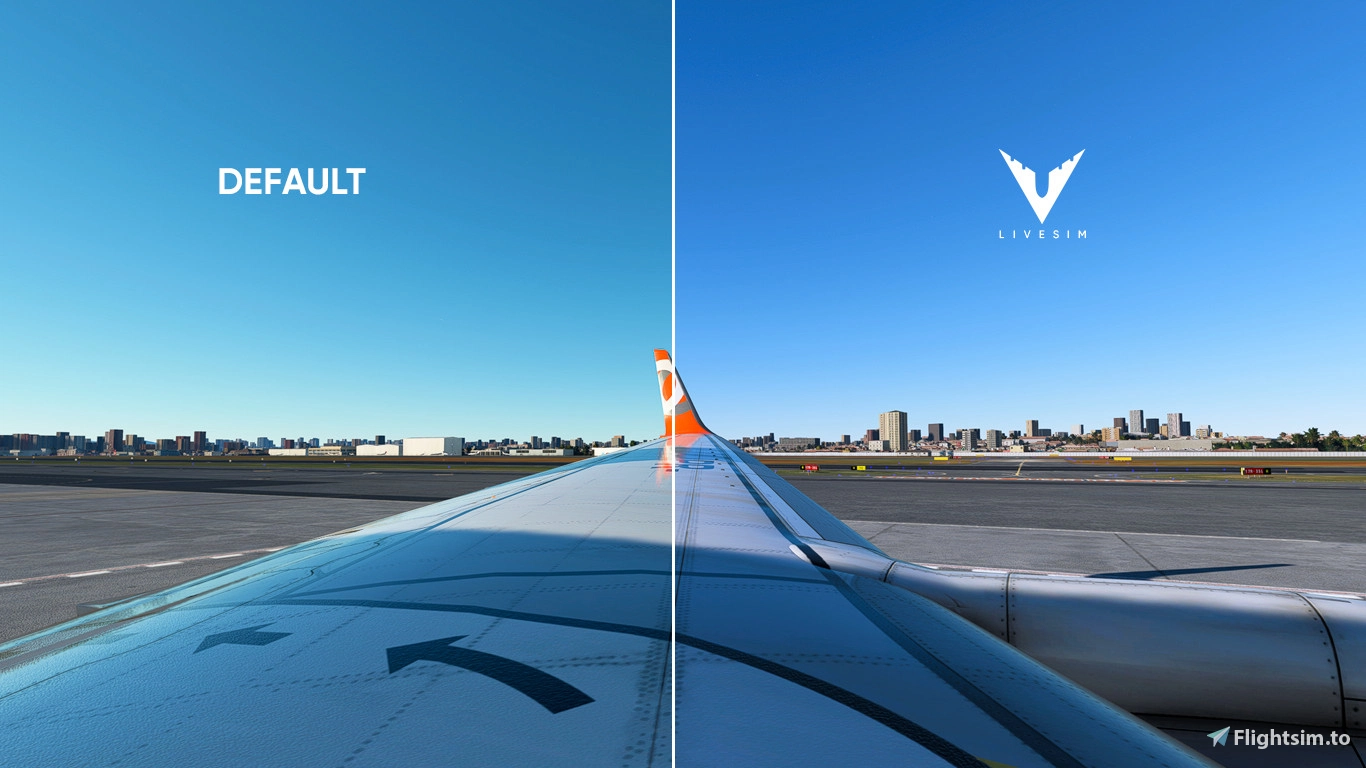
Description
REALISTIC PRESET THAT IMPROVES IMMERSION IN THE SIMULATOR BY CORRECTING COLORS, BRIGHTNESS AND CONTRASTS. ELIMINATES THE GREEN PATTERN AND RETURNS THE QUALITY OF BLUE IN THE ATMOSPHERE. ALSO CORRECTS VISUAL TEMPERATURE AND SATURATION.
MSFS 2020MSFS 2024
LIVESIM REALISTIC RESHADE V1
Enhance your flight simulation experience with LIVESIM Realistic Reshade V1, a preset designed to improve immersion by adjusting colors, brightness, and contrasts. Say goodbye to the green tint and welcome back the true blue hues of the sky. Correct visual temperature and saturation for a more realistic and vibrant scenery.
Downloads3K
Version1.0
File Size0.48 KB
Published3 years ago
Updated3 years ago

Version History
No version history available.
Log in to join the discussion
Log InComments(9)
about 3 years ago
I did the following:
lowered yellow-blue color balance from 600 to 450,
shadows midtones highlights shadow desaturation from -600 to -300.
color temp 6600 kelvin and mix with original 0.700.
result is perfect photorealism.
about 3 years ago
about 3 years ago
C:\Users\AppData\Roaming\Microsoft Flight Simulator
or
C:\Program Files (x86)\Steam\steamapps\common\MicrosoftFlightSimulator
Basically just install it or drop it in your main installation folder.
Tutorial on how to download Reshade: (USE THE LATEST VERSION OF RESHADE IF THIS VERSION IS TOO DIFFICULT OR TOO BUGGY)
https://www.youtube.com/watch?v=MvmF5AWN1Yk&ab_channel=ChrizzyReviews
about 3 years ago
about 3 years ago
about 3 years ago
https://nl.flightsim.to/file/57300/lucas-reshade-preset
about 3 years ago
about 3 years ago
about 3 years ago
https://nl.flightsim.to/file/57300/lucas-reshade-preset