
Flightsim.toFlightsim.to
    Knots ASI Conversion for A2A Comanche 250 - Image 1

    Description

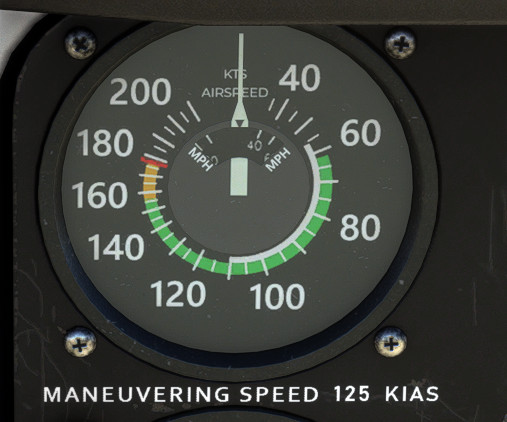
    This is a quick little texture mod I made for the A2A Comanche that changes the ASI and cockpit decals to be in knots instead of miles per hour. Supports the tablet customizations that change Vne and Va (Tip tanks and stabilator tips). I don't think it's realistic to have this in a real Comanche, however I personally prefer it. So I figured I would share it in case other people wish to use it as well.

    To install, just drag and drop "a2a-comanche-asi-conversion" into your community folder.

    Comments(25)

    Log in to join the discussion

    Log In

    4 months ago

    Yeah, need this too!

    5 months ago

    Unfortunately with the native 2024 the texture needs to be in .KTX2. Any chance of re-uploading? I miss using this mod!

    5 months ago

    Please consider updating your mod for MSFS2024-native version of the Comanche released by A2A 24/12/2025.

    almost 2 years ago

    Hi there, i fiddled with the files a bit to change reference speeds (vx,vy,vto etc.) as well as speeds in emergency checklists to use knots as well. If you're interested, I can send you the files and you can include it in this mod.

    over 1 year ago

    Could you upload them here on fs.to?

    about 2 years ago

    LEGEND! Thx so much for this!

    over 2 years ago

    Thank YOU! LOVE

    over 2 years ago

    I can't work with mph either :-) thanx for this mod.

    I made a gauge for the Logitech FIPs and also used knots and used your modified texture for the ASI. Is it ok for you to upload these gauges if I credit you?

    The gauges can bee seen here: https://imgur.com/a/BmYHbyQ

    over 2 years ago

    Very clever. 👍

    over 2 years ago

    Hi,
    this is great idea but I have problem. I installed mod but it only changed cockpit decals but ASI stays the same.
    Don't know what could be a problem.

    over 2 years ago

    Sounds like a mod conflict, likely a livery or something is supplying its own copy of the gauge texture file. If you empty your community folder and just put the A2A comanche and my mod, does it work then?

    over 2 years ago

    Solved. It was in conflict with ADI Gauge Texture Mod. Removed it and now works fine.
    Thanks.

    almost 3 years ago

    Thank you very much for this update. As real world pilot I fly only the planes with airspeed indicator based on knots. I was a bit afraid destroying my feeling of airspeed when using mph scale in the sim.

    almost 3 years ago

    Thanks for making this! Regarding your comment "I don't think it's realistic to have this in a real Comanche" - IDK I mean if you own the plane, you can customize how you like and I think making the airspeed indicator show knots instead of mph seems like something that probably happens more often than "knot" in the real world :-)

    almost 3 years ago

    I agree with that. But on the other hand, I didn't really model the ASI off any real world gauges that are in KTS. I just sorta freehanded it and tried to keep in the same style as the original Comanche one. I guess you could call it a DIY aftermarket gauge :P

    about 2 years ago

    It's a certified airplane, which means you can't just do as you wish with gauges. Unless there is an official STC to change to an ASI in knots, you would not be able to do this in a real Comanche.
    MSFS 2020MSFS 2024

    Knots ASI Conversion for A2A Comanche 250

    Convert your A2A Comanche 250s ASI and cockpit decals from miles per hour to knots with this simple texture mod. Compatible with tablet customizations changing Vne and Va, enhancing your flight experience. Install easily by dragging and dropping the files into your community folder.


    Downloads1K
    Version1.2.3
    File Size18.80 MB
    Published2 years ago
    Updated2 years ago

    User Reviews

    5.0

    3 reviews

    5
    100%
    4
    0%
    3
    0%
    2
    0%
    1
    0%

    More Information

    Simulator
    MSFS2020
    CategoryAircraft
    Affiliation
    A2A Comanche

    Version History

    Minor update -Adjusted font color on ASI to be a very very light shade of gray, like the other gauges on the panel. -Exported better mipmaps. Potentially better readability. Let me know if its better/worse than previous versions. (Looks better to me, though) -Improved position of ASI texture resulting in better accuracy. It now reads within +/- 1 knot of what the tooltip says. (It was sitting a few pixels too high previously, causing it to read about 2-3 kts higher than it should on the sides of the gauge)