
Description
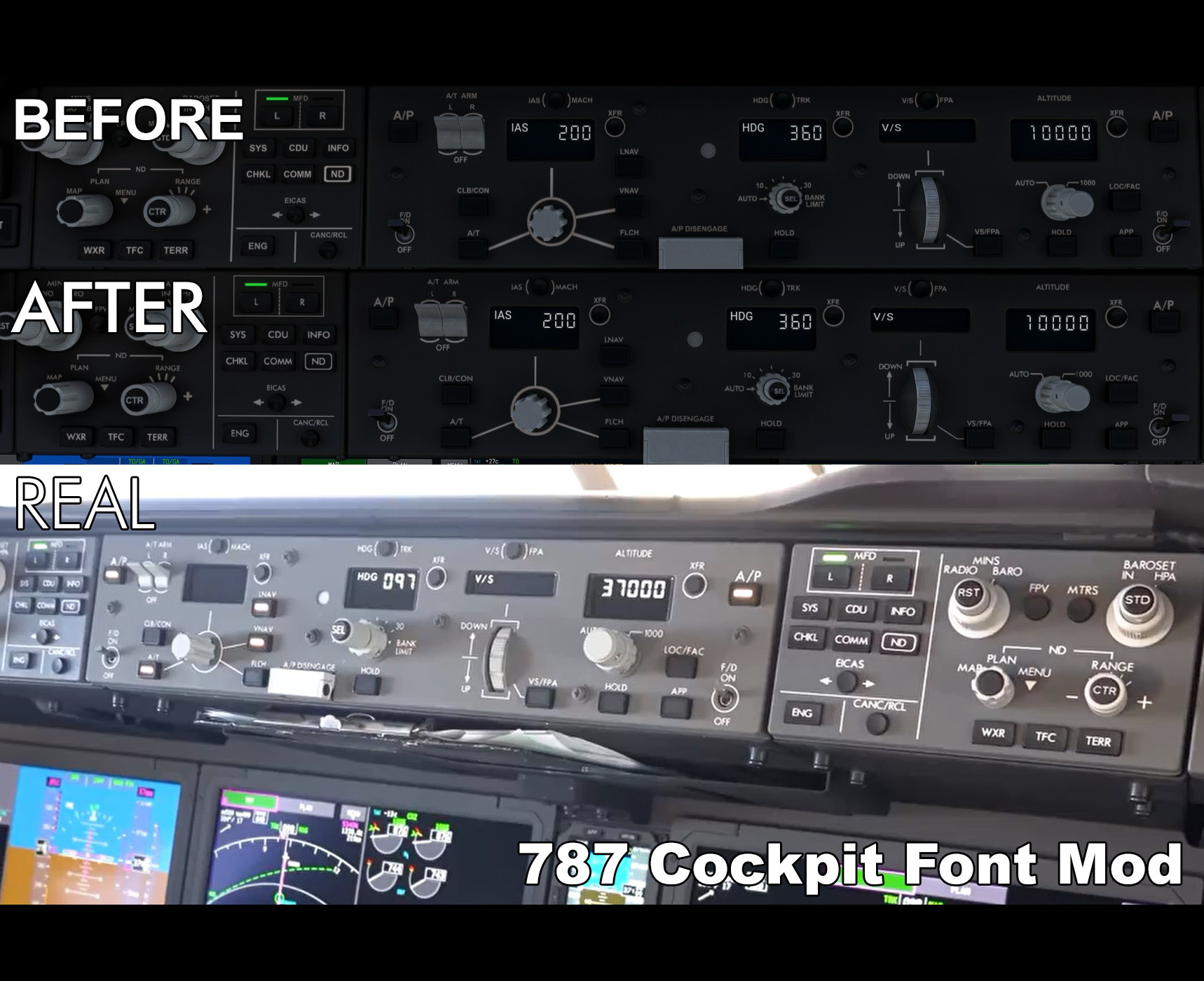
The default Asobo 787 uses Arial as a font inside the cockpit. It is not as obvious as the 747 (where the wrong fonts are really noticeable) but nevertheless I cannot ignore it after having noticed it. I have therefore replaced them with a font that more closely resembles the font on the actual plane.
The font on the MCP should be thinner and larger, and slightly different from other places such as the overhead. The sizes of some decals are also not completely accurate to real life. However, fixing them all was not possible to do with the current decal system that MSFS uses without making the work much more difficult.
I have tried my best to work with the current system to better reproduce the font in the real aircraft.
RECOMMENDED TEXTURE RESOLUTION: HIGH OR HIGHER
You can find the version for the -8 here.
How to install
1. There are two folders in your MSFS Packages folder. Go to your MSFS Official folder, NOT the Community folder (ex. Microsoft.FlightSimulator_8wekyb3d8bbwe\LocalCache\Packages\Official\OneStore\)
- MS Store: C:\Users\YourUsername\AppData\Local\Packages\Microsoft.FlightSimulator_8wekyb3d8bbwe\LocalCache\Packages
- Steam: C:\Users\YourUsername\AppData\Roaming\Microsoft Flight Simulator\Packages\
2. Navigate to Official\OneStore\ or Official\Steam\
3. Navigate to asobo-aircraft-b787-10\SimObjects\Airplanes\Asobo_B787_10\TEXTURE\
4. Back up these four files:
- 787_10_COCKPIT_TEXTS1_ALBD.TIF.dds
- 787_10_COCKPIT_TEXTS1_EMIS.TIF.dds
- 787_10_COCKPIT_TEXTS3_ALBD.TIF.dds
- 787_10_COCKPIT_TEXTS3_EMIS.TIF.dds
5. Drop the files from the zip file.
Realistic font mod for default Boeing 787-10
The default Asobo 787 uses Arial as a font inside the cockpit. I have replaced them with a font that more closely resembles the font on the actual plane. The font on the MCP should be thinner and larger, and slightly different from other places such as the overhead. However, this was not possible to do with the current decal system that MSFS uses without making the work much more difficult. I have tried my best to work with the current system to better reproduce the font in the real aircraft. This should also work for the Kuro 787-8 with the file names renamed accordingly, except maybe with the flap speed limit placard from 787-10. I will upload a version for the 787-8 soon.


User Reviews
4 reviews
Version History
Higher resolution Fix glitches
Related
Realistic font mod for Kuro Boeing 787-8
Based on my mod for the 787-10 here, I have created a mod for the 787-8 with its flap restrictions. The default Asobo 787 uses Arial as a font inside the cockpit. It is not as obvious as the 747 (where the wrong fonts are really noticeable) but nevertheless I cannot ignore it after having noticed it. I have therefore replaced them with a font that more closely resembles the font on the actual plane.
by DoubleD.Inc
![[4K] Vietnam Airlines B787-10 VN-A873 100th Aircraft Edition](https://cdn.flightsim.to/images/25/4k-vietnam-airlines-b787-10-vn-a873-100th-aircraft-edition-32002-1688118336-vCI6D.jpg?width=500)
[4K] Vietnam Airlines B787-10 VN-A873 100th Aircraft Edition
Explore the 4K Vietnam Airlines B787-10 VN-A873 100th Aircraft Edition, a detailed recreation of Vietnam Airlines Boeing 787-10 Dreamliner. This add-on features the specific registration VN-A873 and MSN 60288, reflecting the airlines fleet of 4 -10 variants and 11 -9 variants.
by DoubleD.Inc
![[8K] Vietnam Airlines A321neo VN-A625](https://cdn.flightsim.to/images/25/8k-vietnam-airlines-vn-a625-32002-1686525555-b6YjH.jpg?width=500)
[8K] Vietnam Airlines A321neo VN-A625
Explore the detailed representation of Vietnam Airlines A321neo VN-A625 in stunning 8K resolution. This livery, powered by PW 1100G engines, showcases the airlines modern fleet with accuracy and attention to detail. Join the Vietnam Airlines fleet with this meticulously crafted add-on for Microsoft Flight Simulator.
by butterdori
Log in to join the discussion
Log InComments(14)
about 3 years ago
about 3 years ago
about 3 years ago
about 3 years ago
about 3 years ago
about 3 years ago
about 3 years ago
about 3 years ago
over 3 years ago
Hi. These fonts are awesome! But the white illumination light in the MCP is missing. Please fix that. Otherwise superb!
over 3 years ago
Hi! Thanks. What do you mean by the white illumination lights?
over 3 years ago
The white light when buttons are pressed in the MCP is missing. You can compare the original emis.tif.dds file with yours to see the difference :)
over 3 years ago
Oh thanks! I am fixing it now.
over 3 years ago
What is the Steam directory?
over 3 years ago
He wrote it in the description above.