
Description
FS2020Control: Export Control Settings in Microsoft FS2020 (FS2024?) to SQLite, Excel and PDF
FS2024:
This release contains a temporary workaround for users who got the message "Multiple settings directories found; don't know which one you want" when installing FS2024. Since I have no FS2024 yet, I cannot test this, but you can now choose which installation you want. You have to do this every time you start the game. When I can test it here, I will make the settings persistent in a future revision.
With only one installation, the app should start without questions asked.
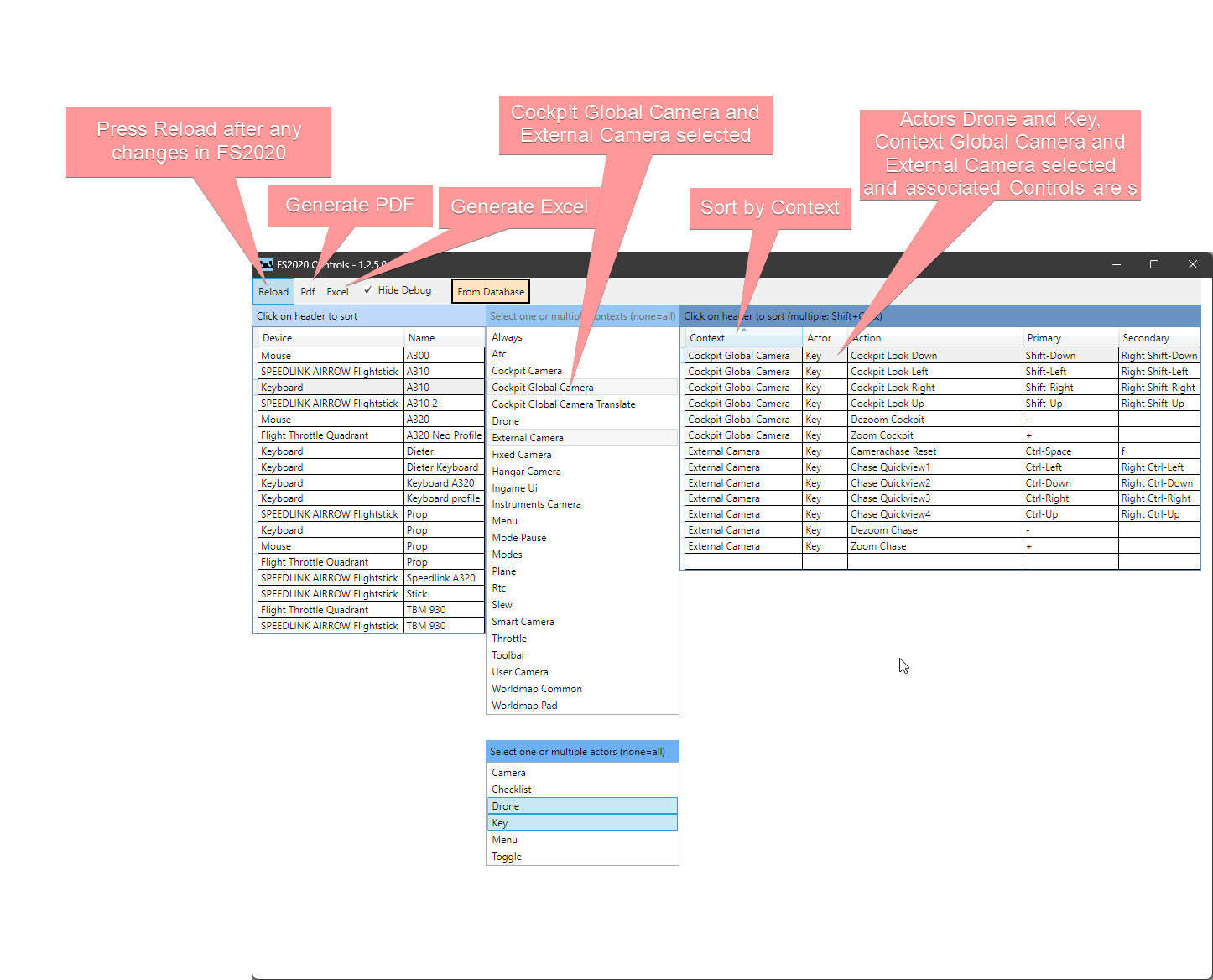
What the app does- Tries to find the settings files of the controls and scans all
- Writes all settings into an SQLite Database, which can be used by advanced users to generate custom reports;
- Displays all control settings, allows for a subset selection and sort order for reporting;
- Generates a PDF reference sheet;
- Generates an Excel file with sortable and selectable entries.
Database, Excel and PDF file are stored in directory Documents/FS2020Key with names such as FS2020Controls_Mouse_A300.pdf. The directory is created when it does not exist.
Installation- Unzip SetupFS2020Control.zip into a temporary directory
- Double-click `setup.exe`
- You can delete all temporary files after installation
- To start the program, type FS2020Control (part is enough) after clicking start. You can create links to FS2020Control from the popup menu.
Since Version 1.3.0: When you have made a change in FS2020, files will be deleted and re-created. A slow blinking label in the menu indicates that a Reload is required.
Since Version 1.4.1:
When you double-click an item in the upper left data grid, you can select to open the file with the associated application for XML on your computer, or with Notepad by default. I recommend installing Notepad++ for XML files because it has a nice color coding.
See the github repository for details
FS2020 Control
Prints active control settings for keyboard, mouse and other devices, and creates Excel/SQlite file of assignments. You can select one or more multiple actors to print in PDF. If you want to create your own list of keyboards assignment, using the Excel worksheet is a good starter to avoid diving into Microsoft's pseudo-XML.


User Reviews
11 reviews
Version History
Previous upload had the version number incorrectly displayed as 1.2.; corrected to 1.4.1 No need to re-download if you do not care about the version number, nothing else change.
Log in to join the discussion
Log InComments(83)
about 1 year ago
about 1 year ago
about 1 year ago
over 1 year ago
over 1 year ago
worked fine for me with ms2020. after switching to ms2024 and de- and reinstallation of FScontrol same issue on my side as layvelo mentioned on https://github.com/dmenne/FS2020Control/issues/5. unfortunately i am admin on my computer. so the provided solution doesnt work for me. according to logfile the errorcode should be:
Die Bereitstellung und die Anwendung haben keine übereinstimmenden Sicherheitszonen.
any tips?
thx!
br gernot
over 1 year ago
over 1 year ago
over 1 year ago
over 1 year ago
over 1 year ago
over 1 year ago
almost 2 years ago
almost 2 years ago
almost 2 years ago
almost 2 years ago
So it would be helpful if you could qualify how it "does not work". Is this the Steam version (I do not have it)?
almost 2 years ago
almost 2 years ago