
![[v2] Kuro_B787-8 | Base Livery + Fuselage Blend file - Image 1](https://cdn.flightsim.to/images/24/kuro_b787-8-paintkit-55321-1674561366-oVNWL.jpg)
Description
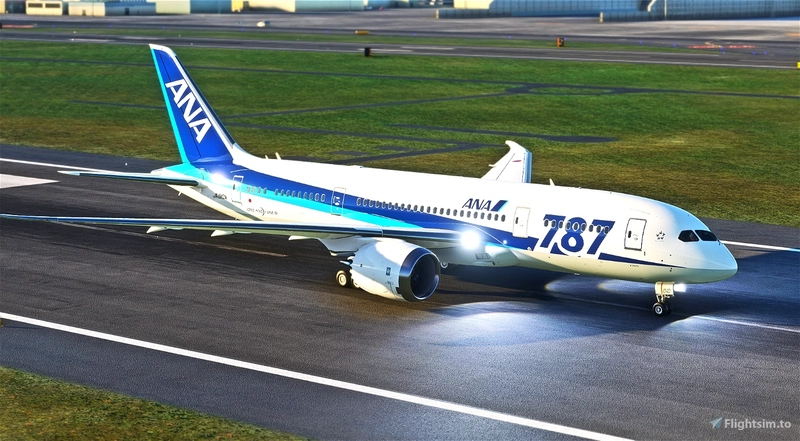
Kuro_B787-8 | Base Livery + Fuselage Blend file
v2.1.0
It is for tech people with experiences.
If you are new to paint liveries, practice on B787-10 or similar before working on B787-8.
Kuro_B787-8 | B787-8 Dreamliner » Microsoft Flight Simulator
[v2] Kuro_B787-8 | Base Livery + Fuselage Blend file
Customize your Boeing 787-8 aircraft in Microsoft Flight Simulator with the Kuro_B787-8 base livery and fuselage blend file. This add-on is designed for experienced tech enthusiasts, offering a unique painting experience for your simulator. Practice on the B787-10 or similar aircraft before delving into this detailed customization option.

User Reviews
5 reviews
Version History
- Steering has been adjusted in Kuro_B787-8_v2.1.0. (Changelog : [FM/EXT] Steering fix (Kuro)) Liveries using the decal method must be updated with the models included in Kuro_B787-8_v2.1.0. - Added KLM_Livery_UV.png for Nose gear door decals - If you modify and upload liveries which are included by default(ANA/ACA/etc...), write a credit "Based on livery by Kurorin" in their description.
Related
![Kuro_B787-8 [Req: MSFS2020 Asobo B787-10 (v1)]](https://cdn.flightsim.to/images/25/boeing-787-8-55321-1687446838-eQ9nd.jpg?width=500)
Kuro_B787-8 [Req: MSFS2020 Asobo B787-10 (v1)]
Fly the skies in the Kuro_B787-8 | B787-8 Dreamliner add-on for Microsoft Flight Simulator, requiring the Premium Deluxe Edition (B787-10) to access. Customize your experience with available paint kits and a Discord community for support. Experience the realism and detail of this aircraft, crafted under Microsofts "Game Content Usage Rules."
by Kurorin
![B747-8i All Nippon Airways ANA v3.2.0 [8K ULTRA] (No mirror)](https://cdn.flightsim.to/images/15/JpxoEe03.png?width=500)
B747-8i All Nippon Airways ANA v3.2.0 [8K ULTRA] (No mirror)
Experience the iconic Boeing 747-8i in the livery of All Nippon Airways with this high-quality add-on. Dive into the world of aviation with improved textures and fixed effects to enhance your simulator experience. Compatible with SimUpdate 5, this update brings a more realistic model and instrument fix, offering a detailed and immersive flight simulation.
by Kurorin
![[Navdata] ROAH - Naha Airport](https://cdn.flightsim.to/images/22/naha-airport-roah-5t29p.jpg?width=500)
[Navdata] ROAH - Naha Airport
Enhance your Naha Airport experience with this NavData add-on, merging seamlessly into KAZEs scenery in Microsoft Flight Simulator. Make sure to use V1.4 or later for accurate utilization. Navigraph users are advised not to install for potential compatibility issues. Download now for an updated airport navigation data experience.
by Kurorin
![Kuro_A3neo [Req: FBW A32NX]](https://cdn.flightsim.to/images/27/kuro-a3-neo-55321-1729304401-5ETBZ.jpg?width=500)
Kuro_A3neo [Req: FBW A32NX]
The Kuro A3neo is a humorous, meme-inspired addon, designed to be used with the Flybywire A32NX add-on. This mod features a playful take on the aircrafts appearance, although it is pointed out that the flight models are not customized. Users should note that the add-on is still in development and contains some visual imperfections.
by Kurorin
Log in to join the discussion
Log InComments(34)
over 3 years ago
v2.0.0+(AAU2) support and update to new (v2) exterior models.
v2 exterior model: Unmirrored Tail/Engines/Wings/Bottom-Gear-Door/Cargo-Hinge sections.
important difference for v2.0.0+:
- "aircraft.cfg>panel, sound" sections are required
- “texture.cfg”>
fallback.6=..\..\Kuro_B787_8\texture.RR
or
fallback.6=..\..\Kuro_B787_8\texture.GE
needs to be added
(You can still use v1 model for livery(keep blank "aircraft.cfg>model"section),
but I highly recommend to use v2 model for new livery creation.)
about 1 year ago
over 2 years ago
over 2 years ago
about 3 years ago
If they can be pointed out in the UV Maps, I can fix these manually.
Additionally, could we get the engine covers added to the Blender files to make it easier to paint/"sticker" these...
Thanks!
about 3 years ago
about 3 years ago
I have tried to download and unzip several times with the same results. The last few times I cannot get the full download. I get the file pkv2.1_TU7GU.zip.
Gnacino
about 1 year ago
over 3 years ago
If you have modified and published liveries which are included by default(ANA/ACA/etc...), credit “based on kurorin’s livery” in their description.
over 3 years ago
Is there a PSD version? Blender is hard to use and takes more time to paint compared to PSD version
over 3 years ago
The Blender model is all pink, and even though I change the base color, I cannot paint on the fuselage textures. Any tips on how to get it to work with the Blender paiting technique?
Edit: Nevermind, it works! And man is it ever a fantastic pantkit. Thanks for sharing!
over 3 years ago
I can't get mine to work. Same issues as you had
about 3 years ago
over 1 year ago
over 3 years ago
v2.0.0+(AAU2) support and update to new (v2) exterior models.
v2 exterior model: Unmirrored Tail/Engines/Wings/Bottom-Gear-Door/Cargo-Hinge sections.
important difference for v2.0.0+:
- "aircraft.cfg>panel, sound" sections are required
- “texture.cfg”>
fallback.6=..\..\Kuro_B787_8\texture.RR
or
fallback.6=..\..\Kuro_B787_8\texture.GE
needs to be added
(You can still use v1 model for livery(keep blank "aircraft.cfg>model"section),
but I highly recommend to use v2 model for new livery creation.)
over 3 years ago
Hey,
I'm in the process of updating my liveries to fix the mirror problem while I wait for V2 to be released to get a head start. Thanks for fixing this!
However it seems that the bottom still has this problem contrary to what is written in the changelogs! The rest works fine! :)
over 3 years ago
It was typo...
Unmirrored : Tail/Engines/Wings/Bottom-Gear-Door/Cargo-Hinge sections.
over 3 years ago
For everyone who wants to remove the tail number from user-made liveries, simply find your panel.cfg file (community/livery_folder/SimObjects/Airplanes/livery_name/panel.XXX.cfg) and insert the following at the bottom (ensure there is a line break between it and other text):
[VPainting01]
size_mm = 2048,512
texture = RegistrationNumber
location = exterior
painting00=Registration/Registration.html?font_color=0x00000000, 0, 0, 2048, 512
(do NOT copy text after this) If there is a VPainting01 in the file already, change the text in brackets to [VPainting02] or 03 or so on depending on how many VPaintings already exist. If there is already a VPainting with a texture of RegistrationNumber (and the registrations still appear on the fuselage), replace everything underneath the [VPaintingXX] header with this:
size_mm = 2048,512
texture = RegistrationNumber
location = exterior
painting00=Registration/Registration.html?font_color=0x00000000, 0, 0, 2048, 512