

Description
These pages were created using version 344.
The INI file must be copied to the misc folder in the TP subdirectory.
The INI and Variables buttons on the main page must be loaded by pressing the buttons in order for the pages to function properly.
These were created to use with the 145 the way I use it, primarily in missions. Updates may occur as I branch out into other mission types.
Change Log: Version 1.03
Main: More Variables added to that button.
Overhead: Added Air Conditioning and Vent Toggles. Rearranged switches.
OPS Added BambiBucket fill Qty. Readout, A water drop button, AGL and VS readouts to assist in getting Bambi loaded.
AP: No Changes
MFDs: No Changes
Radios: No Changes
Touch Portal H145 Pages
These pages were created to use with the HPG H145. They were created using version 344 of the helicopter. Developers over at HPG assured me that using it with the newer versions should not be a problem. I have yet to upgrade and test. I chose to leave the installation of the INI file manual because if you are not flying the 145, but some other aircraft with touch portal it does not need to be using resources. The variables button must also be pressed when pages are loaded to function properly.

Supporters
User Reviews
5 reviews
Version History
Change Log: Version 1.03 Main: More Variables added to that button. Overhead: Added Air Conditioning and Vent Toggles. Rearranged switches. OPS Added BambiBucket fill Qty. Readout, A water drop button, AGL and VS readouts to assist in getting Bambi loaded. AP: No Changes MFDs: No Changes Radios: No Changes
Related
Touch Portal Pages for HPG H145 Versions above 344
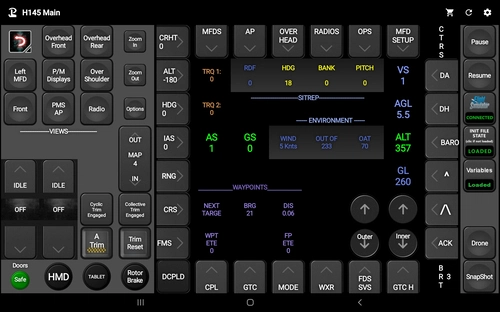
This is an update to cover changes brought about as a result of the amazing work done by the HPG Team bringing the H145 into the helicopter control systems of msfs and that of Max.Paperno with the Touch Portal Plugin. It also includes some behind the scenes repairs and a few new buttons and readouts. Let me know in the comments if something is not working for you. I left the older pages up to accommodate those who are still flying the 34x version of the H145.
by Spider5983
Touch Portal Pages for HPG H135
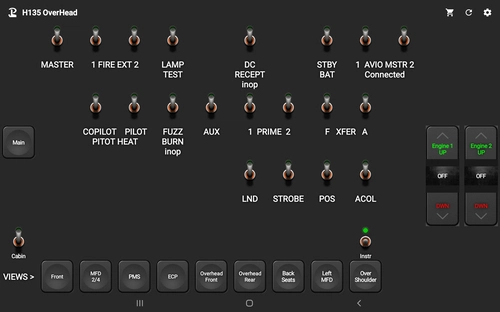
Enhance your HPG H135 experience with Touch Portal Pages, featuring main and overhead pages for better cockpit control. Copy the enclosed INI file to easily customize your setup and enjoy seamless integration with your simulator. Please note that due to limitations, some buttons may not be two-way communicating.
by Spider5983
Touch Portal 40th Anniversary Cabri
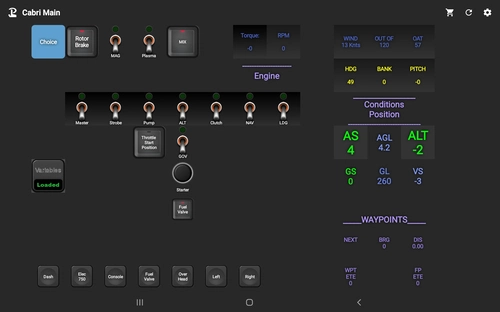
Enhance your flight sim experience with the Touch Portal 40th Anniversary Cabri add-on! Enjoy interactive buttons and switches, including a rotor brake with a hold feature. Note that not all buttons may change in sync with the sim, so use them directly for optimal functionality. Explore the unique Plasma button feature for added realism in your flights.
by Spider5983
Log in to join the discussion
Log InComments22
Merci de votre aide
amicalement
Hello, Spider5983, I haven't tried all the functions yet, but I can already say that you have done a great job! For me, after importing the pages, the links between the pages didn't work; that was probably because I imported the pages into a subfolder? In the meantime, however, I have adjusted all the links and can switch between the pages without any problems. Thank you very much and keep up the good work!
Which version of the 145 are you flying?
Hello, unfortunately I only read your answer today. I am currently still flying build 385, but I don't think it has anything to do with the links between the touch portal pages. And as I said, it works now.
The reason I asked the version you were running is because there is a newer set of pages to run with the newer versions over 344. I just wanted to make sure that you were getting the best option for you.
I uploaded a new version that works better with the newer versions of the 145. I'm leaving this one up because some people have decided to still fly the 344
In the user Gallery you will find a new button. If you will make the changes to your overhead hook button it will communicate in both directions.
The new buttons were added using the latest plugin and wasm from Max.paperno
It has also been brought to my attention that you will need to either rename some of the pages to make the page navigation buttons work or to change the command within the button. I apologize for the inconvenience.
I realize that the Com and Nav Frequency controls, on the Radios page, are not changing by proper amounts, close but not exact. Max.paperno confirmed TP difficulty. He will soon published a solution. Keep an eye out for it on flightsim.to.
I guess I'm not Flightsim.to savvy. I cannot remove the picture in the user gallery. The new version of the pages has a new and improved version of that button. Be sure to look at the text file included in the download for more info. Enjoy! Please comment!
One of the best projects on Touch Portal for H145. Good job.
Great job with this!
I consider this HIGH PRAISE. Thank y'all for the variable help.
My Discord ID is Spider#6366. Let me know if something needs to be changed.