
Description
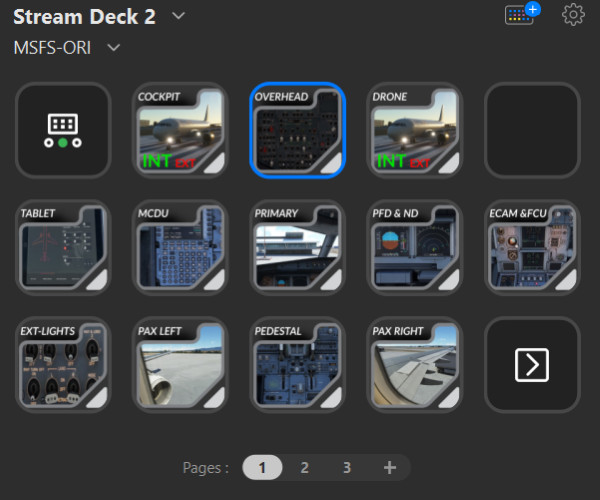
Here are some icons to use as shortcuts while using FENIX A320 with StreamDeck. v2.0 offers a complete redesign of all images :
COCKPIT :
7 images for the COCKPIT
4 images to switch between EXT or INT view
2 images to switch to PAX seats view.
EXT Lights :
12 images dedicated to the LIGHTS (shortcuts to switch ON or OFF)
8 images with the new same redesign and 8 same images with larger border as alternative
3 images to Switch ON Lights to "TO State", "AFTER To State", "Landing State", "After Landing State" (you will have to set MSFS keyboard mapping and set a multi action in Stream Deck to do so)
1 GIMP template to create your own version.
You will have to set your custom view in MSFS by placing your point of view with arrows /page up/ page down (not zooming) and save it by CTRL ALT 0
You could call back this custom view by pressing ALT 0
This is this shortcut you have to set in StreamDeck
Enjoy
Best Regards
ReXNeB
ETH : 0xC7152F2168eF8CDDAEA8f1505446911Ff614bAE4
FENIX A320 ICONS for STREAMDECK (v2.0)
Icons designed for enhancing the FENIX A320 experience on StreamDeck, featuring a complete image redesign for cockpit, external lights, and passenger seats view toggles. Includes shortcuts for lights control and customizable GIMP template. Set custom viewpoints in MSFS for seamless integration. Created by ReXNeB for smoother simulation navigation.

Version History
v2.0 offers a complete redesign of all images.
Log in to join the discussion
Log InComments(4)