
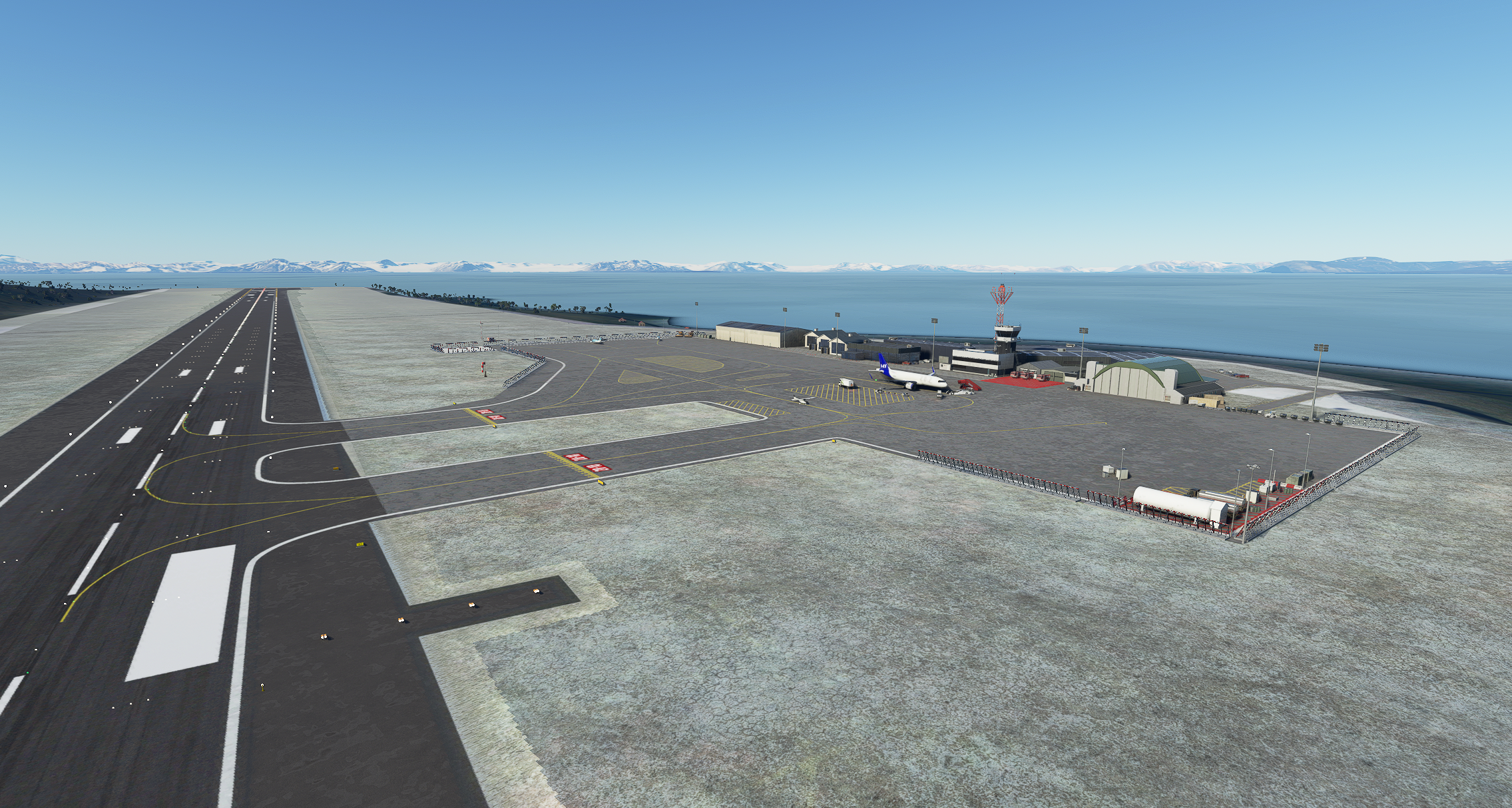
Description
Quick update:
-Invisible taxiways have been linked to the parking on the east side of the apron and to the fuel ramp
-ILS glide slopes have been swapped as I made a typo in the original, now they are as I stated in the description below and I hope ILS 28 doesn't send you into a mountain
-More props have been added around the airport (a different fuel station spawns next to the fuel ramp (99) everytime you load the game and I gave it enough space so it looks normal each time)
-The beacon next to the tower has been moved so the controllers can see out their windows
-A radar has been added to the northwest corner of the airfield
-Some props have been added (based on google maps terrible image) to the coastline east of the airfield, like a boat and piles of containers and conduit and stuff
-Some unionized Norwegian airport workers are now standing around doing nothing while being paid like 10,000NOK per hour (just kidding, they deserve the break and I would have to be paid pretty well also to live in Svalbard during the winter)
-Most importantly, a polar bear is now rummaging somewhere so be careful
Description:
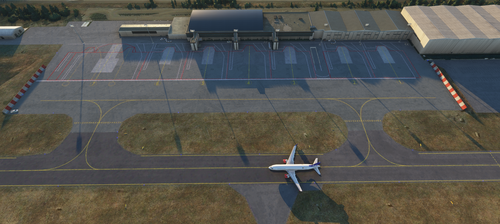
I created the airport in Longyearbyen, Svalbard, Norway because it wasn't on the map. It's not perfectly accurate and I used some random custom building objects I found in the SDK which I thought were appropriate for the airport. I also used a lot of props. Tower works and ILS is good enough to get you to the ground. The VFR map doesn't work this far north but you can still load a flight plan to Tromso or Oslo-Gardermoen with a direct departure and the autopilot will take you back to civilization. (There are some buggy things like road traffic driving on the roof of one of the buildings that I couldn't figure out how to stop but the airport is functional).
Runway 28 is heading 285.0 and runway 10 is heading 105.0 but because it is so far north, the instruments are about 5-10 degrees off.
Tower on 119.85, ILS 28 on 109.5 with a 6.3 degree glideslope (you might hit a mountain while landing, I might need to fix that but it would require a very steep glide slope). ILS 10 on 110.3 with a normal 3 degree glideslope. The ILS antennas are before the runway so you can use ILS to get close in bad weather, and then use the PAPI lights to guide you.
Enjoy :)
Also, if anyone would like to tell me how to remove the pushback tugs from "Gate A1, A2, and A3" and change where the ground power unit is parked, I would appreciate it because these ramps don't require them and it annoys me that I have to taxi through them on the way to the runway.
If you would like to support my work, I appreciate it! If you can't, that's okay too :)
Location
Svalbard Airport ENSB
Explore the detailed re-creation of Svalbard Airport ENSB with enhanced features such as corrected invisible taxiways, added props, and a relocated beacon tower. Enjoy a functional airport environment in Longyearbyen, Norway, complete with a working tower and ILS systems for runway guidance. Take on the challenge of landing with slight instrument deviations and watch out for a roaming polar bear in the vicinity.


User Reviews
4 reviews
Version History
Quick update: -Invisible taxiways have been linked to the parking on the east side of the apron and to the fuel ramp -ILS glide slopes have been swapped as I made a typo in the original, now they are as I stated in the description below and I hope ILS 28 doesn't send you into a mountain -More props have been added around the airport (a different fuel station spawns next to the fuel ramp (99) everytime you load the game and I gave it enough space so it looks normal each time -The beacon next to the tower has been moved so the controllers can see out their windows -A radar has been added to the northwest corner of the airfield -Some props have been added (based on google maps terrible image) to the coastline east of the airfield, like a boat and piles of containers and conduit and stuff -Some unionized Norwegian airport workers are now standing around doing nothing while being paid like 10,000NOK per hour (just kidding, they deserve the break and I would have to be paid pretty well also to live in Svalbard during the winter) -Most importantly, a polar bear is now rummaging somewhere so be careful
Related
Tromso Airport ENTC
Enhance your Microsoft Flight Simulator experience with the Tromso Airport ENTC add-on. This scenery update includes flattened airport terrain for smoother takeoffs and landings, improved taxiway signage, updated gate numbers, and more realistic airport elements. Discover the attention to detail in this ongoing project, making your virtual visit to Tromso more enjoyable.
by donutsdemise
Sandefjord Airport Torp ENTO
Customized version of Sandefjord Airport Torp ENTO featuring accurate runway design, taxiways, and approach lights. Buildings are default but with added details like taxiway markings and gate numbers. Known issue with autogen street lights on airfield.
by donutsdemise
A330 Fuel and Thrust Fix
Enhance the realism of your A330-300 experience with this mod. Adjustments include lowered thrust, accurate fuel capacities, and realistic fuel burn rates. Enjoy a more authentic flight simulation with updated overspeed and cruise speeds. Simply replace the necessary files in your A330 folder to apply these modifications.
by donutsdemise
Moss Airport, Rygge - ENRY
Enhance your flight simulator experience with Moss Airport, Rygge - ENRY. Version 1.1 of this add-on includes updates to taxiway lights and approach lights, providing a more accurate representation of the airport. Formerly serving Oslo, this airport is now primarily used as an air base with plans for new passenger services. Drop the files into your community folder for easy installation.
by donutsdemise
Log in to join the discussion
Log InComments(14)
9 months ago
over 1 year ago
over 1 year ago
over 2 years ago
almost 3 years ago
over 3 years ago
Thanks, good work!! but there are two sets of ILS in each runway.
over 5 years ago
Hey the Runway is broken you need to fix that
over 5 years ago
over 5 years ago
over 5 years ago
Cheers
over 5 years ago
over 5 years ago
almost 6 years ago
almost 6 years ago