
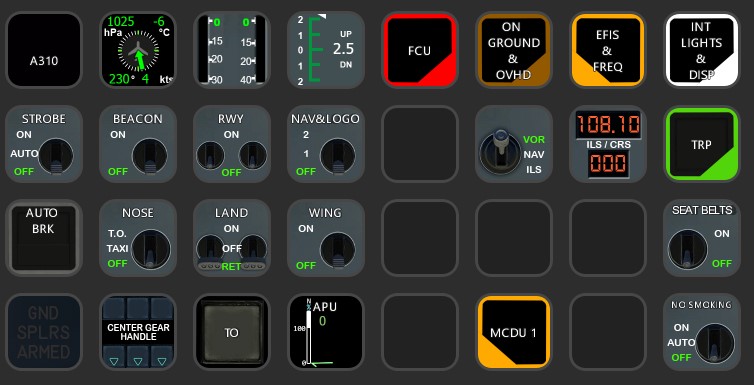
Description
iniBuilds A310 AAO Scripts & StreamDeck XL Profile & VRInsight MCP Combo Template
by Guenseli
You need LORBYs AAO and its StreamDeck Plugin to run this StreamDeck profile.
ATTENTION!
PLEASE READ CAREFULLY!
- When you import SD profiles, make sure to delete the old ones, otherwise you'll get profile copies.
- Make sure to always have the latest AAO and AAO StreamDeck plugin versions!
- I just create the SD profiles! For any connection issues, SD plugin not working, Buttons show "?" or nothing, no reaction of the SD etc., please contact the developer of AAO! And please read the AAO Manual or the short Troubleshooting PDF
- It is - as the title says - just for the StreamDeck XL (!). Please do not ask for a 15 button conversion. This will not happen as this will more than double the amount of development and support for me as I do not have a 15 button SD. Sorry.
- Profiles for the AAO MCP Bridge are only tested and working with a VRInsight MCP Combo II (Boeing). Other variants will probably not work
- Please ask if you want to use parts of my SD profiles, icons or AAO scripts or whatever! And please ask everytime you start a new project! You have to credit and link me in your description!
- If you use my work, you are then NOT allowed to beg for own donations!
Installation:
Install the SD profile by double clicking at A310.streamDeckProfile
Install the SD profile by double clicking at PLUS A310.streamDeckProfile for the SD PLUS
Import the AAO script A310_AxisAndOhsScripts.xml according to the AAO manual
Installation of the VRInsight MCP Combo Template:
Import the A310 MCP COMBO.tmpl into AAO
Known issues:
FD/FPV is only toggle on/off, can't code FPV thouroughly.
DH has no value/variable I found
As always, the AxisAndOhsScripts could be assigned to any other hardware you have. So, this download is not only useful for StreamDecks!
It is a lot of work to do these icons and gather the variables. If you like it, please consider a little donation, thx!
iniBuilds A310 AAO Scripts & StreamDeck XL & PLUS Profile & VRInsight MCP Combo Template
Enhance your A310 experience with iniBuilds A310 AAO Scripts, StreamDeck XL & PLUS Profile, and VRInsight MCP Combo Template by Guenseli. Ensure you have the latest AAO and AAO StreamDeck plugin versions, and follow the installation instructions carefully for optimal performance. This package is specifically designed for the StreamDeck XL and VRInsight MCP Combo II (Boeing), offering a seamless integration for your flight simulation setup.
Deleted by Creator
This addon has been deleted by the creator and is no longer available.


User Reviews
7 reviews
Version History
Reworked complete profile for (hopefully) better usability (added no new screenshots for this page here, too lazy today) added emer lights switch fixed some script errors Tested with SU12 Beta! Can't say if current official version is affected then.
Log in to join the discussion
Log InComments29
If you have greyed out buttons, no reaction of the StreamDeck, exclamation marks etc, that means you have connections issues between AAO and the StreamDeck.
94% of all support request are due to no proper connections or outdated versions of AAO and/or the AAO SD plugin.
Check ports, check the troubleshooting PDF, contact AAO support.
My Streamdeck profiles work (beside from probably little bugs). If you have such issues, I can't help you, sorry! Support requests can't not solved by me as I'm not the developer of AAO!
I does not have to start 100% from scratch, but nearly
So all profiles you provide work perfectly for me. Apart from this one. Connection and Readouts and button states are perfectly synched, But if I press anything, it doesn't gget send to the Simulator.
As I said. Everything works apart from this profile.
Are you sure you have no copies of profiles accidently?
Or accidently some old scripts with wrong names?
Otherwise I have no idea, sorry
Negative. Interestingly a full PC Restart helped for some reason.
Thats computer sience ;)
glad it works now
Make sure the AAO InGame panel is activated
I just can't seem to control the FCU rotary knobs. Both short presses and long presses don't do anything.too all software is new thanks
Awesome profile! I just can't seem to control the FCU rotary knobs. Both short presses and long presses don't do anything.
Thanks, Check if AAO nGame panel is active
Yeah, that's the weird part. I know it should be installed, but AAO didn't install it in my community folder. Is this something I can download separately?
That is out of my scope, please contact the AAO developer
If you have greyed out buttons, no reaction of the StreamDeck, exclamation marks etc, that means you have connections issues between AAO and the StreamDeck.
94% of all support request are due to no proper connections or outdated versions of AAO and/or the AAO SD plugin.
Check ports, check the troubleshooting PDF, contact AAO support.
My Streamdeck profiles work (beside from probably little bugs). If you have such issues, I can't help you, sorry! Support requests can't not solved by me as I'm not the developer of AAO!
Hello and thank you for all your work. With this latest update I can no longer assign toggle strobe or toggle taxi lights on the Inibuilds A310. Additionally, if I run AAO with this latest version, I can also no longer move the light switches via the mouse. However, if I do not run AAO after loading into the jet, I can operate the switches normally with the mouse.
Are you 100% sure you have AAO version 2.80 or higher?
Wie immer, großes Kino was Du uns hier anbietest! Herzlichen Dank dafür ...
Einfach mal wieder mega, was du lieferst. Vielen, vielen Dank!
One more great Job by Guenseli. Thank you very much / herzlichen Dank. Looking forward for the upcoming releases.