

Description
The FBW A320 StreamDeck XL Night Flying Profile stable release is Version 2.5. Please read all version release notes so you may understand the functionality that is devilvered with each modification.
This StreamDeck XL profile is tested with the FBW A32N through release #7ac70bf. I would like to thank our friend Gunseli for the initial design inspriation that has been forked and used to accelerate the development of this night profile.
Profile Requirements:
1. Application testing conducted on 10th GEN Core i7, 16GB RAM, SSD, and NVIDIA RTX2070 8GB. Performance may be effected by your own system configuration.
2. Axis and Ohs Version 3.01(b22)
3. Axis and Ohs Streamdeck Plugin
4. Streamdeck Software 6.2.1.18825. Performance testing conducted at the default refresh settings of 100ms.
5. Tested with Microsoft Flight Simulator 40th Edition SIM UPDATE 12 (1.32.7.0)
Installation:
1. Download the FBW A320 NIGHT.zip file.
2. Extract FBW A320 NIGHT.zip contents to a working directory of your choice. You must have the latest Axis and Ohs (AAP) and Elgato StreamDeck Plugin version installed prior to using this Plugin!! Import the needed A320 Scripts "AxisAndOhsScripts_FBWA320.xml" into AAO (Scripting --> import Scripts)!!
Doubleclick the StreamDeck profiles to install them to the SD profile manager.
FBW A320 NIGHT.streamDeckProfile
A320_MCDU_Base_Night.streamDeckProfile
A320_MCDU_ABC_Night.streamDeckProfile
A320_MCDU_123_Night.streamDeckProfile
AxisAndOhsScripts_FBWA320_Night (AAO script file)
FBW A320 Night.tmpl (AAO template file)
FBW NIGHT PROFILE V2.2.rtf (version release notes)
3. For connection issues such as StreamDeck plugin not working, StreamDeck buttons with yellow "?", or no reaction of aircraft to StreamDeck commands please consult the AAO manual for further details. If you can execute test functions from Axis and Ohs and the aircraft is responding to those commands, the problem is with SteamDeck communicating to/from AAO. Consult AAO trouble shooting documentation. Read all user guides, especially AxisAndOhs_WebAPI_Troubleshooting.PDF.
Please enjoy the full nightime flying experience!! I look forward to improving this profile in the future. Comments welcome!
FBW A320 StreamDeck XL Night Flying Profile
The FBW A32N StreamDeckXL profile for pilots that love NIGHT FLYING!! The template is based on current open source A320 FBW panels and functionality, but please read the documentation carefully to ensure you get to enjoy the full experience in MSFS.
User Reviews
1 reviews
Version History
Compatibility testing for MSFS 2020 SU11 1.29.30 and Streamdeck 6.01.17722.
Related
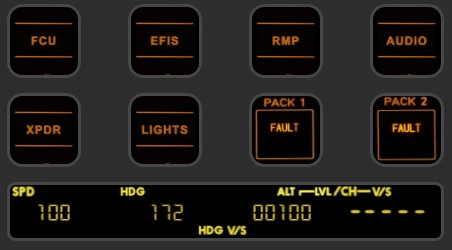
FENIX A320 Block2 StreamDeck+ Plus Night Flying FCU
Enhance your A320 FCU experience with the FENIX A320 Block2 StreamDeck+ Plus Night Flying FCU. This stable release offers in-Sim dial actuation, audio feedback, and compatibility with current Fenix Block 2 capabilities. Designed by EuroTexan Northstar Scenery and Avionics, this profile is exclusively for Fenix Block 2 A320 users, providing a unique night flying ambience. Compatible with Axis and Ohs & StreamDeck plugins, immerse yourself in the full nighttime flying experience.
by EuroTexan
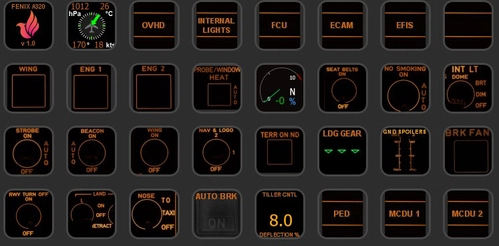
FENIX A320 StreamDeck XL Night Flying Profile
Enhance your night flying experience with the FENIX A320 StreamDeck XL Night Flying Profile. This profile is designed for the FENIX Block 2 A320 and requires specific software and system configurations for optimal performance. Follow the installation instructions to integrate this profile with your StreamDeck and Axis and Ohs setup. Dive into the immersive world of nighttime flying with this meticulously crafted profile.
by EuroTexan
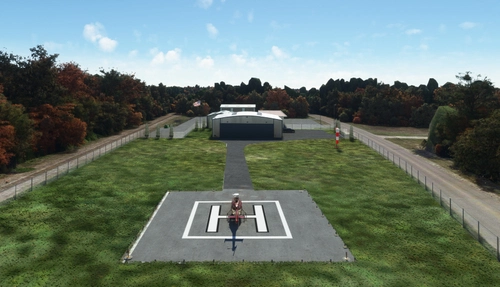
The Woodlands Area Heliport Galaxy FBO
Experience the Woodlands Area Heliport (Galaxy FBO) by Northstar Scenery, located in The Woodlands, Texas. This helipad facility features an 80 x 80 ft concrete pad, perimeter fencing, security gate, and a spacious hangar. Conveniently situated 10nm north of Houston Intercontinental Airport, it offers a unique flying experience in the area.
by EuroTexan
Log in to join the discussion
Log InComments(8)
almost 4 years ago
Whre i get the icons, please?
almost 4 years ago
almost 4 years ago
Thank you Jambolino, I look forward to exploring some of these features of the recently released StreamDeck+ in the future.
almost 4 years ago
This is awesome thank you! I do notice though that the buttons for the Generators do not work. Any way this can be fixed? Many thanks again!
almost 4 years ago
Glad you are enjoying the profile, I have really enjoyed working on creating it! I am working hard on the GEN1, GEN2, and APU GEN switches. They are currently only in read mode.
almost 4 years ago
Ooo ok awesome! Keep up the great work
almost 4 years ago
The GEN1/2 and APU swtiches are now activated in the 1.9.2 release that I just uploaded. Enjoy!
almost 4 years ago
The switches work perfect. Thank you again!! :)