
Flightsim.to
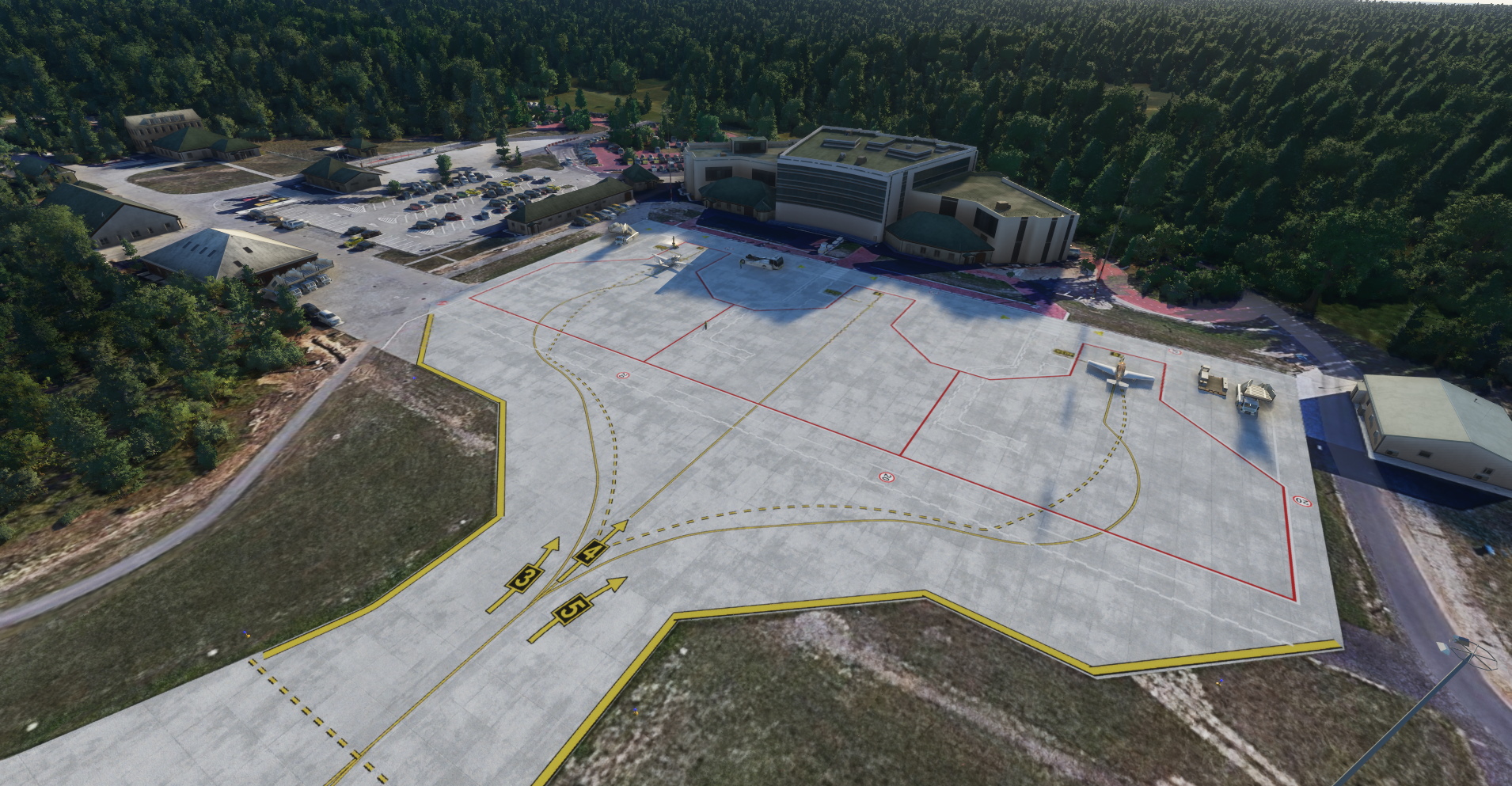
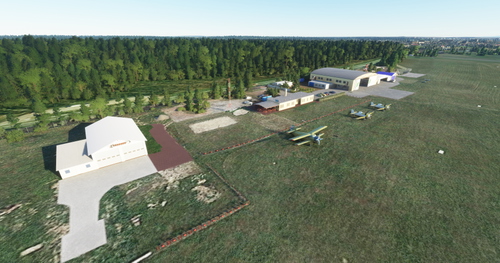
    Bydgoszcz airport EPBY for FS2020 - Image 1

    Description

    Bydgoszcz airport for FS2020,   

    INSTALLATION:
    a. unpack the zip package
    b. copy the folder "cmdesign-epby" and optionally "cmdesign-epbyortho" to the \ Community \ folder in the main game folder    
    Have fun flying.


    v1.0.2 - fixed terrain errors
    v1.0.1 - fixed terrain errors
               - some buildings in the aeroclub part have been fixed
               - windstock improved  
    v1.0 - default buildings
            - improved taxiways, lines, runways and parking spaces.
            - added models of airport vehicles - lighting has been added
            - PAPI lights added and approach lights improved.
            - horizontal markings have been added


    If you want you can support me here. Thank you.

    Comments(7)

    Log in to join the discussion

    Log In
    M

    about 3 years ago

    The airport I always fly to when going to Poland, it is amazing. Thank you!

    V

    about 5 years ago

    Thank You!!!
    N

    over 5 years ago

    Thank you a lot!! :) Geat job !
    C

    over 5 years ago

    Just don't install epbyortho folder
    S

    over 5 years ago

    I think the person is talking about the download.
    x

    over 5 years ago

    Could you also make a version without the satellite imagery? The file size is massive! Thanks :)
    V

    over 5 years ago

    Very nice, thank you! My eldest son was in Bydgoszcz in 2019, for the annual music festival.
    MSFS 2020MSFS 2024

    Bydgoszcz airport EPBY for FS2020

    Enhance your virtual aviation experience with the Bydgoszcz airport add-on for FS2020. This mod includes improved taxiways, runways, and parking spaces, as well as enhanced airport lighting and detailed airport vehicles. Update v1.0.2 fixes terrain errors and enhances the overall aeroclub area, providing a more realistic flying environment.


    Downloads3K
    Version1.0.2
    File Size803.49 MB
    Published5 years ago
    Updated5 years ago

    User Reviews

    4.7

    3 reviews

    5
    67%
    4
    33%
    3
    0%
    2
    0%
    1
    0%

    More Information

    Simulator
    MSFS2020
    CategoryAirports
    Sub-CategoryRegional Airports
    CountryPoland
    ICAOEPBY

    Version History

    - fixed terrain errors

    Related
    Aero club airport in Gliwice - EPGL (Poland). 2.0.0

    Aero club airport in Gliwice - EPGL (Poland). 2.0.0

    Enhance your virtual flying experience with the Aero Club Airport in Gliwice (EPGL), Poland. Version 2.0.0 includes new building models, textures, field corrections, and more. Compatible with Mikea.at - AssetPack and Daves 3D People Library for optimal performance. Support the creator if you enjoy their work.

    by ChrisMaver
    5.0
    Szczytno Szymany airport (EPSY)

    Szczytno Szymany airport (EPSY)

    Enhance Szczytno Szymany airport in Microsoft Flight Simulator with this add-on. Experience default building improvements, enhanced taxiways, and added airport vehicles. Enjoy upgraded lighting systems, PAPI lights, and improved approach lights. Support the developer if you wish.

    by ChrisMaver
    4.7
    Zielona Gora Babimost airport EPZG

    Zielona Gora Babimost airport EPZG

    Enhance your Microsoft Flight Simulator experience with the Zielona Gora Babimost airport add-on. This mod brings improved taxiways, runways, parking spaces, and more to the airport, along with added airport vehicles and lighting features. Version 1.0.1 also addresses terrain errors for a smoother flying experience.

    by ChrisMaver
    5.0
    Rybnik Gotartowice Airport (EPRG)

    Rybnik Gotartowice Airport (EPRG)

    Explore Rybnik Gotartowice Airport (EPGR) for Microsoft Flight Simulator 2020, featuring custom buildings, parking places, airport vehicles, and enhanced lighting. Version 1.0.1 includes an improved runway, additional buildings, and various corrections for a more realistic aviation experience. Install by unpacking the zip package and copying the "cmdesign-eprg" folder to the Community folder in the main game directory.

    by ChrisMaver

    4.9
    Logo

    Looks like your ad blocker is on.

    ×

    We rely on ads to keep creating quality content for you to enjoy for free.

    Please support our site by disabling your ad blocker.

    Continue without supporting us

    Choose your Ad Blocker

    • Adblock Plus
    • Adblock
    • Adguard
    • Ad Remover
    • Brave
    • Ghostery
    • uBlock Origin
    • uBlock
    • UltraBlock
    • Other
    1. In the extension bar, click the AdBlock Plus icon
    2. Click the large blue toggle for this website
    3. Click refresh
    1. In the extension bar, click the AdBlock icon
    2. Under "Pause on this site" click "Always"
    1. In the extension bar, click on the Adguard icon
    2. Click on the large green toggle for this website
    1. In the extension bar, click on the Ad Remover icon
    2. Click "Disable on This Website"
    1. In the extension bar, click on the orange lion icon
    2. Click the toggle on the top right, shifting from "Up" to "Down"
    1. In the extension bar, click on the Ghostery icon
    2. Click the "Anti-Tracking" shield so it says "Off"
    3. Click the "Ad-Blocking" stop sign so it says "Off"
    4. Refresh the page
    1. In the extension bar, click on the uBlock Origin icon
    2. Click on the big, blue power button
    3. Refresh the page
    1. In the extension bar, click on the uBlock icon
    2. Click on the big, blue power button
    3. Refresh the page
    1. In the extension bar, click on the UltraBlock icon
    2. Check the "Disable UltraBlock" checkbox
    1. Please disable your Ad Blocker
    2. Disable any DNS blocking tools such as AdGuardDNS or NextDNS
    3. Disable any privacy or tracking protection extensions such as Firefox Enhanced Tracking Protection or DuckDuckGo Privacy.

    If the prompt is still appearing, please disable any tools or services you are using that block internet ads (e.g. DNS Servers, tracking protection or privacy extensions).