
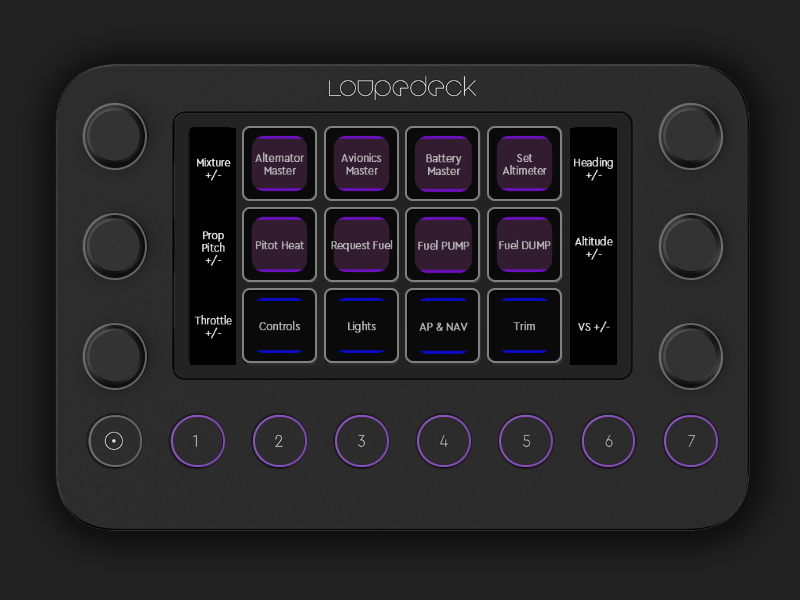
Description
This is a custom profile for Loupedeck Live consoles for use in MSFS.
(If you don't have a Loupedeck Live this is useless to you)
To use: Unzip the file, in Loupedeck Configration software go to Settings (cog wheel), then under Device Settings choose Profile and import the file. It should automatically map to FlightSimulator.exe but you may have to adjust based on your setup (this was for Steam).
Check the comments for some install troubleshooting help.
Current Version (V2) has 5 Touchscreen pages, 6 encoder wheel mappings, 3 encoder buttons, and 7 camera & view buttons:
Issues I've encountered:
(If you don't have a Loupedeck Live this is useless to you)
To use: Unzip the file, in Loupedeck Configration software go to Settings (cog wheel), then under Device Settings choose Profile and import the file. It should automatically map to FlightSimulator.exe but you may have to adjust based on your setup (this was for Steam).
Check the comments for some install troubleshooting help.
Current Version (V2) has 5 Touchscreen pages, 6 encoder wheel mappings, 3 encoder buttons, and 7 camera & view buttons:
- Systems Page
- Alternator Master
- Avionics Master
- Battery Master
- Pitot Heat
- Reqeust Fuel
- Fuel Pump
- Fuel Dump
- Controls
- Decrease Flaps
- Increase Flaps
- Gear Up/Down
- Spoilers
- Tail Wheel Lock
- Parking Brakes
- Pushback
- Water Rudder
- Lights
- Beacon
- NAV
- Strobes
- Landing
- Taxi
- Interior
- Flashlight
- AP & NAV
- AP Master
- YD
- FD
- Select ALT Bug
- NAV1 Hold
- ALT Hold
- LOC Hold
- Select HDG Bug
- Trim
- Aileron Trim Left
- Aileron Trim Right
- Rudder Trim Left
- Rudder Trim Right
- Elevator Trim Nose Down
- Elevator Trim Nose Up
- Encoder wheels
- Mixture +/-
- Button Press: Set Mixture Rich
- Prop Pitch +/-
- Button Press: Set Prop Pitch High
- Throttle +/-
- Button Press: Cut Throttle
- Heading +/-
- Altitude +/-
- VS +/-
- Mixture +/-
- Round Buttons
- 1: Instrument View 1
- 2: Instrument View 2
- 3: Cockpit / External View Mode
- 4: Toggle Drone
- 5: Select Next POI
- 6: Next SmartCam Target
- 7: Reset SmartCam
Issues I've encountered:
- A couple times during the first trial run the encoder dials stopped responding and then my mouse cursor dissappeared. Seems to have stopped in the version I have uploaded here.
- The encoder dials need 2-3 clciks to have any effect most of the time. Not sure if I can adjust the sensitivity or use a modifier maybe. I'm open to suggestions :)
MSFS 2020MSFS 2024
Loupedeck Live MSFS profile
A custom profile for Loupedeck Live consoles, tailored for Microsoft Flight Simulator. Contains 5 Touchscreen pages, 6 encoder wheel mappings, 3 encoder buttons, and 7 camera & view buttons. Features various control options such as systems management, lights control, autopilot functions, and more. Please note compatibility with Loupedeck Live hardware is required for use.
Downloads3K
Version2.0
File Size5.32 KB
Published5 years ago
Updated5 years ago


User Reviews
5.0
8 reviews
5
100%
4
0%
3
0%
2
0%
1
0%
Version History
Major layout change; Camera views added to Round buttons
Log in to join the discussion
Log InComments(39)
over 1 year ago
Version 5.9.119364 funktioniert mit MSFS 2020 UND mit MSFS2024.
Man darf kein Update von Loupedeck/Logitech auf Version 6.x.x. machen! Dann ist alles gut. Siehe Screenshots und Photos
To all who want to use this fantastic plugin with Loupedeck!
Version 5.9.119364 works with MSFS 2020 AND with MSFS2024.
You must not update Loupedeck/Logitech to version 6.x.x.! Then everything is fine. See screenshots and photos
over 1 year ago
It would be great if the programmer of this plugin could recompile it so that it works with Loupedeck/Logitec version 6.x.x. It's simply a brilliant solution.
over 2 years ago
over 1 year ago
over 2 years ago
about 3 years ago
How do I select MSFS2020 application when importing a profile?
I am unable to map this toolkit to FlightSimultor.exe - Any ideas?
about 3 years ago
about 3 years ago
about 3 years ago
over 3 years ago
Fails to Install. I just got a LoupeDeck Live Christmas 2022. I tried to install it, but got message: Unfortunately installation of the add-on failed. It seems like other have been able to install it. I'm on Windows 11. Could that be a problem?
Any idea on what I should try to get it to install. I really would like to try it out.
over 3 years ago
I get the blue highlights for the page buttons, but the action buttons are all plain B/W with no purple highlights. Doesn't look as good as the photos. I have the latest software. I don't know if I'm doing something wrong.
over 3 years ago
is this broken - cant get it to map to flightsimulator.exe?
apparently you need to break your .exe out as a shortcut to your desktop and then associate it with the the short cut or will not work......
about 3 years ago
almost 4 years ago
I have been unable to assign the profile to the fs2020.exe application. I have bought the sim via Microsoft store. Please help me:)
about 3 years ago