
Description
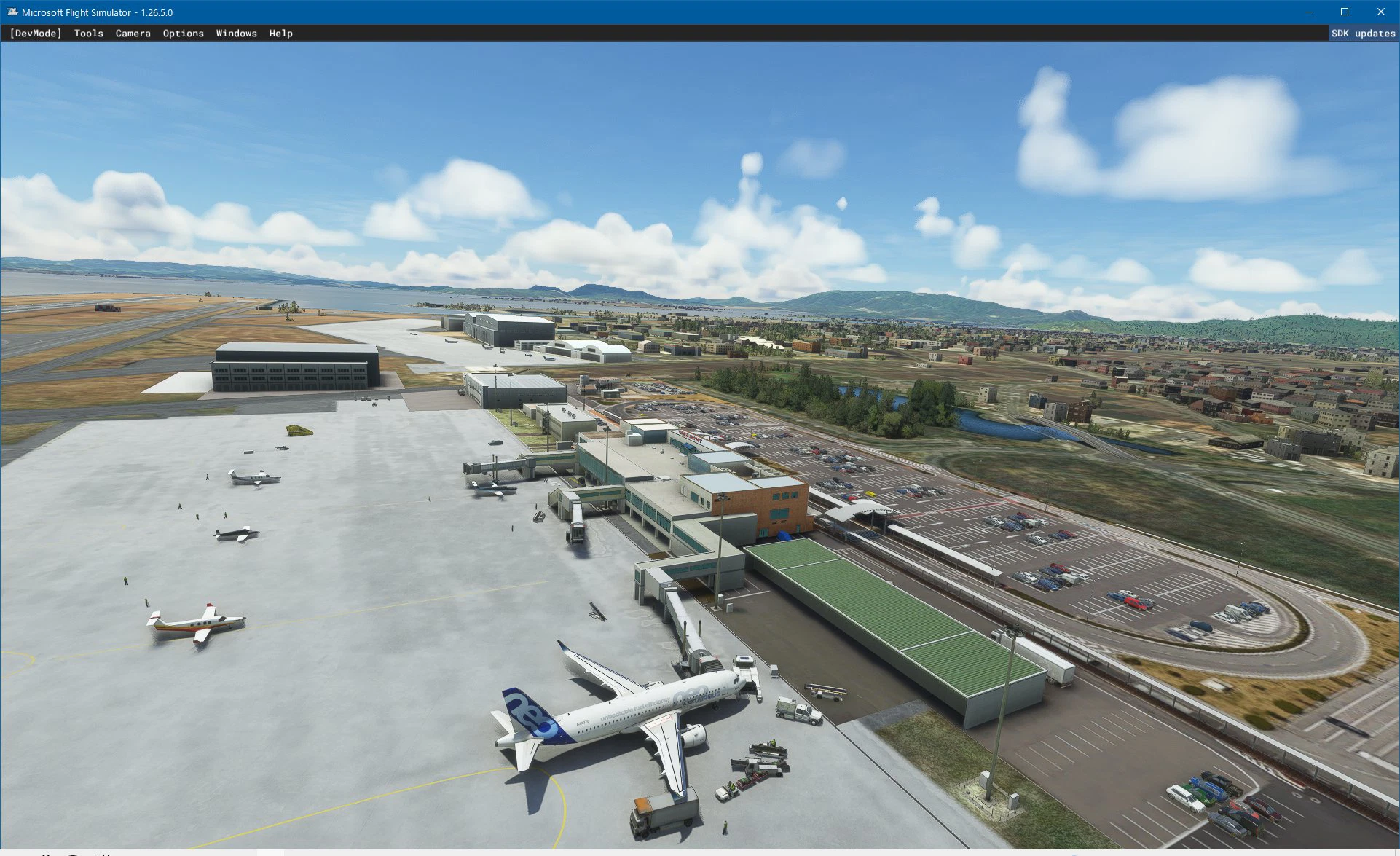
米子空港RJOH
New Version is available
RJOH Yonago V1.0.5
https://flightsim.to/file/63380/yonago-airport-rjoh-v-1-0-5
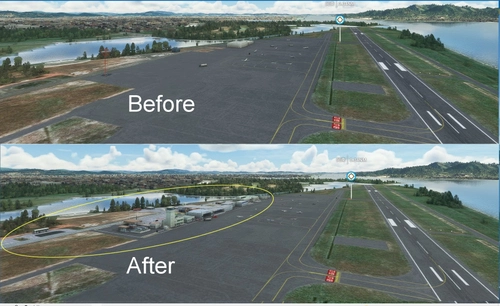
Scenery が大幅に改善されました
2023/11/08
米子空港は、日本の西部に位置する空港です。
航空自衛隊美穂基地と民間航空会社は滑走路を共有しています。
空港ターミナルビルは2019年に拡張工事で完成し、現在3つの搭乗橋があります。
私が作った米子空港風景の中には、民間航空のターミナルビルのほかに、隣接する航空自衛隊や海上保安庁の建物があります。
インストール
方法 ダウンロードしたZIPファイルを解凍します。
だからあなたはパッケージフォルダを持つことになります。
次に、フォルダーを [コミュニティ] フォルダーにコピーします。
Location
Yonago airport RJOH
Experience the revamped Yonago Airport (RJOH) in Japans western region with this latest version update. Share the runway with the JASDF Miho Base and witness the expanded terminal building featuring three boarding bridges. Enhance your flight simulation with detailed scenery of the civilian terminal, alongside adjacent JASDF and Japan Coast Guard structures.


User Reviews
8 reviews
Version History
No version history available.
Related
RJOB Okayama Airport
Experience the revamped Okayama Airport in Japan with this add-on. Improved details include the terminal building, control tower, and expanded scenery areas. Enhance your flying experience with enhanced road paintings, leveled airport land, and updated apron ground and taxi signs.
by Yasu
RJBT Tajima Airport
Experience the rebuilt Tajima Airport (RJBT) add-on, enhancing the commuter-only airport in West Japan with detailed scenery and a realistic environment. Witness the reconstructed runway terrain, terminal building, and surrounding landscapes, bringing a new level of immersion to your flight simulation. Update to version 0.9 for improvements like static exhibit placement, enhanced taxiway integration, and overall enhancements to the airport environment. Install easily by following the provided instructions and elevate your virtual flying experience.
by yasu
Yonago airport RJOH V_1.0.5
Enhanced version of Yonago Airport (RJOH) scenery featuring bug fixes and improvements. Updates include new lighting tower, jetway, remade aprons, reworked ground textures, corrected taxiway markings, and added objects in terminal area.
by Ishii
Okayama KOHNAN Airfield(RJBK) Ver1.0
Discover Okayama KOHNAN Airfield(RJBK) Ver1.0, a small airfield in southern Okayama City with a rich history as a major airport in the area. This add-on enhances the MSFS2020 scenery, offering a base for private aircraft, scenic flights, and more. Enjoy improved visuals and even find an original WACO Biplane on-site. Simply unzip and copy the folders to your Community folder to install.
by YASU
Log in to join the discussion
Log InComments(16)
almost 4 years ago
It would've been a good scenery if the author continued to improve it.
For now we only have some custom buildings, and the rest is default:
The layout is not very accurate and partially outdated;The ground marking is inaccurate;There are no taxi signs;When it's snowy the aprons are fully covered and indistinguishable;The night lighting is very basic;Jetways are missing. I know that it requires the EDLP scenery, but I'm not keen on downloading 4Gb of useless data, even if it's free.Nonetheless, thanks for the effort.
P.S. This scenery uses modelLib.BGL that you might want to rename to avoid potential conflicts.
almost 4 years ago
Really nice scenery coming in!
about 4 years ago
Author YASU
Jetway Conclusion
In this Scenery , " EDLP Jetway" made by Aerosoft is used .
If you don't see Jetway ,I recommend to download and install "EDLP Paderborn-Lippstadt Airport" for free from the MSFS Market Place.
Thank you.
about 4 years ago
素晴らしい米子空港(美保基地:保です)ありがとうございます。
EDLP は、マーケットプレイスに無料であります。get and download で米子空港のジェットウェイが表示されます。
今後も中国地方の空港をお願い致します。
about 4 years ago
Comment from YASU
Thank you for your nice comments and for pointing out any problems.
I tried to check it, but at the moment the problem of Jetway had not been reproduced.
The setting of the frequency of appearance of airport equipment was irrelevant.
I will continue to investigate.
Any advice on this issue is welcome.
about 4 years ago
こんばんは、ご丁寧な返信ありがとうございます。
JETWAYが出てこない件 調べてみましたが、ワールドアップデートではなく
エアロソフト社の JETWAYを使われているのが原因じゃないですかね。
AIRPORT PADERBORN/LIPPSTADT MSFS FREE
https://secure.simmarket.com/aerosoft-airport-paderbornlippstadt-msfs-free.phtml
この6枚目の写真のJETWAYと一致します。
エアロソフトに限らず 他人の作ったシーナリーをPCに入れたまま空港を作成すると SDK上では他人の作った部品が全部出てくるんですよね。
その部品を間違って使っちゃうと 作者様のMSFS上では正常に表示されますが お客様のMSFSには当然表示されません。
確認したわけではないのですが、そういった問題で表示しないのではないかと思われます。
about 4 years ago
KADOさん ご指摘ありがとうございました。
SDKのObject ListにAerosoft製のパッケージが入っていました。
私はAddonsLikerを利用していますので、開発中はCommunity Folderは空になっています。このパッケージはMSFSのマーケットプレースで無料でDLできるものです。
当面の対処法としては、マーケットプレースから”EDLP”をダウンロードして併用して頂ければよいかと思います。(米子シナリーを修正しておくべきか、迷っています。)
私はKADOさんの徳島空港Sceneryをダウンロードさせていただきました。丁寧に造られていてすばらしいです。
about 4 years ago
ありがとうございます
over 4 years ago
素晴らしい空港を有難うございます。海側からILSで降りるのがとても楽しいです。かなり以前に行った事があるのですがやっぱり米子は鬼太郎ですよね。もし機会がございましたらお隣の隠岐空港も・・・
Thank you for the great airport. I really enjoy getting off at ILS from the ocean side. I have been there quite a while ago.
I think Yonago = Kitaro !
If you have a chance, please make the Oki Airport next time.
over 4 years ago
jetway が丸ごと抜けているのですが 依存関係があるなら教えてください。
about 4 years ago
ご指摘ありがとうございます。
sabrOanさんからご質問がありましたが、
Jetway はドイツの「パーダーボルン・リップシュタット空港」の物を流用しています。
WORLD UPDATE Ⅵ (ドイツ、オーストリア、スイス)の時に追加された空港かもしれません。 もし、WORLD UODATE Ⅵの導入がまだでしたらお試しください。
引き続き、調査します。
over 4 years ago
nice work!i like japan!more airport more time to fly japan!!
over 4 years ago
今回も素晴らしい空港シーナリーを有り難うございます。
空港ターミナルの再現も素晴らしい出来で、米子空港訪問が楽しみになります。
出来たら次回更新の際、自衛隊・第3輸送航空隊格納庫横の管制塔屋舎の増設に取り組んで頂けたら最高です!
over 4 years ago
Thanks for this new airport for Japan, would you mind telling me which jetway scenery you're using from? cuz my jetways are missing. Thanks!
about 4 years ago
Thank you for your comment.
I used "SimObject EDLP_Jetway_Type_A".
over 4 years ago
Thank you for bringing us this awesome and very very highly detailed handcrafted scenery. I was missing this airport for a long time in Japan. Very grateful to you for this.