
Description
Motivation
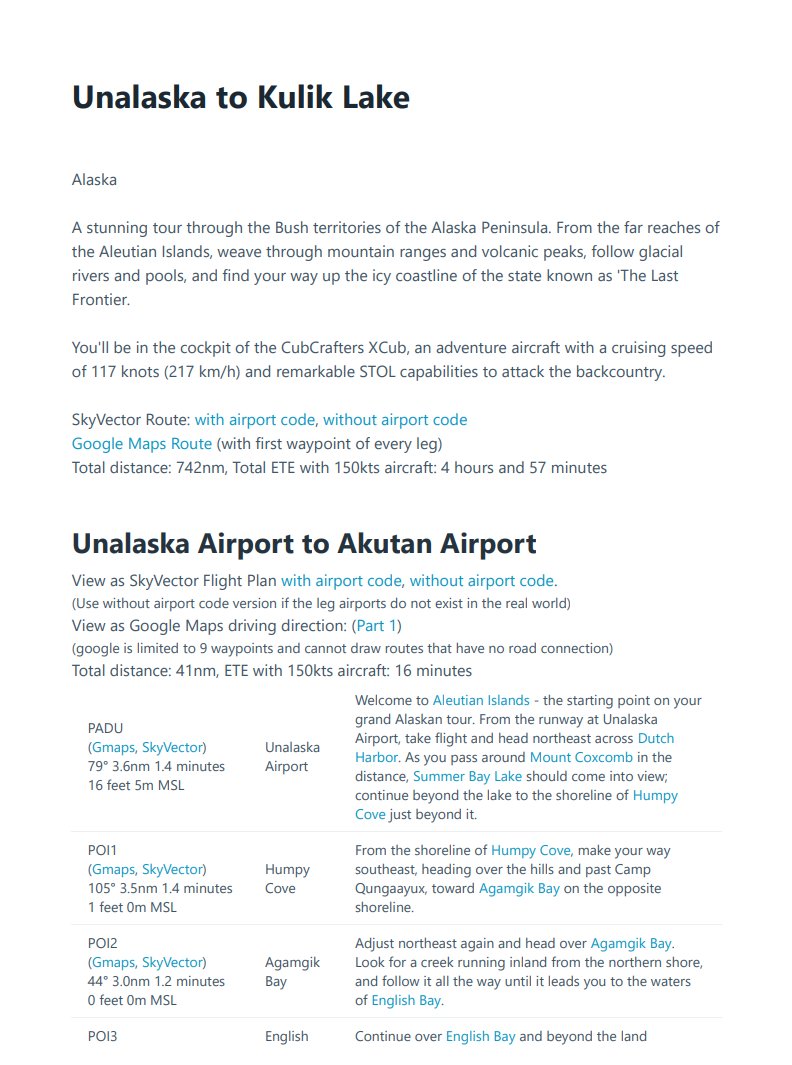
This project started with the desire to fly the bush trips from the world map with choice of airplane and atc, while being able to view the navlog in pdf format on a 2nd screen. It has since expanded to include quite an extensive pdf that can be useful to prepare for a given trip whether from the world map or from the bush trip interface - the PDF provides links to google maps and wikipedia that give background information on waypoints along the way.
This file is a all-in-one package that includes all the built in + WU1-WU9 bush trips, superseding my previous one download per region options.
Contents
This upload contains the following for each bush trip: 1) PDF, 2) LittleNavMap flight plan, 3) MSFS flight plans for each leg.
The pdf contains a lot of information that can help you familiarize with the trip and each leg:
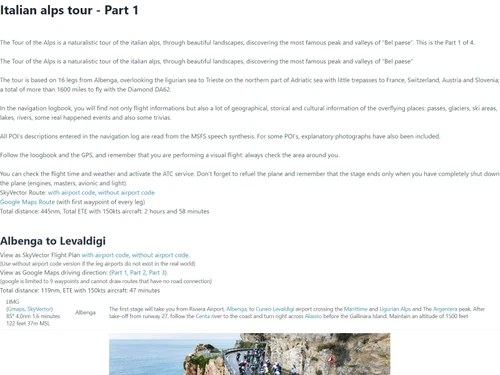
1. Bush trip description, total distance and ETE. View the trip in google maps driving direction, and in Skyvector.
2. Each leg has a link to skyvector so you can get familiar with the area, similar to how you would prepare for a flight in real life
3. Each leg has a link to google map driving direction. This is another cool way to study a trip. Note: driving directions and flying are not the same, and google cannot draw routes that don't follow roads.
4. Each waypoints has a description, along with heading, distance, altitude, ete. and links to google map and sky vector.
The LittleNavMap flight plan contains:
1. All legs and waypoints
2. Names of waypoints
3. The description of the waypoint under Remarks tab - by default the remarks tab is the last tab. You can drag the column (i make it the 2nd column) to make it easier to see the remarks.
Also in a "legs" folder you will find a .pln file for each leg that you can open from Microsoft Flight Simulator world map.
How can you use this? (this is my preferred way to fly these trips)
1. Open the PDF on a 2nd screen and study the bush trip leg you are about to fly
2. Open Flight Simulator, open the leg pln file from the world map, choose your plane and start flying. If this is not your first leg, use AircraftState mod to load the fuel remaining.
3. When you reach the destination airport taxi to the gate. Use AircraftState mod to save the fuel remaining under a name that matches the bush trip and go back to the world map
4. Continue back from step 2 when you are ready for the next leg.
More Information
You can provide feedback for this download either in the comments below or in this thread on the official forums
The pdf files and flight plans are generated using open source utility i wrote that is available here.
MSFS Bush Trips Navlog PDF + Flight Plan - All In One
A comprehensive all-in-one package for Microsoft Flight Simulator bush trips enthusiasts. Includes detailed PDF navlogs with links to Google Maps and Wikipedia, LittleNavMap flight plans, and MSFS flight plans for each leg. Perfect for preparing and immersing yourself in the bush trip experience.


User Reviews
1 reviews
Version History
- Fixed mag var in some waypoints (thanks to antzdeman for reporting) - Arranged all in one file so each trip is in its own folder. (thanks for the community for suggestion)
Log in to join the discussion
Log InComments(7)
about 1 year ago
over 2 years ago
almost 3 years ago
over 3 years ago
Great giving the choice of plane, weather and including the LNM plans! Any hopes to get an update including latest two world update US and Canada?
about 4 years ago
Nice work. Would recommend that you place the corresponding lnmpln and pdf into the folder that contains the FP each bush trip folder is complete with the fp, lnmpln as well as the pdf documentation for that trip. (Total of 29 Folders and each folder is complete in itself)
about 4 years ago
Yes, this was suggested on the forum. i'll try to do that on the next update
about 4 years ago
Just downloaded your new package, and it will be so easy to keep up to date in this manner. I am a great admirer of your work and bush flying is the perfect mode to enjoy MSFS, even with all the bugs that others complain about. I use 3 or 4 of the basic planes (152, 172, Cub Crafter, Zlin Savage,etc, even the 208) and it's a lot of fun. I had all previous releases but not sure that they were all up to date. You can really enjoy the scenery and land anywhere you want. Wonderful work and I thank you for it.