
Flightsim.to
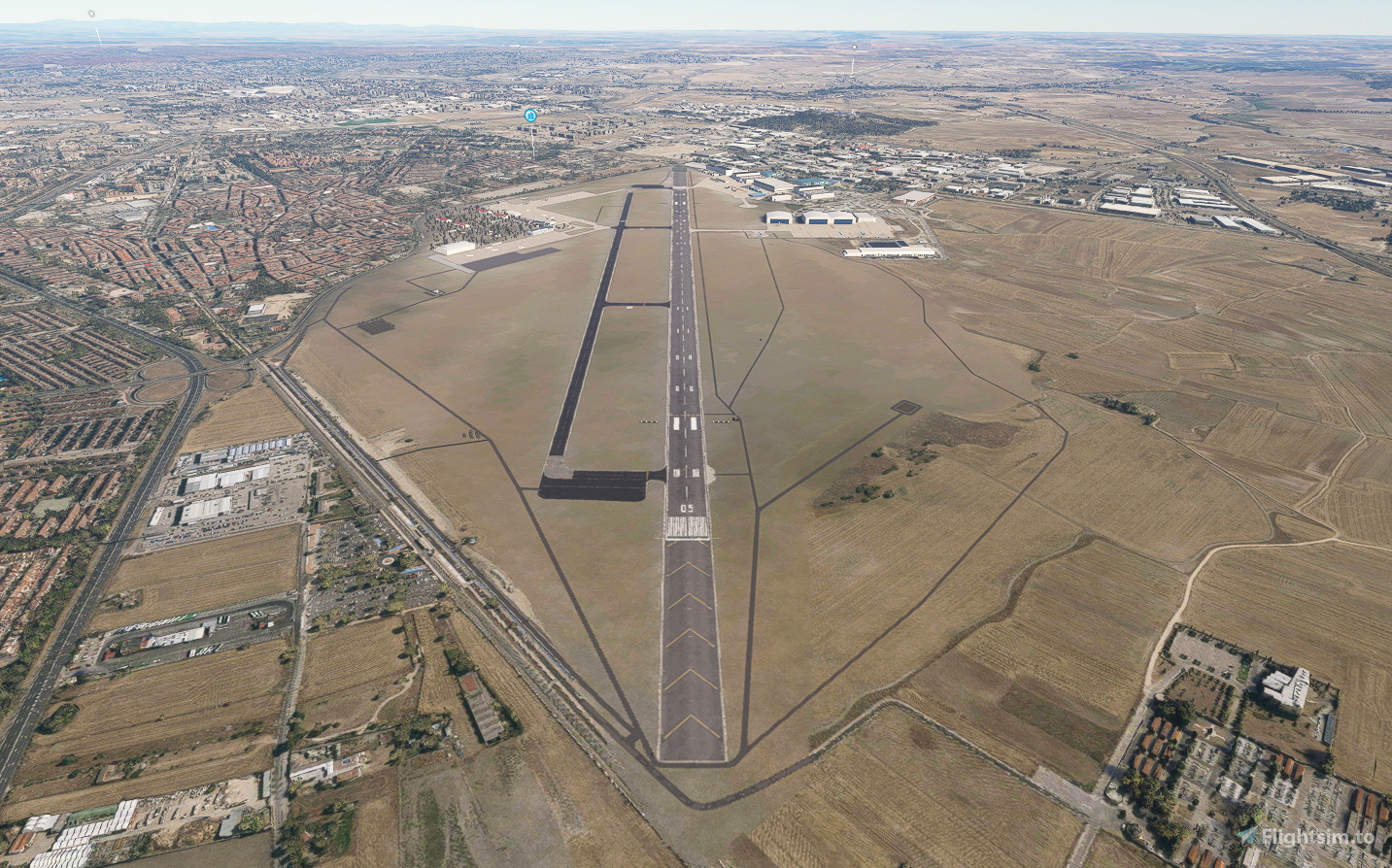
    Base Aerea de Getafe / Airbus Getafe (LEGT) - Image 1

    Description

    This is an intended contribution to the MSFS community. As originally there was no scenario for the Getafe Air Base / Airbus Getafe (LEGT) I made a scenario for my personal flights. I hope this input can get someone to fly to/from this location.

    To use it, unzip 'drp-airport-legt-ba-getafe vXXX - HeliPad Bomberos Getafe.zip' file and put 'drp-airport-legt-ba-getafe vXXX - HeliPad Bomberos Getafe' folder in your 'MSFSPackages\Community' folder.

    Made By DRP (PurpleErmine407)

    ++++++++++++ ChangeLog +++++++++++++

    New modifications and additions to the scenario. The Getafe Hospital/Firefighters heliport has been added and modified.

    DVOR/TACAN VGE 112.050 MHz / CH 57Y
    NDB GE 421.000 kHz
    LOC 04 IGE 110.900 MHz ILS CAT I
    ILS/DME 04 IGE CH 46X


    Location

    Hold Ctrl to interact with the map
    Interaction activity
    DownloadsCommentsSeparate scales for downloads and comments
    Oct 23 Downloads: 2 Comments: 0Oct 24 Downloads: 3 Comments: 0Oct 25 Downloads: 0 Comments: 0Oct 26 Downloads: 2 Comments: 0Oct 27 Downloads: 1 Comments: 0Oct 28 Downloads: 1 Comments: 0Oct 29 Downloads: 1 Comments: 0Oct 30 Downloads: 3 Comments: 0Oct 31 Downloads: 1 Comments: 0Nov 01 Downloads: 2 Comments: 0Nov 02 Downloads: 1 Comments: 0Nov 03 Downloads: 1 Comments: 0Nov 04 Downloads: 0 Comments: 0Nov 05 Downloads: 2 Comments: 0Nov 06 Downloads: 1 Comments: 0Nov 07 Downloads: 0 Comments: 0Nov 08 Downloads: 1 Comments: 0Nov 09 Downloads: 2 Comments: 0Nov 10 Downloads: 2 Comments: 0Nov 11 Downloads: 1 Comments: 0Nov 12 Downloads: 2 Comments: 0Nov 13 Downloads: 1 Comments: 0Nov 14 Downloads: 3 Comments: 0Nov 15 Downloads: 0 Comments: 0Nov 16 Downloads: 1 Comments: 0Nov 17 Downloads: 0 Comments: 0Nov 18 Downloads: 2 Comments: 0Nov 19 Downloads: 2 Comments: 0Nov 20 Downloads: 1 Comments: 0Nov 21 Downloads: 2 Comments: 0
    Oct 23Nov 06Nov 21
    41
    Downloads
    0
    Comments
    Last comment 30 days ago
    Creator responds to 21% of comments

    Log in to join the discussion

    Log In

    Comments40

    sdaadQuestion·about 1 month ago
    can u make it for msfs 2024?
    gugaleal2012·4 months ago
    Thank you for this airport! I've seen a Beluga departing from there the other day, and wanted so much to recreate the flight!!
    maximusboscus
    ·4 months ago
    Can you update the runway numbers, approaches and all fixes? They are outdated.
    Thank you!
    drpAuthor·4 months ago
    done
    phdumortier2
    ·9 months ago
    Belle scène mais on constate deux pistes identiques superposées et décallées? Une solution
    Hermosa escena pero notamos dos pistas superpuestas y desplazadas.
    drpAuthor·9 months ago
    La aparición de una doble pista (o pista duplicada/superpuesta) en Microsoft Flight Simulator 2020 al utilizar Navigraph ocurre porque los datos de navegación actualizados de Navigraph entran en conflicto con la versión del aeropuerto (ya sea stock o de terceros) instalada en tu simulador.
    Aquí tienes los pasos para solucionarlo, ordenados del más sencillo al más técnico:
    1. Solución rápida: Reordenar con la herramienta de Navigraph (Recomendado)
    Navigraph Navdata Center tiene una función integrada para gestionar la prioridad de carga.

    Cierra MSFS 2020.
    Abre Navigraph Navdata Center.
    Asegúrate de que Navigraph Navdata y Navigraph Navdata Base Scenery están instalados y actualizados.
    La herramienta suele ordenar automáticamente los escenarios para que tu escenario de terceros (o el de Asobo) tenga prioridad sobre los datos de navegación, evitando que se dibuje una pista extra.
    Reinstala los paquetes si es necesario.

    2. Solución manual: Modificar el archivo content.xml
    Si la herramienta automática no funciona, debes ajustar manualmente el orden de carga para asegurar que tu aeropuerto de terceros se cargue después de los datos de Navigraph.

    Localiza tu archivo content.xml (generalmente en %localappdata%\Packages\Microsoft.FlightSimulator_...\LocalCache).
    Abre content.xml con un editor de texto (como Notepad++).
    Busca la carpeta de tu escenario (terceros o predeterminado) y muévela hacia el final de la lista, asegurándote de que aparezca después de cualquier entrada que contenga navigraph-navdata.
    Una regla práctica es que la prioridad del escenario de terceros sea mayor que la de Navigraph.

    3. Solución temporal: Borrar el archivo de conflicto
    A veces, Navigraph crea un archivo de aeropuerto base que choca con un aeropuerto que ya fue actualizado por Asobo.

    Ve a tu carpeta Community.
    Entra en navigraph-navdata-base.
    Busca y elimina la subcarpeta o archivo .xml que corresponda específicamente al ICAO del aeropuerto conflictivo (ejemplo: APX26280.xml para MPTO).

    4. Alternativa: Usar un gestor de escenarios (Addons Linker)
    Utiliza MSFS Addons Linker para gestionar tus escenarios. Esto te permite activar/desactivar escenarios fácilmente y asegurar que la estructura de carpetas Community no duplique elementos.
    Importante: Siempre cierra el simulador antes de realizar cualquiera de estos cambios y reinícialo para que surtan efecto.

    Yo tengo navigraph y reordenando los escenarios se soluciona sin problema. Hay mucha documentación al respecto en internet.

    Saludos!
    phdumortier2·9 months ago
    Muchas Gracias despues la solucion 1
    Ginete
    ·about 1 year ago
    Thank you!
    AccAkut
    ·over 1 year ago
    Works fine in the 2024. Sure a custom new aerial texture replacing the blurred Bing Maps one would be sweet, but for what this is, it's a very well and detailed remake of the airport with just stock assets. Thanks for this!
    tornado77
    ·almost 2 years ago
    NIce but i see the runway two times. Can you help me? thanks
    Ian_Featherstone·almost 2 years ago
    Tried to download but apparently the file is corrupt! I would really like this as one of the Airbus factory sites. Regards Ian.
    Konrad5987·almost 2 years ago
    Please make it compatible with MSFS 2024 i want to fly there with BEluga
    PaskalG·almost 2 years ago
    ¿no funciona? hasta ahora todos los escenarios españoles que he instalado en msfs2024, siendo de msfs2020 me han funcionado bien.
    Ahora mismo estoy bajándome los aeródromos militares, ya que no salen en MSFS2024 y es una pena no poder volar a ellos, por eso estoy buscando LEGT.
    ascr35·almost 2 years ago
    Hola! Muchas gracias por el escenario! Con la última actualización he sufrido una bajada de FPS muy significativa. A qué puede ser debido? Podría descargar de nuevo la versión anterior?

    Muchas gracias!
    mercury13·almost 2 years ago
    solved. version6.0 ok. corrupted file while installation
    mercury13·almost 2 years ago
    version 6.0 not working " could not read manifest json file"
    mercury13·almost 2 years ago
    version 6.0 not working " could not read manifest json file"
    Rayen_LH·almost 2 years ago
    It is posible to add a parking in the beluga station?
    drpAuthor·almost 2 years ago
    done ... update to new version!
    MSFS 2020MSFS 2024

    Base Aerea de Getafe / Airbus Getafe (LEGT)

    This is an intended contribution to the MSFS community. As originally there was no scenario for the Getafe Air Base / Airbus Getafe (LEGT) I made a scenario for my personal flights. I hope this input can get someone to fly to/from this location. To use it, unzip 'drp-airport-legt-ba-getafe.7z' file and put 'drp-airport-legt-ba-getafe' folder in your 'MSFSPackages\Community' folder.


    Downloads5K
    Version7.0
    File Size41.0 KB
    Published4 years ago
    Updated4 months ago
    Classification
    AirportsSpainLEGT4.4 (10)

    User Reviews

    4.4

    10 reviews

    5
    60%
    4
    10%
    3
    20%
    2
    0%
    1
    0%

    Version History

    Runway numbers and minor corrections added
    Related