
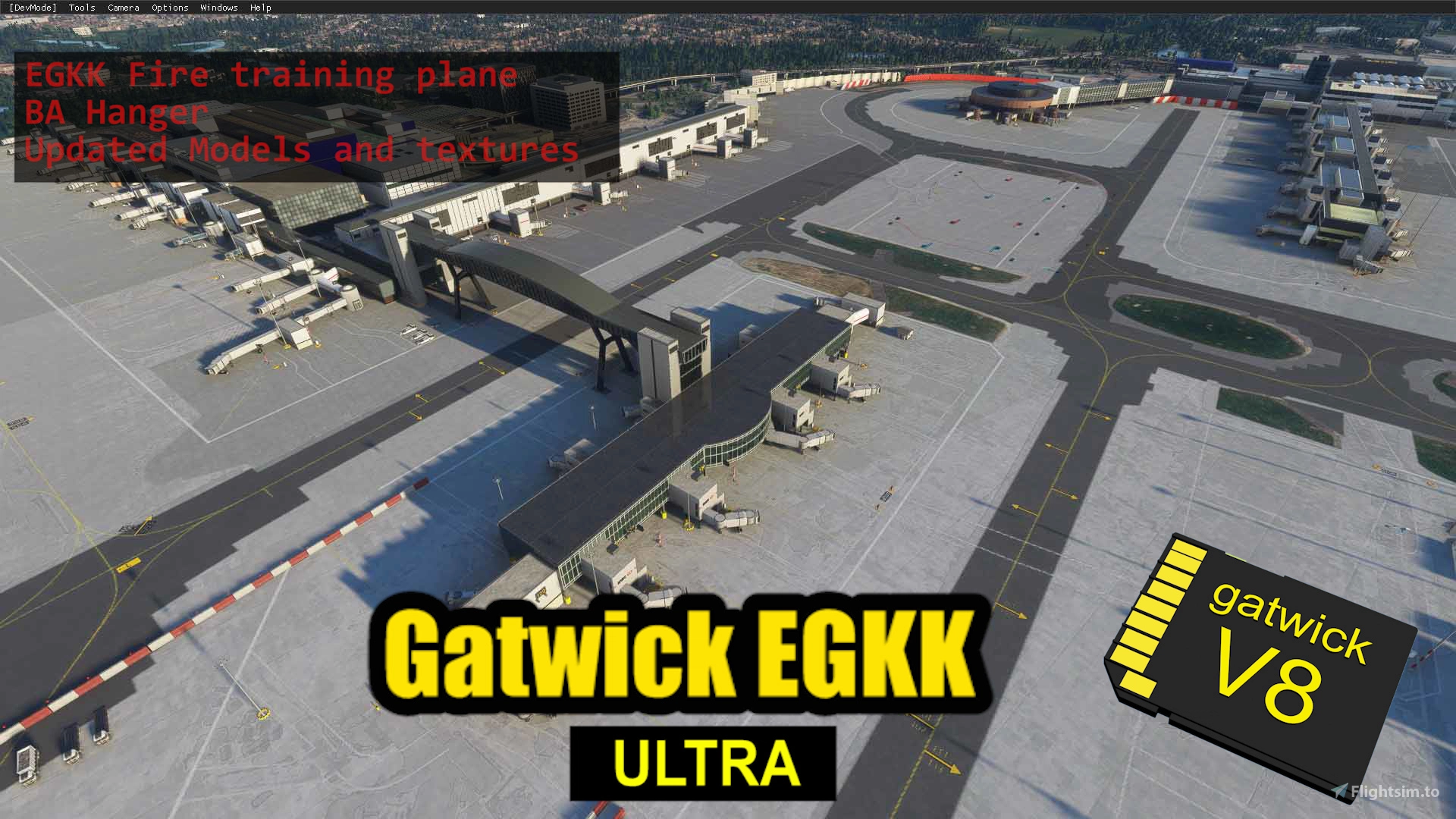
Description
Lets make Gatwick Great Again!
Extract Folder as one into your community folder as gatwick
This version uses Default Airport runways/taxiways and jetways... But all the terminals/piers/stand plates are handcrafted. Every stand number is correct on the airport but incorrect in the world map at the moment. This may change with world update uk. Depends on Asobo.
This is the full version with added animations and trains
A Lighter version is available here with all the upgrades but without the trains and monorail animations
https://flightsim.to/file/3441/gatwick-egkk-standard-pilots-version
Another Version i am developing which is a full Edit of runways/aprons/texiways/jetway positions and correct stand numbers in world map is available here
https://flightsim.to/file/5784/gatwick-egkk-ultra-star-edition-phase-1-0
Big thankyou to my supporters. . it was supposed to be just the bridge!
Great Free resouce used for this project - CC0 Texture
https://help.cc0textures.com/doku.php?id=start
The amazing free Blender 3D application
https://www.blender.org/
All would be impossible without Blender2MSFStoolkit
https://www.fsdeveloper.com/forum/resources/blender2msfs-toolkit.256/
Without these tutorials i would have just been scratching my head
https://www.youtube.com/channel/UCTrmxNqBCjRpnrMmDQeDMiA
Installing updated versions for EGKK and Best way to clear your cache and get rid of old data indexes
1) Delete the older version 'gatwick' from community folder
2)Start fs2020 and spawn to default Gatwick
3)Close Fs2020 and install New version into community folder as 'gatwick'
4)Open fs2020
This method will solve the problem of scenery not appearing, or overlapping models
V8.0.2
Package completely rebuilt with SDK 0.12.0
V8.0.1
Ai building removed from taxiway Juliet
Packaged using latest SDK V0.10.0
V8
EGKK Fire Training Aircraft.
BA Hanger.
Pier 1 4K Bricks update.
South Terminal adjustments and Textures.
Airbridge Less dark textures and glass.
Inside Gate number corrected Pier 6.
V7.9.5
Virgin Hanger- fits 747-400. Asobo 747-8 will not fit fully, 5 metres longer.
A380 stand 558 added- jetways inop ATM.
ATC tower lowered slightly.
Added detail to airbridge ends.
Added detail to 500's jetty stairwell pods on 500's..
Pls Note.. some safedocks need adjustment on 552/553/557/558 due to rework.
V7.9.4
Centre Line T bar end terminations on every pier stand.Gate 101 shifted and new centreline in place.Poliigon Concrete Blocks Generator 4K Textures for Pier 2 and airbridge supports. (more additions later)More work on North Terminal added details and re levelling building heights using Google Earths NEW telemetry data as a visual reference aidV7.9.3
All Jetty Stands now have safedocks and stop markers for A320/747/787
Some tweaking still needed for 500's
V7.9.2
Test Introduction of Stop Markings on13,15,17,19,21,23Stand 23 is calibrated with its own safe dock.13-21 are not yet calibrated and checked but with a bit of luck they will match with the safedock stop.This is particularly useful for the Dreamliner where visibility of the safedock disappears near stop point due to H.U.D and low windows. In VR you can duck to see the safedock but in normal 2D you can now finish the taxi on stand in external view and capture the stop marker. This problem is only on stands 13M-23 due to reduced stand size
81 Safedocks now added and calibrated
1-5 Airbus or smaller
31M,32M,33M,34M,35M,36M,37,38 747 or smaller
31L/R, 32L/R, 33L/R,34L/R,35L/R,36L/R Airbus A320 or smaller
KA taxiway sign moved to correct location
Stand 109 now has its stand plate back
Added taxiway lights to KQ intersection
Airbus or smaller stands 140-145
Pier 6
Airbus or smaller 104,105,106,107,109,112,113,101
747 or smaller 102
Pier 2
Airbus or smaller 10,11,12,13L/R,14,16,18,20,22,24,28
747 or smaller 13M,15,17,19,21,23,27
Dreamliners may be a bit tail out on 13M,15,17,19,21,23. But 747 are as snug as a bug in a rug
stand 25,27 747 ASABIR (as snug as a bug in a rug)
Pier 5
Airbus or smaller 48L,49 L/R,, 50 L/R, 51 L/R,52 L/R, 54 L/R
747 or smaller 49M,50,51M,52M,53,54M
More waves of stands in V7.9..
Any pilots with parking issues are very gratefully recieved, off centre line issues or tweaks i need to make to the stop points do let me know..
HOW TO USE AGNIS STAND GUIDENCE
Just left red light visible - Too far to left
Just right red light visible - Too far to right
Both red lights visible/flickering. Green and orange bars visible= dead centre
AS the aircraft gets closer to stop point the size of the orange/green bars reduces and the red bar becomes visible.
When the green/orange bars disappear, means STOP
I have no idea how i manged to make this work.. i starting to wonder if i am a genious (LOL)
Gatwick Airport EGKK Ultra: Custom Buildings and Models Only
Enhance Gatwick Airport EGKK with custom-built terminals, piers, and stand plates. This add-on features handcrafted details and correct stand numbers, offering a realistic airport experience. Explore the full version with animations and trains, or opt for a lighter version without the additional animations. Update your EGKK scenery with each new version for optimal performance and enjoy the detailed improvements in this latest rebuild.

User Reviews
184 reviews
Version History
Package build with Sim Update 6
Related
EGKK - Gatwick Airport 2026
This add-on offers a complete reconstruction of Gatwick Airport (EGKK) for Microsoft Flight Simulator, compatible with both FS2020 and FS2024. It includes detailed installation instructions and compatibility tips for utilizing features such as GSX and VDGS systems. The add-on aims to enhance the airports appearance and functionality, providing real-world immersiveness for flight simulation enthusiasts.
by mkvy
Gatwick EGKK Standard Full
Explore Gatwick Airport with the Standard Full version add-on, featuring detailed animations such as airbridge escalator and baggage trailers without trains or monorail for improved performance on older systems.
by mkvy
EGKK Gatwick FSLTL Static Aircraft
Enhance Gatwick airport with static FSLTL aircraft models. Add realism without FPS loss, requires FSLTL Base models. Please note, some gates are now static due to aircraft placement.
by StaticSceneries
EGKK Gatwick Airport - FSLTL Static Aircraft
This add-on enhances EGKK Gatwick Airport by incorporating static aircraft models from FSLTL, creating a more vibrant airport atmosphere without the need for an FSLTL Injector. The enhancement does not impact FPS performance, as it uses only static models. Users are required to have FSLTL Base models installed for full functionality, though some gates may be rendered unusable due to the placement of these aircraft.
by StaticAircrafts
Log in to join the discussion
Log InComments(701)
over 4 years ago
It says SU6 here but we are all on SU9 now... does that mean the airport doesn't work anymore?!! Am I suppose to use the Ultra version at https://flightsim.to/file/5784/gatwick-egkk-ultra-star-edition-phase-1-0 instead?! Some clear information would be nice!
over 4 years ago
Hi mkvy,
I've created this video : https://youtu.be/LSziNjgJark and so we can see how you have very well achieved this airport ! 😏
almost 5 years ago
Well done sir. I checked this out yesterday and I must say it's easily on par with some of the better paid for airports. I might need to make EGKK my base now! Coffee going your way.
almost 5 years ago
Thankyou so much !
almost 5 years ago
Come and join us at EGKK Scenery brilliant and VatSim Controllers some of the best Daftpunk
almost 5 years ago
I'm already there m8.
almost 5 years ago
Please please update this Mod to SU6..I cannot get your Full Ultra to load up when in my Community Folder..the loading gets to the very very end then freezes.Without Any EgKK Mods the Sim works just fine.
almost 5 years ago
I’ll take a look this afternoon after work
almost 5 years ago
That would be brilliant..I fly from EGKK once a week at least because of your Mod 👏👏
almost 5 years ago
Works brilliant 👍you made an old man happy 👏 I can make my own liveries but wish I knew how to keep updating myself instead of bugging people for the updates that are sure to follow..Again..many thanks…Terry
almost 5 years ago
Its strange because the file size is exactly the same from building the package with sim update 5 compared to sim update 6. To me the says nothing has changed in the package. But if it works , thats great
almost 5 years ago
Your full Ultra is a total rework..Runway Taxiways etc..where’s this one is based on the Default Runways etc..so to load the Full Ultra should I have taken the Asobo original Egkk airport out and replaced it by yours via the Community Folder .A yes / no answer and I will leave you in peace 🤷🏻
about 5 years ago
on loading the game freezes when ive installed into community folder . any ideas or workarounds ? tried 3 times now and still wont load but when i remove from community folder game runs and loads fine
about 5 years ago
The work around is to fly from Biggen Hill to Gatwick, a short hop
about 5 years ago
Hi, I've just downloaded Ver 8.0.2 SU5 (Gatwick). The loading gates when loading MSFS do not agree with the Jeppesen charts. For example at the southern end of the bridge, Jeppesen has gates 103 - 107, whereas you / MSFS have 162 - 165. Also, is it possible to use gate 25 at the western end of pier 2?
Otherwise it looks great - am I being too picky?
about 5 years ago
Hi, yes that’s the default Asobo layout, which is incorrect. I have corrected this in the full version , the one with 75,000+’downloads , give it a spin!
about 5 years ago
Sim continue to lock up "not responding" when trying to load. Downloaded and dropped in the community folder, and still can get the sim to loadup to EGKK mod. Any suggestions?
about 5 years ago
Spawn at Biggen hill and fly there, see if that works
about 5 years ago
Thanks...it worked like a charm!!!!
about 5 years ago
One of the best freewares out there thank you so much!