
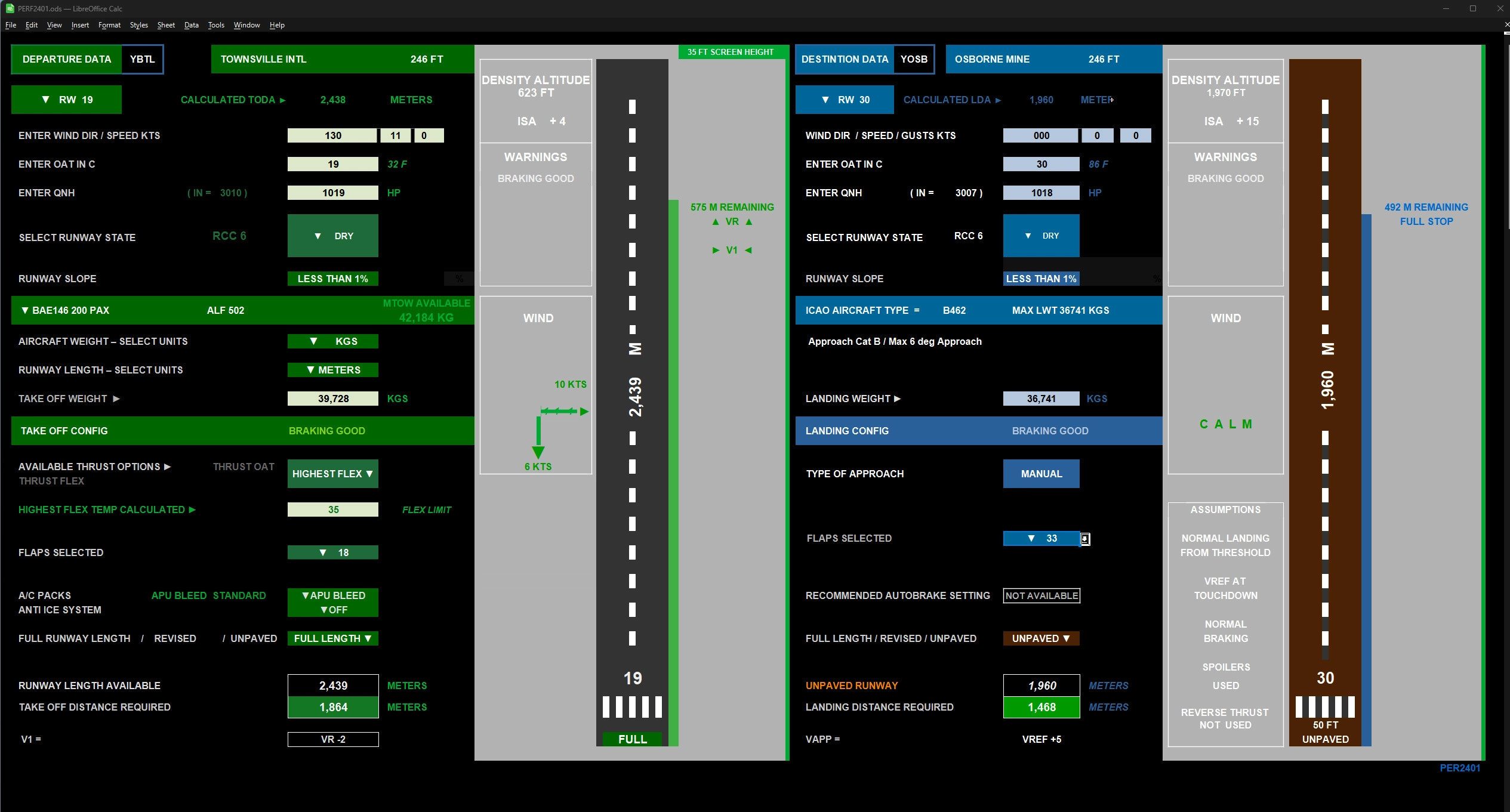
Description
FEB 2026 UPDATE
The spreadsheet has been developed using aircraft performance data freely published by Airbus, Boeing, British Aerospace and Bombardier. You will need to download LIBRE OFFICE which is freely available and does not interface directly with MSFS, so can be safely used with any MSFS update.
This version has been completely rewritten to provide more accurate take off, landing and flex temperature figures.
An additional Aircraft Anti-Ice calculator has been added to provide accurate data on icing holdover times.
The following aircraft types are simulated, and more will be added later.
AIRBUS A318/319/320/320Neo/321/321Neo/330-200/330-300/330-800/330-900
350-900/350-1000/380
Avro RJ70/RJ85/RJ100
BAE 146-100/146-CC2/146-200/146-200QC/QT/146-300/146-300QT
BOEING B737-200/B737-600/B737-700/B737-700 BDSF/B737 BBJ1/B737-BJ1W/B737-800/B737-800W/B737-800 BDSF/B737-BDSF W/B737-BJ2/B737-BJ2W/B737-900/B737-900ER (W=Winglet versions) /B747-400/B747-400F ER/B747-8/B747-8F/B757-200/B757-300/ B777-200 ER/B777-300 ER/B787-8/B787-9/B787-10
BOMBARDIER CRJ 550/CRJ 700/CRJ 900/CRJ 1000
The Spreadsheet has a number of tabs at the bottom left. These are:
HELP. Instructions on how to use the spreadsheets.
COMPLEX. The full version with all the bells and whistles.
EASY. A simpler version similar to those used by pilots in the flight deck.
TOOLS. Various tools to assist in logging flight details, calculate fuel burn during long flights and a runway slope calculator and tool to add your own airport details.
ANTI-ICE An aircraft holdover time calculator, following deicing, based on real world use.
RWY The tables of runway data used by the simulator which can be edited.
ACFT. Aircraft data used by the spreadsheet in order to calculate the performance for each aircraft.
This was designed purely as a private project to assist me with my flight simulation. I have not had access to the wealth of information that would be required to create a complete aircraft performance chart for each individual airfield, so use with care. The runway performance indicated only takes into account the runway lengths indicated, whereas in real life a lot of other factors, such as local terrain needs to be considered. Having said that it will assist in making informed decisions on safe take off and landing.
FUTURE PLANS
More aircraft of course and further revisions to calculations when required. Your comments are appreciated as it is almost impossible to flight test every aircraft type in all weather and airport conditions, so my apologies if you encounter errors. I hope you find this useful.
HOW TO RUN
Download the Spreadsheet.
Extract the contents of the folder.
Copy the PERF2601 file onto to your computer and open it with Libre Office.
LIBRE OFFICE ISWHICH IS FREELY AVAILABLE FROM:
https://www.libreoffice.org/download/download-libreoffice/
Frequently Asked Questions
Aircraft Runway Performance Spreadsheet
This spreadsheet is designed to simulate the type of performance procedures used by aircrew when planning a flight and to provide an indication of the types of limitations imposed by weather conditions and to make the flight simulator operation more realistic.


User Reviews
14 reviews
Version History
This vesion has been completely rewritten to provide more accurate take off, landing and flex temperature figures. An additional Aircraft Anti Ice calculator has been added to provide accurate data on icing holdover times.
Log in to join the discussion
Log InComments(100)
3 months ago
I see that Just Flight have some performance tables on their forum that might help you.
https://community.justflight.com/topic/6623/f28-flex-takeoff
3 months ago
9 months ago
over 1 year ago
The spreadsheet doesn't calculate the V speeds, it only takes the stopping distances into account, at take off weight, to calculate the relationship between VR and V1 (the speed at which you should be able to stop on the runway if aborting a take off). Most aircraft FMC systems calculate VR and V2 correctly as these are primarily based on the aircraft weight at take off. The spreadsheet will indicate the difference, if any, between V1 and VR.
I have noticed that the FBW A380 FMC does not calculate V speeds, so I am currently experimenting with adding these for this aircraft. V speeds can be obtained from Simbrief using their take off calculator. Hope that helps
7 months ago
over 1 year ago
I can't seem to get V1, Vr and V2 speeds out of your spreadsheet, although I think I have filled in everything required. Can you see why ?
Great work by the way :)
over 1 year ago
over 1 year ago
I just downloaded it and it seems to work fine, so perhaps you received a corrupted download. Could you try again please.
Also please confirm that it works with Libre Office, which you also have to download, for free.
I'm currently working on a minor update to improve some of the performance figures when using anti icing / aircon during take off.
almost 2 years ago
over 1 year ago
If someone were to offer to take an experimental version of the spreadsheet, with Embraer data attached and test fly the aircraft in the sim to check the accuracy that would help. I mainly fly the BAe146 and Avro RJ aircraft, as I used to work for BAe at Hatfield, and cant really justify buying all the available aircraft to check that they work correctly with the spreadsheet figures. I have a very good test pilot for the Airbus aircraft, but one for the other aircraft types would be useful.
almost 2 years ago
One question though in the "complex" calculation sheet I can't get any of the aircraft to work. It shows "#Value" in a lot of cells for example in the derated thrust section.
In the "easy" sheet it works fine.
almost 2 years ago
almost 2 years ago
BASICALLY THE RUNWAY IS LONG ENOUGH FOR YOU TO STOP ONCE YOU HAVE REACHED VR.
V1=VR-21 MEANS THAT THE AIRCRAFT V1 SPEED IS VR MINUS 21 KTS. SO A SHORT RUNWAY.
almost 2 years ago
almost 2 years ago
almost 2 years ago
almost 2 years ago
almost 2 years ago
Probably finished in about a week. I've already amended the A380 following flight testing, so both should be much more accurate. The Avro RJ performance is of course very similar to the 146, so it would be safe to use that in the interim period.
Regards
almost 2 years ago
Thank you