
Description
(for ios see below)
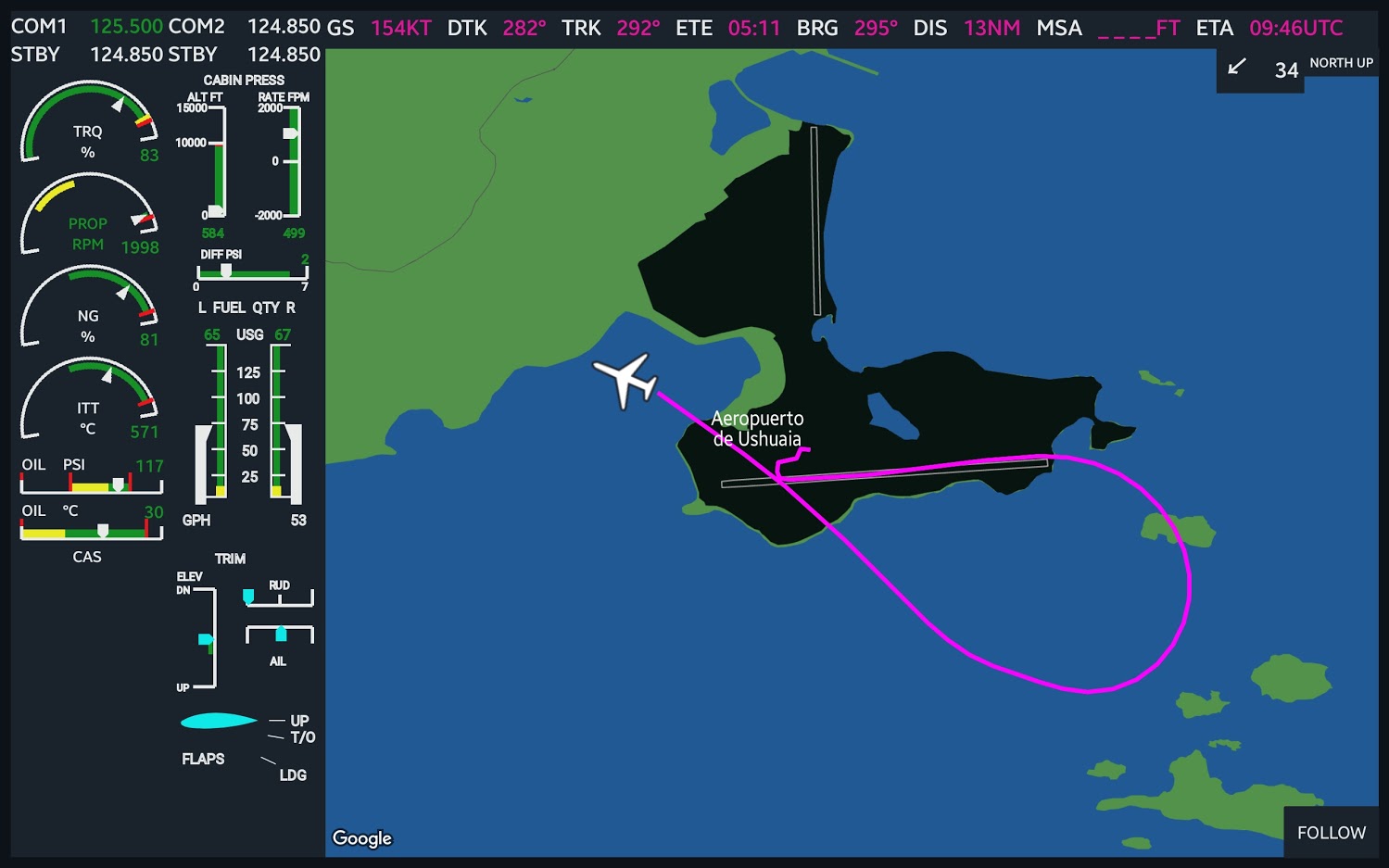
This is the mirrowed screen of the G3000 MF display on the Android Tablet. Best is to use with TBM930 (or other Turboprops) since I usually fly this one, but it should work (more or less) with all aircrafts - it just grab data from the Sim Stream.
I mainly made it for myself, but thought you might like it as well. It works with MSFS API (SimConnect), so you will need to launch an app next to your simulator and connect your Android to the same network (wifi for example).
Let me know, if suddenly it will look bad on your device - I only tested it on my tablet (Samsung S6) and some virtual devices, so you could also help me to make this app better.
I also have plans to migrate it to iPads, but not sure if people really need it.
The client could be download on Google Play store here (it is free and no ads, I don't plan to charge money).
Join the DISCORD Channel to report issues or requests
This is the mirrowed screen of the G3000 MF display on the Android Tablet. Best is to use with TBM930 (or other Turboprops) since I usually fly this one, but it should work (more or less) with all aircrafts - it just grab data from the Sim Stream.
I mainly made it for myself, but thought you might like it as well. It works with MSFS API (SimConnect), so you will need to launch an app next to your simulator and connect your Android to the same network (wifi for example).
Let me know, if suddenly it will look bad on your device - I only tested it on my tablet (Samsung S6) and some virtual devices, so you could also help me to make this app better.
I also have plans to migrate it to iPads, but not sure if people really need it.
The client could be download on Google Play store here (it is free and no ads, I don't plan to charge money).
Android
The latest android app is always available here (Google Play is pretty slow in release the updates, you will get it anyway, just in case if you dont want to wait - use this link).Join the DISCORD Channel to report issues or requests
IOS
Apple is a really shitty company in terms of approving the apps in their store. The G3000 MFD is ready but Apple keep rejecting it, today is the reason Design: Minimum Functionality. It means that they just don't understand the purpose of the app. I still fight them trying to get the app in the appstore, but so far no luck. However, you still can get a test version on your iPad via the official Apple Testing App - TestFlight. You will need to get an invination from me, so PM me your apple email. I will send the redeem code.How to use it?
- Start Microsoft Flight Simulator
- Launch the MSFSTools Connect app on the same computer
- Press Magenda button to Connect to the MSFS Simulator
- You will need to get your local computer address - you should see it in the MSFSTools Connect app
- Connect your Tablet to the same network where the MS Flight Simulator is running
- Start the app on your Tablet
- Enter the IP address and port from the app
- Press Connect
- Enjoy!
MSFS 2020MSFS 2024
MSFS G3000 MFD Screen for Tablets
Access a mirrored G3000 MFD screen on your Android tablet with this free Microsoft Flight Simulator add-on. Designed for use with the TBM930 and other turboprops, it syncs data from the sim stream via MSFS API. Connect your tablet to the same network as your simulator and launch the app for a seamless experience. Test versions for iPads are available via TestFlight due to Apples app approval process.
Downloads5K
Version1.3
File Size456.60 KB
Published5 years ago
Updated5 years ago


User Reviews
4.5
33 reviews
5
76%
4
9%
3
3%
2
0%
1
3%
Version History
update to work with android app version 1.8
Log in to join the discussion
Log InComments(181)
about 2 years ago
about 3 years ago
Hi could you send me a test flight code? Thanks in advance
over 3 years ago
Does IOS app still work or only android ?
over 3 years ago
Works perfectly, looks great
and is a great upgrade for the MSFS.
It is compatible with SU12,
thanks for that
over 3 years ago
No links work for the PC app.... is this abandoned?
over 3 years ago
Hi could you send me a test flight code? Thanks in advance
nikitashemiatkyn@gmail.com
almost 4 years ago
使用google 地图,应用却是免费,你是怎么做到的?google的API现在可不便宜啊
over 4 years ago
Dead project is dead.
over 4 years ago
Hi could you send me a test flight code? Thanks in advance :) puchalskiadrian@googlemail.com
over 4 years ago
Hi there!
Could you please help me with one code/link for iOS? sniffiertundra2@gmail.com
over 4 years ago
Hello, please send me the link to test app in my ipad levedoveli@icloud.com
thanks
over 4 years ago
For iOS I ended up using the free program SplashTop.
over 4 years ago
does touch input work properly with splashtop ?
over 4 years ago
It seems the links are not working ? Only iOS
over 4 years ago
Could I please have a code? urban.gt@gmail.com ios!
almost 5 years ago
android links not working
almost 5 years ago
May I have the code of IOS? My Apple ID is tyeh@symax.com. Thanks!
almost 5 years ago
May I have the code for iOS?
siuwai0831@gmail.com
Thanks!
almost 5 years ago
Could I please have a code? confuseddads@gmail.com
almost 5 years ago
Love to try this, if you could send the IOS Code to alanneil7237@gmail.com
Thank you.