
Description
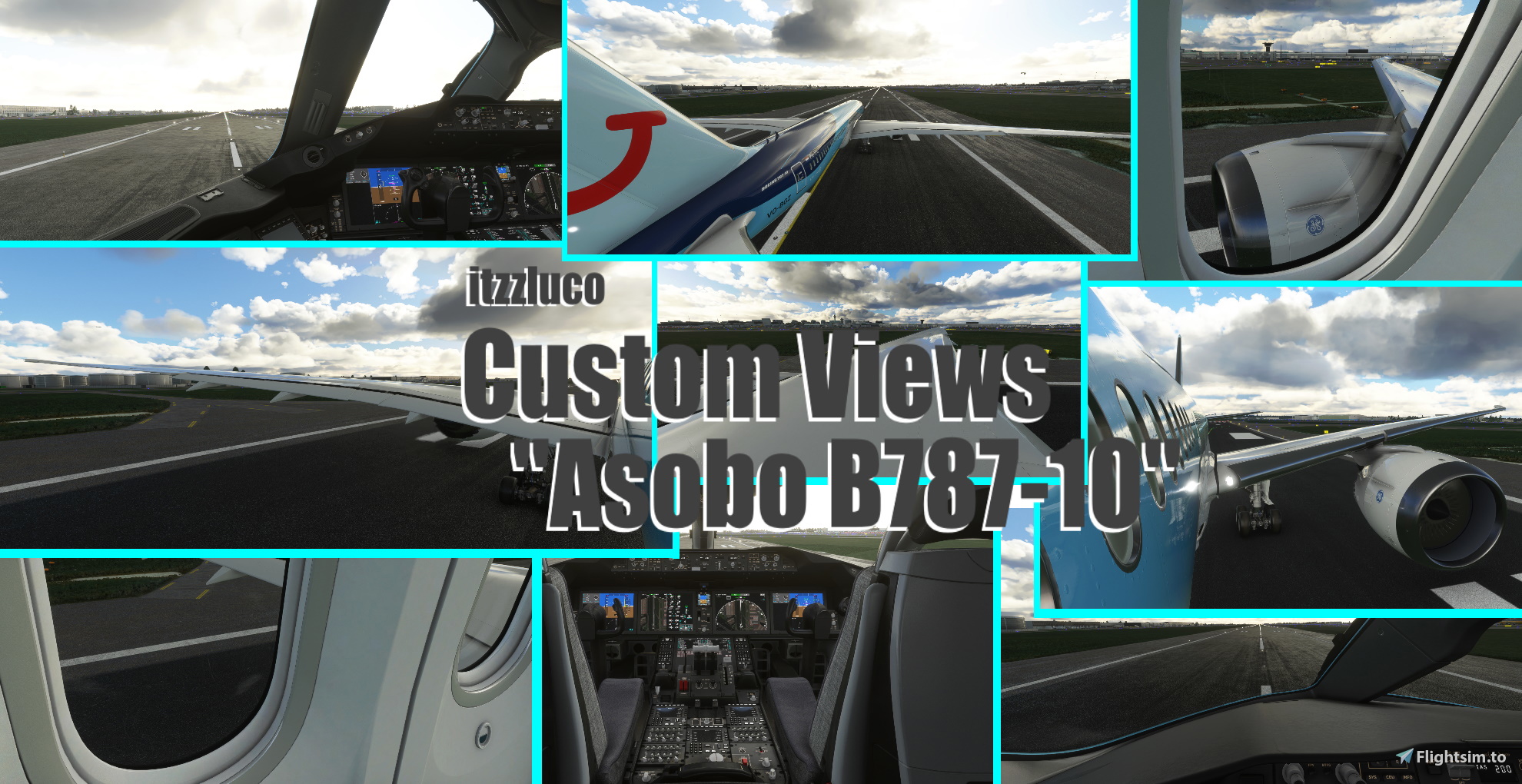
Here are some nice Custom Camera Views for the Asobo B787-10. Have Fun with it! ✈️
The different Views:
0 - Cockpit Front
1 - Cockpit Left
2 - Cockpit Back
3 - Window 1
4 - Window 2
5 - Wing View 1 (Back)
6 - Wing View 2 (Front)
7 - Wing View 3 (Overview)
8 - Plane (Overview)
9 - Gear (Overview)
++ Of course you can also see the views in the pictures ++
++ I do not implementet many Cockpit Views (for example: Overhead panel View) because you can reach every Cockpit view easily with: CRTL + 1-9 ++
Make sure that you have set the custom camera views in the settings.
In Game: --> Options/ Controls/ "Your Device"/ Camera/ Cockpit Camera/ Load Custom Camera 0-9
How to Install?
1. Download and UnZip the Folder and Copy the downloaded "cameras.cfg" file
2. Follow this Path:
Steam:
C:\Users\xxxxx\AppData\Roaming\Microsoft Flight Simulator\Packages\Official\OneStore\asobo-aircraft-b787-10\SimObjects\Airplanes\Asobo_B787_10
Microsoft Store:
C:\Users\UserName\AppData\Local\Packages\Microsoft.FlightSimulator_8wekyb3d8bbwe\LocalCache\Packages\Official\OneStore\asobo-aircraft-b787-10\SimObjects\Airplanes\Asobo_B787_10
3. Now replace the existing cameras.cfg with the new downloaded cameras.cfg
4. Restart the Game
! Make sure, that you make a Backup from the normal cameras.cfg before you replace it. In case you want back the normal camera settings !
This should actually work without any problems!
But if if there are any problems I can try to help you, but I cannot insure you and I do not assume any liability etc.
++ So do it on your own risk ++
And now have Fun with your new Custom Camera Views!
Itzzluco
Asobo B787-10 - Custom Views
Customize your flight experience with a collection of unique camera views for the Asobo B787-10 aircraft. From cockpit angles to scenic wing views, enhance your simulation adventure with this mod. Follow simple installation steps to enjoy these custom camera perspectives and elevate your flight simulation immersion. Dive into different viewpoints and capture stunning moments from new angles as you soar the virtual skies.

User Reviews
1 reviews
Version History
- Compatibility with SU6 - Custom View 4 updated (changed)
Log in to join the discussion
Log InComments(22)
7 months ago
almost 4 years ago
Don't work now can you update it ????
almost 5 years ago
Custom 4 dont...:))
almost 5 years ago
do costum view 4 not work?
about 5 years ago
You should create a custom view for the left wing just how you did for the 7th custom view
about 5 years ago
Thanks for your Idea, eventually i will implement it in the next version 👍
about 5 years ago
I already have one custom views file for 787 but if I install this how would both of the custom views work
about 5 years ago
you have the delete the older version of this addon
about 5 years ago
so everytime i choose a new aircraft i have to change the custom views in the community folder?
about 5 years ago
no, when you have downloaded the custom view is it the normnal view for the aircaft
about 5 years ago
what if i have multiple custom views in my community folder, for different aircraft
about 5 years ago
ahh, no you do not have to put the file into your community folder. For the B787 custom view you have to follow this path: C:\Users\UserName\AppData\Local\Packages\Microsoft.FlightSimulator_8wekyb3d8bbwe\LocalCache\Packages\Official\OneStore\asobo-aircraft-b787-10\SimObjects\Airplanes\Asobo_B787_10 (for Microsoft Store users)
In this path you find a camera.cfg -> this you have to be replace by the downloaded.
about 5 years ago
hey i downloadedyour mod but when i am switching views by the views menu in the toolbar i cant find the custom vies is there any other way?
about 5 years ago
You just have to set in your Custom Camera Keys 0-9 the settings (Options/ Controls/ "Your Device"/ Camera/ Cockpit Camera/ Load Custom Camera 0-9.
When you have done that, you just have to stay in the normal cockpit camera an press your selectet keys.
about 5 years ago
Will this work with the B787 mod?
about 5 years ago
I do not really know, just try it out 👍