
Description
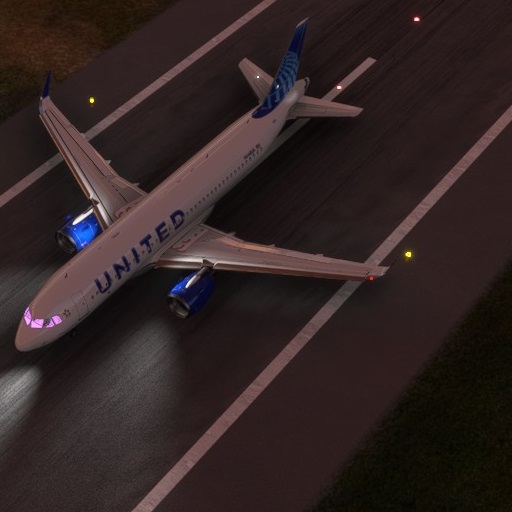
After Sim Update 5 you may have seen some of your windows go pink (see photo), this is due to the linkbacks in the texture.cfg changing with the update. Many livery makers have not updated their liveries for this as of yet and I'm noticing a lot of people in the comments wanting them to fix it so I thought I'd upload the fixed texture.cfg file.
Extract this cfg file and drop it into your A320 Livery folders.
MSFS 2020MSFS 2024
Airbus A320 Default Pink Windows Fix
Ensure your Airbus A320 windows stay clear with this fix for the pink windows issue that occurred after Sim Update 5. Simply download and drop the fixed texture.cfg file into your A320 livery folders to resolve the problem easily.
Downloads5K
Version1.0
File Size0.42 KB
Published5 years ago
Updated5 years ago
User Reviews
5.0
5 reviews
5
100%
4
0%
3
0%
2
0%
1
0%
Version History
No version history available.
Log in to join the discussion
Log InComments(24)
13 days ago
about 1 year ago
almost 2 years ago
over 2 years ago
almost 3 years ago
almost 4 years ago
Does this mod fix B787-10 heavy division pink window ..?
over 3 years ago
sadly not
over 3 years ago
Thanks for responding.
over 4 years ago
Does this works with other planes, such as 787? Some of the liveries have pink glass during night. Maybe this config can be used to other planes?
over 4 years ago
This is just for the old A320 livery setup. For the 787 is could be an issue for old liveries as well but it is worth noting the virgin atlantic is supposed to have windows that from some angles may seem pink. For example the livery from impulse simulations.
almost 5 years ago
Thanks for the tip as this was an issue for me as well, even after clean install with SU7. I created several custom liveries as well and found the pink window issue with some of my liveries.
I believe the missing line of code that's now required is "fallback.X=..\..\..\..\texture\Planes_Generic
Thanks again for posting and nice livery too!
almost 5 years ago
No need for this anymore. It's been fixed wih SU6
almost 5 years ago
im with blueskies2k30 on this... in the archive their is a cfg and a folder with another cfg file in it... so what gets dropped where in the a320 folder ... your install instructions are a bit lacking on info.. saying that.. i hate the sun bed look from the windows.. thx for the fix
almost 5 years ago
HOW DO U DO THIS CAN I GET A TUTORIAL FOR THIS ALL SEE IS A BLUE TEXTURE
almost 5 years ago
You just need to go into the texture folder in the respective liveries and drop the cfg and replace
almost 5 years ago
Texture_VEd8p.7z this the download i get dosent say cfg file how do i get it to work on the file you sent me to put it
almost 5 years ago
dosent say cfg
about 5 years ago
I basically had to do this to every livery I had.
about 5 years ago
I just flew a Pacific night flight in the B747 and noticed the same VERY BRIGHT pink windows. You would think the pilots were having a cockpit party. Can you help with that?
about 5 years ago
I'm currently redoing my entire plugins list so maybe but it will be a little while off.