
Description
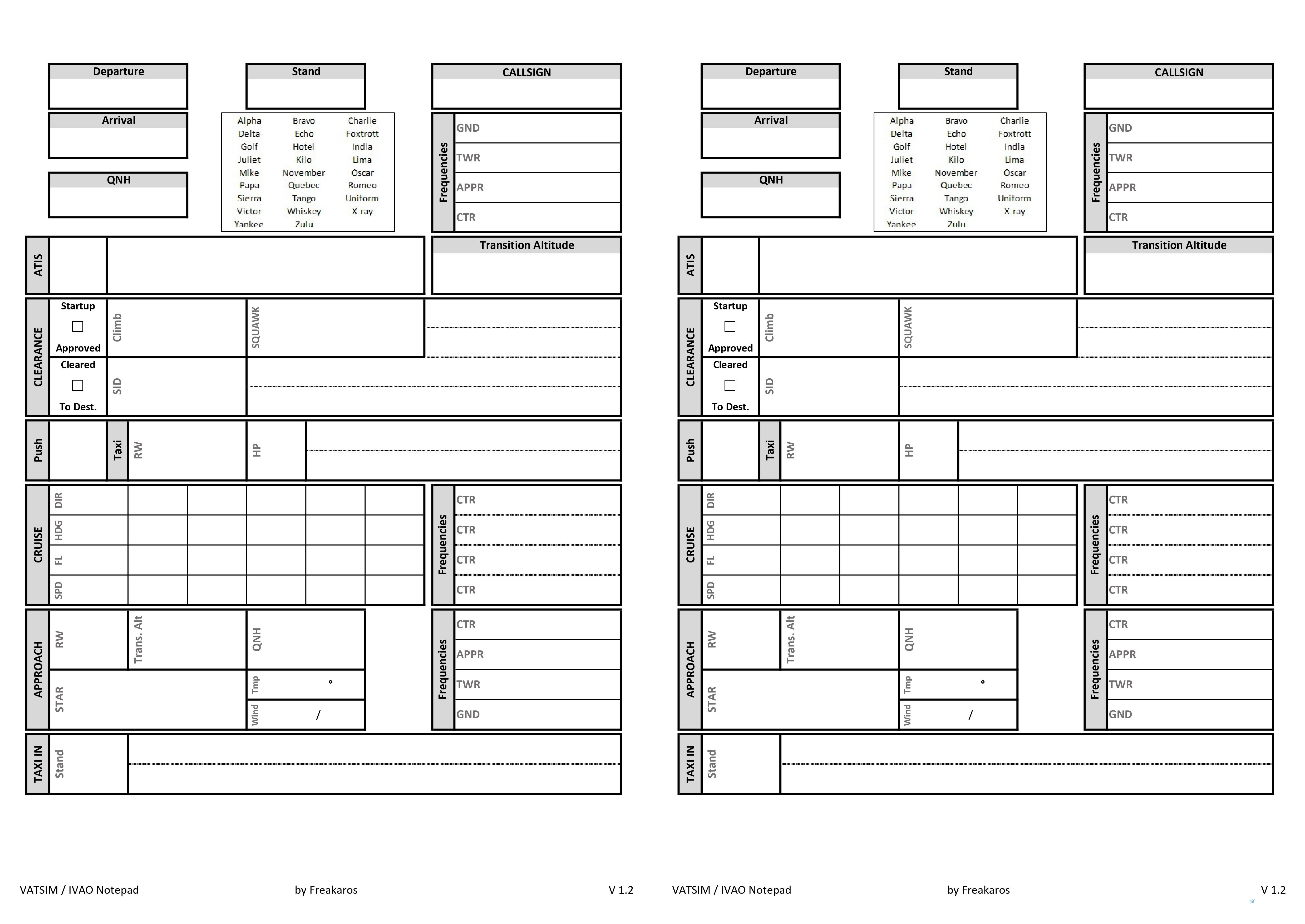
A Simple JPG you can print out with all the neccesary fields needed for an easy communication with ATC on Vatsim, IVAO etc.
Especially beginners (like me) often struggle to keep up with atc commands - the result often is a mess of post-it-notes easy to loose track in.
It comes in 2 variants:
- Singlepage - useful to simply print out on 1 sheet of paper
- Doublepage - basically the landscape variant (contains 2x the singlepage next to each other)
Please feel free to make any suggestions to improve :)
VATSIM / IVAO Notepad
Keep your ATC communication organized with the VATSIM / IVAO Notepad add-on. This printable JPG helps beginners and experienced simmers alike to easily keep track of ATC commands, available in single-page and double-page variants for convenience. Customize and enhance your communication with this handy tool.


User Reviews
4 reviews
Version History
Several changes - added ICAO phonetic alphabet - improved Cruise section - added dedicated area for Cruise frequencies - Added field for the SQUAWK Code (how could i forget that in the first place?) - small rearrangements and adjustments
Log in to join the discussion
Log InComments(19)
5 months ago
over 4 years ago
Very helpful, thanks!
about 5 years ago
Very good idea to make these 2 pages, so those of us who are starting in IVAO or in VATSIM can fly without being worried that we forget things, let's say them wrong ... I started in IVAO a few days ago and it is being a little complicated, when using these pages it will probably be a lot easier for me, and if it continues to be difficult for me, it is my fault hahahah; Still, thank you very much for the pages. 👍
about 5 years ago
thats exactly the struggle that gave me the idea ;) , when starting up on Online-flights its pretty easy to get overwhelmed.
I simply gave the PDF to a printing service that made me a glued 200 page writing pad and use it ever since :)
Please always feel free to give feedback if something could be handled better in the sheet and always happy landings.
about 5 years ago
Thank you very much. What is the meaning of HP cell ?
about 5 years ago
its meant for the Holding Point of the Runway Ground wants you to taxi to. :)
about 5 years ago
Good Idea Freakaros, this is useful for IFR and VFR!
about 5 years ago
Amazing thought. I was wondering if you could make a transparent one and remove the white background?
about 5 years ago
Thank you very much :) - sure that would be totally possible - but what would be the benefit of that ?
about 5 years ago
Yes, why LemonJuice? When it is printed out, I wanna see on the white background what I wrote down...
about 5 years ago
Maybe he wants to put the transparency over another image
about 5 years ago
I would like to lazer engrave this and would like a high defintion image without a background. It can be done as a seperate download and either way this does not affect printing. EDIT: its okay now, managed to remove the background with some PS.
about 5 years ago
Okay this sounds smart - please share your result here, im curious what you're up to :)
about 5 years ago
Managed to get this engraved onto my whiteboard, result is 50/50. Maybe running a different trace path would have fixed the deformation of the plastic. I will definetly try again once i find my other whiteboard.
about 5 years ago
this sounds so great - can u share a pic of that ?
about 5 years ago
https://i.imgur.com/FysazrA.jpeg I will post my second version once i find/buy another whiteboard
about 5 years ago
You might have better results using an aluminum clipboard. I've used one in the past (though not laser engraved) with dry erase markers and it's worked great - Imagine the engraving would turn out better on that
about 5 years ago
i rly love that idea - thats great :)
about 5 years ago
Looks great, very nice idea