
Flightsim.to
    Luxov's Realistic ReShade - Image 1

    Description

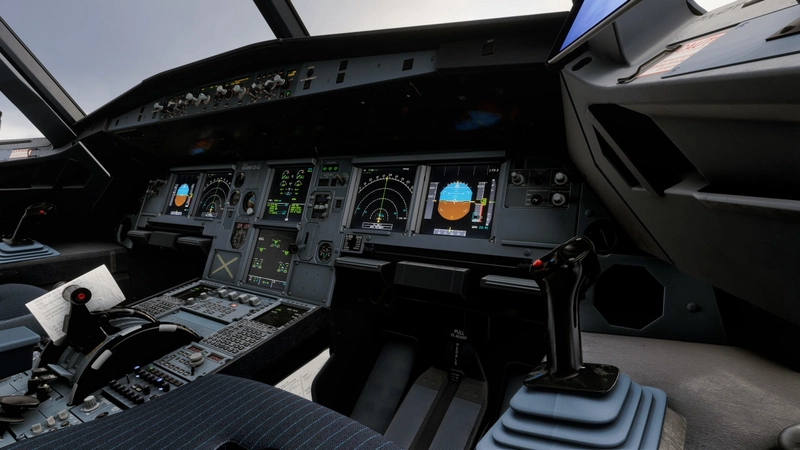
    Hello Everyone! During my time on MSFS I've always believed that the sim looked a little dull and lifeless... This preset aims to add more defined shadows, colors, bloom, And much more! After countless hours of testing and experimenting I present this ReShade!

    Please Note All Photos Shown Were Using Rex Atmos Core.

    Rex Atmos Core Presets Used

    Weather: Luxov V1

    Enviro: Airborne Geek

    Atmos: AB MSFS (Top 5 menu)

    INSTALLATION:

    Make sure you also install "MPR Universal Tonemap" and drag and drop it into your Reshade Shaders folder.

    1. Make sure you have ReShade Installed: https://reshade.me

    2. Once you install the Preset and ReShade Follow The ReShade Setup then once prompted install from a preset select this Reshade.

    3. Once Installed correctly select the Key Bind for ReShade and make sure this preset is selected.

    4. Enjoy!

    One Tip!

    If the sim looks too bright you can increase the input normalization under MPR Universal Tonemap.

    MY PC SPECS:

    CPU: AMD RYZEN 5 5500

    GPU: AMD RX9060XT 16GB

    RAM: 16GB 3600MHZ DDR4

    Log in to join the discussion

    Log In

    Comments(28)

    a

    8 days ago

    Hi which AB preset is it for Atmos?
    L
    LuxovsAuthor

    8 days ago

    Hey, Mate! Recently i've been using the ones on the Top 5 Menu
    c

    9 days ago

    Impressive !!
    L
    LuxovsAuthor

    8 days ago

    Hey, Mate! Photos look great! Glad you like it!
    D

    9 days ago

    Do I need some app for this to download?
    L
    LuxovsAuthor

    9 days ago

    Hey, Mate! All you need is ReShade, though i do recommend Rex Amos.
    w

    18 days ago

    NICE!!!
    L
    LuxovsAuthor

    18 days ago

    Hey, Mate! Glad you like it!
    i

    21 days ago

    Hey, thinking about downloading this but I don't know too much about specs, is your pc good? (because you said it doesnt affect your performance)
    L
    LuxovsAuthor

    21 days ago

    Hey, Mate I have a rather low end PC with a mid range GPU I get a constant 60FPS With frame generation with high to ultra settings, but you might notice maybe a loss of 1-2 FPS very little to no loss of performance with ReShade. If you don't mind telling my your PC Specs I can let you know how your PC will perform!
    i

    21 days ago

    @Luxovs
    Thanks first of all for the quick reply!
    I have a 3070, i7 11700k I believe 32gb ram

    also, I saw you were using Rex atmos core, is that needed? (since its 14 euros)
    L
    LuxovsAuthor

    21 days ago

    No worries! That setup sounds really good! Lots of ram and a good CPU! Only thing that might cause a little bit of issues is the 8gbs of VRAM on the 3070 might need to lower textures to medium or so but other than that its really good! And Rex Atmos is a big game changer for the price it really made my sim lively if you use the right presets, you might wanna give it a shot!
    M

    21 days ago

    Excelent!! Very good job!! is amazing!
    L
    LuxovsAuthor

    21 days ago

    Hey, Mate! Thanks for the review! Glad you like it!
    p

    22 days ago

    its so dark on my oled screen i can barelyh see
    L
    LuxovsAuthor

    22 days ago

    Hey, there! Hmm… well i use an IPS monitor so mine looks okay, what you can try is turning off FGFX: :LSPOIrr or Convert Color space maybe both. They make the cockpit much darker, you might find some luck turning them off.
    L
    LuxovsAuthor

    22 days ago

    Also, one question when you open the ReShade menu do you see “MPR Universal Tone Map”? It increases the brightness and balances it out.
    d

    23 days ago

    I really like the exteriors, but the flight deck (Fenix) is still way too dark or has too high contrasts for my taste, some areas are just black and vents/details vanish completely. But I guess it‘s either exterior or interior with ReShade.
    L
    LuxovsAuthor

    23 days ago

    Hmm.... Few questions Have you already installed the MPR Universal Tone Map? It increases the brightness and balances it out. Or are you using the right Rex Atmos? If you already are in the ReShade Menu you can Turn off FGFX: :LSPOIrr or Convert Color space they make the cockpit darker.
    MSFS 2020MSFS 2024

    Luxov's Realistic ReShade

    Luxov's Realistic ReShade is a preset designed to enhance the visual experience in Microsoft Flight Simulator. It adjusts shadows, colors, and bloom effects for a more defined and lively appearance. The preset is optimized for use with REX Atmos Core but can be installed with standard ReShade tools. This add-on aims for a more realistic and visually engaging simulator environment.

    Downloads1K
    Version1.6
    File Size28.6 KB
    Published3 weeks ago
    Updated3 weeks ago

    User Reviews

    5.0

    4 reviews

    5
    100%
    4
    0%
    3
    0%
    2
    0%
    1
    0%

    Version History

    Minor Update tweaked a few effects as i believed the cockpit was too dark and the sky was too bright it's now more balanced, including "MPR Universal Tone Map" I recommend installing the new version.