
Flightsim.to
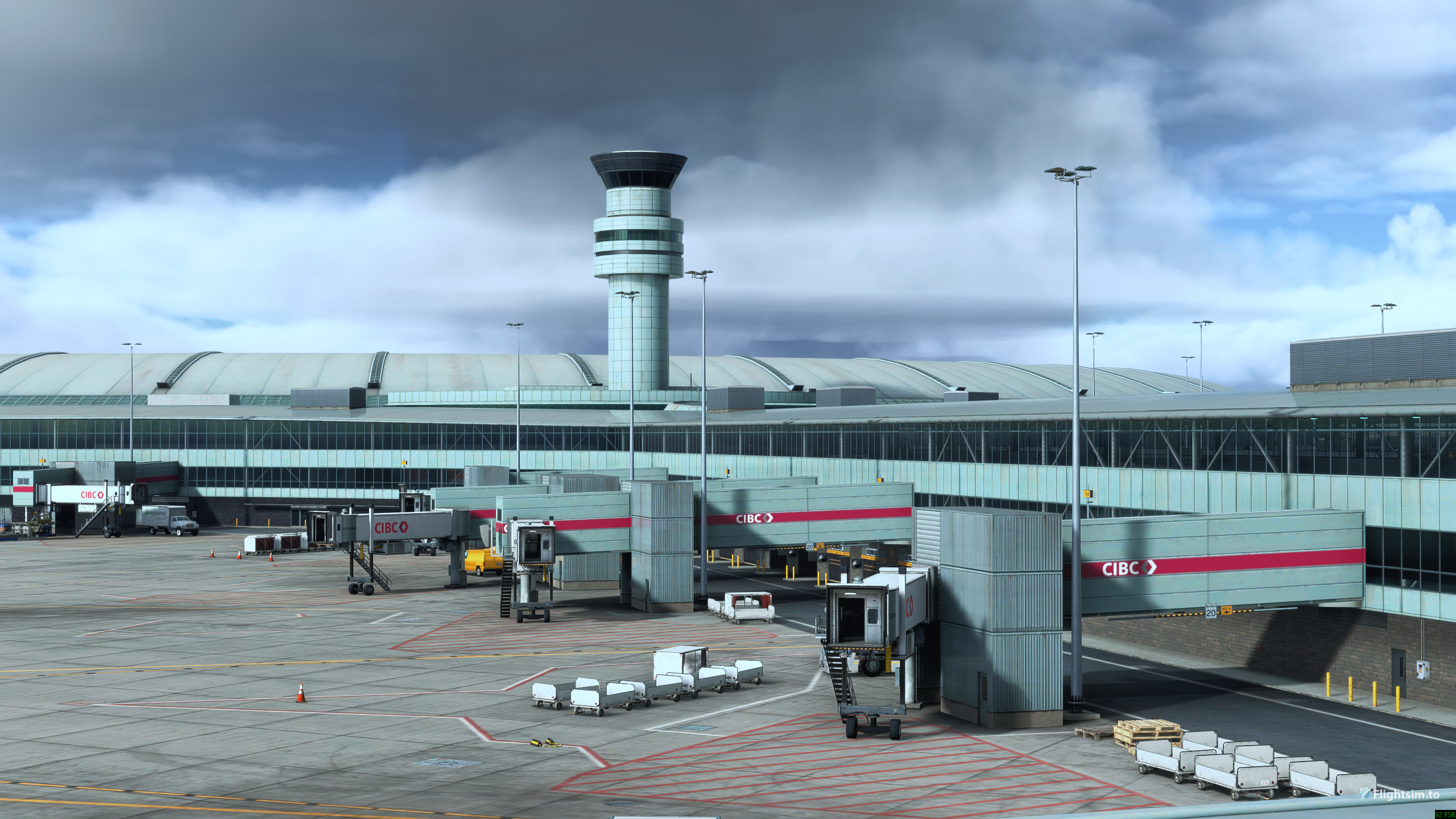
    FlyTampa CYYZ Toronto Pearson Updated Textures (CIBC) - Image 1

    Description


    YOU MUST OWN FLY TAMPA CYYZ TORONTO PEARSON AIRPORT FOR THIS ADDON TO WORK


    **2024 VERSION OF CYYZ HAS BLANK JETWAYS THIS IS A KNOWN ISSUE, UPDATE COMING SOON

    HOW TO INSTALL:
    1-Open your Fly Tampa CYYZ Scenery inside your community folder.

    2-Copy "FLYTAMPA-TORONTO-UPDATE.ZIP" into your Fly Tampa CYYZ Scenery.

    **FOR NEXT STEP: WHEN ASKED TO REPLACE EXISTING FILES, PRESS "YES TO ALL"

    3-Unzip "FLYTAMPA-TORONTO-UPDATE.ZIP" inside your Fly Tampa CYYZ Scenery.

    *Note: Installing this mod is not reversible, you will have to re-download the scenery again if you wish to go back.


    This mod aims to make Toronto Pearson airport by FlyTampa more realistic, since almost a year at the time of writting this HSBC has left all airports in Canada. Unfortunately, FlyTampa has never updated YYZ...

    Keep in mind I'm not from Toronto nor do I have access to YYZ IRL so this mod was made solely off little bits of videos I could find online, don't expect something 1:1 accurate :)

    Interaction activity
    DownloadsCommentsSeparate scales for downloads and comments
    Oct 20 Downloads: 1 Comments: 0Oct 21 Downloads: 1 Comments: 0Oct 22 Downloads: 0 Comments: 0Oct 23 Downloads: 1 Comments: 0Oct 24 Downloads: 0 Comments: 0Oct 25 Downloads: 0 Comments: 0Oct 26 Downloads: 1 Comments: 0Oct 27 Downloads: 0 Comments: 0Oct 28 Downloads: 2 Comments: 0Oct 29 Downloads: 1 Comments: 0Oct 30 Downloads: 0 Comments: 0Oct 31 Downloads: 0 Comments: 0Nov 01 Downloads: 0 Comments: 0Nov 02 Downloads: 0 Comments: 0Nov 03 Downloads: 1 Comments: 0Nov 04 Downloads: 0 Comments: 0Nov 05 Downloads: 1 Comments: 0Nov 06 Downloads: 0 Comments: 0Nov 07 Downloads: 2 Comments: 0Nov 08 Downloads: 0 Comments: 0Nov 09 Downloads: 0 Comments: 0Nov 10 Downloads: 0 Comments: 0Nov 11 Downloads: 2 Comments: 0Nov 12 Downloads: 1 Comments: 0Nov 13 Downloads: 0 Comments: 0Nov 14 Downloads: 2 Comments: 0Nov 15 Downloads: 0 Comments: 0Nov 16 Downloads: 0 Comments: 0Nov 17 Downloads: 0 Comments: 0Nov 18 Downloads: 0 Comments: 0
    Oct 20Nov 03Nov 18
    16
    Downloads
    0
    Comments
    Last comment 150 days ago
    Creator responds to 60% of comments

    Log in to join the discussion

    Log In

    Comments24

    Pinned Comment
    Montreal_DevAuthor·8 months ago
    IF YOU EXPERIENCE INVISIBLE JETWAYS:

    1-Download MSFS Layout Generator ( https://github.com/HughesMDflyer4/MSFSLayoutGenerator )
    2-Put the MSFS Layout Generator inside the FlyTampa Scenery folder
    3-Click and drag the "Layout" file onto the MSFS Layout Generator

    Thanks to @PlantsAreDead for this quick fix.
    Awakened_Wind
    ·5 months ago
    Seems like the newest update broke this. looking forward to the update
    Montreal_DevAuthor·4 months ago
    Turns out the 2024 version of YYZ screws up the gate filles, I will work on a fix soon.
    PlantsAreDead·5 months ago
    It seems the mod only works up to version 1.4. In version 1.5, there are no logos on the gates. It only replaced four files, too—as if there are now different filenames responsible for the textures.

    https://www.dropbox.com/scl/fo/58iam3xzu09gwqzqbfw8z/ADaaASJ-unWrd7PwOE7Fego?rlkey=2vh8p4di59u75qxjmer1al46m&dl=0
    Montreal_DevAuthor·4 months ago
    Turns out the 2024 version of YYZ screws up the gate filles, I will work on a fix soon.
    PlantsAreDead·4 months ago
    very good, thanks :D
    scoeva·7 months ago
    New logos look great! Only issue I'm having is the gate numbers on the tarmac are now a white triangle.
    Montreal_DevAuthor·7 months ago
    Try doing the pinned message.
    TheShanerator·8 months ago
    ''Montreal_dev'' ... starts with a Toronto airport ... HMMMMM suspicious! But its a great mod :) merci-thank you!
    Montreal_DevAuthor·8 months ago
    Haha lol, well the Montreal made by MKStudio is pretty spot on compared to FlyTampa... 😒😒😒
    Montreal_DevAuthor·8 months ago
    IF YOU EXPERIENCE INVISIBLE JETWAYS:

    1-Download MSFS Layout Generator ( https://github.com/HughesMDflyer4/MSFSLayoutGenerator )
    2-Put the MSFS Layout Generator inside the FlyTampa Scenery folder
    3-Click and drag the "Layout" file onto the MSFS Layout Generator

    Thanks to @PlantsAreDead for this quick fix.
    fchakib·8 months ago
    Hi,
    Thank you for this mod, however my Flytampa CYYZ does not have HSBC logo on the jetways but only Toronto airport. I tried installing your mod per your description but it failed and I had to revert back to the original files. Can you please be more specific on which files should be overwritten? Also if the change is only regarding the HSBC logo why not only overwrting the logo texture. Thank you.
    Montreal_DevAuthor·8 months ago
    Hi there, seems that your issue is that GSX is overwriting your jetways. Search online how to "exclude sceneries" in the GSX Control panel and try installing my mod again :)
    SimAeroX
    ·8 months ago
    About time someone fixed this! thanks alot
    mateosochat
    ·8 months ago
    Great work! 5/5
    MSFS 2020MSFS 2024

    FlyTampa CYYZ Toronto Pearson Updated Textures (CIBC)

    This add-on provides updated terminal textures for FlyTampa’s Toronto Pearson (CYYZ) scenery, replacing outdated HSBC branding with current CIBC logos to reflect recent changes at Canadian airports. Installation requires ownership of the original FlyTampa CYYZ product. The updates are based on publicly available videos for improved realism, though they may not be fully accurate. Reverting to the original scenery requires a complete reinstall.
    Downloads865
    Version1.0
    File Size105.9 MB
    Published8 months ago
    Updated8 months ago

    User Reviews

    4.8

    6 reviews

    5
    83%
    4
    17%
    3
    0%
    2
    0%
    1
    0%

    Version History

    No version history available.