
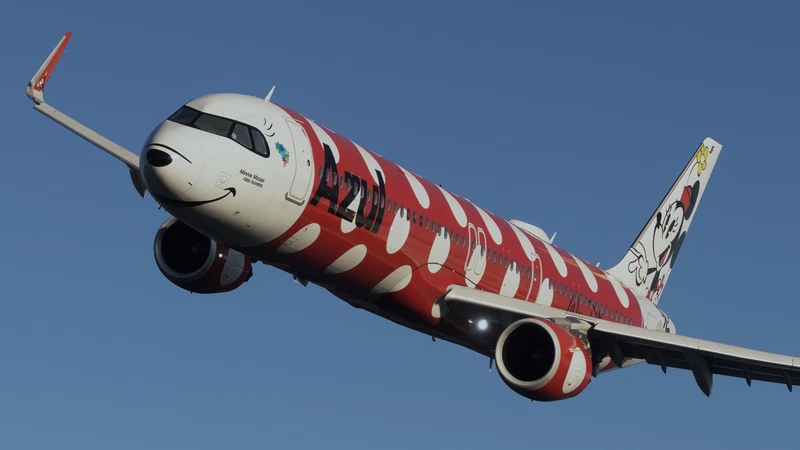
![PMDG 737-800 - GOL Linhas Aereas PR-GUY - "#MeuVooCompensa" [MSFS 2024] - Image 1](https://cdn.flightsim.to/images/28/pmdg-737-800---gol-linhas-aereas-pr-guy---meuvoocompensa-msfs-2024-418113-1771021473-5ofpb.jpg)
Description
GOL Linhas Aereas PR-GUY - "#MeuVooCompensa"
🛠️ PMDG 737 Quick Install Guide:
1. Using WinRar or 7-ZIP, open the .rar you downloaded from Flightsim.to.
⚠️ DO NOT USE WINDOWS DEFAULT EXTRACTOR! IT'S BREAKING THE LIVERY .ZIP FILE!
2. Extract the ".zip" to your Desktop.
⚠️ DO NOT UNZIP IT. Leave the .zip file exactly as it is.
3. Open the PMDG Operations Center v3.
4. On the main screen, find the PMDG 737-800 (MSFS2024 or MSFS2020 version).
5. Click the Green "Import" Button directly below the big picture of the plane.
6. Select the .zip file from your desktop.
7. Success! You’re ready to fly.
Livery painting takes time, hence why requests are paid :D
You can place your order via our Discord server! Join now: https://discord.gg/8teXcGhNYa
PMDG 737-800 - GOL Linhas Aereas PR-GUY - "#MeuVooCompensa" [MSFS 2024]
This add-on features the GOL Linhas Aereas livery for the PMDG 737-800 in Microsoft Flight Simulator 2024, specifically the aircraft PR-GUY with the "#MeuVooCompensa" branding. Included is a detailed quick install guide to facilitate easy integration into the simulator. The creator offers custom livery painting services upon request, indicating a focus on quality and personalization in aviation simulations.

Version History
No version history available.
Related
![PMDG 737-800 - GOL Linhas Aereas PR-GXU [MSFS 2024]](https://cdn.flightsim.to/images/28/pmdg-737-800-ssw---gol-linhas-aereas-pr-gxu-msfs-2024--418113-1770146161-6HQ9K.jpg?width=500)
PMDG 737-800 - GOL Linhas Aereas PR-GXU [MSFS 2024]
This add-on features the GOL Linhas Aereas PR-GXU livery for the PMDG 737-800 in Microsoft Flight Simulator 2024. The package includes detailed installation instructions using the PMDG Operations Center. The creator plans to convert additional liveries to MSFS 2024 throughout the week.
by CloudBrush
![PMDG 737-800 - GOL Linhas Aereas PR-GXR - "Santos Dumont" [MSFS 2024]](https://cdn.flightsim.to/images/28/pmdg-737-800---gol-linhas-aereas-pr-gxr---santos-dumont-msfs-2024-418113-1770493508-dUtw9.jpg?width=500)
PMDG 737-800 - GOL Linhas Aereas PR-GXR - "Santos Dumont" [MSFS 2024]
This add-on features the GOL Linhas Aéreas livery for the PMDG 737-800, specifically the aircraft PR-GXR named "Santos Dumont" for Microsoft Flight Simulator 2024. The package includes a quick install guide for seamless integration into the simulator. The creator plans to convert additional liveries throughout the week, with options available for custom requests.
by CloudBrush
![PMDG 737-800 - Copa Airlines - 2 liveries [MSFS2024]](https://cdn.flightsim.to/images/28/pmdg-737-800---copa-airlines---2-liveries-msfs2024-418113-1770155768-8G_s2.jpg?width=500)
PMDG 737-800 - Copa Airlines - 2 liveries [MSFS2024]
This add-on features two custom liveries for the PMDG 737-800, depicting Copa Airlines. Designed for Microsoft Flight Simulator 2024, the pack allows users to enhance their simulation experience with authentic airline branding. Detailed installation instructions are provided for easy integration into your PMDG Operations Center. Additional livery requests are available for users looking for more personalized options.
by CloudBrush
![PMDG 737-800 - GOL Linhas Aereas PR-GUL - OC [MSFS 2024]](https://cdn.flightsim.to/images/28/20260714_194941_5901dca31c98aa99_pmdg-737-800-gol-linhas-aereas-pr-gul-oc-msfs-2024.jpg?width=500)
PMDG 737-800 - GOL Linhas Aereas PR-GUL - OC [MSFS 2024]
This add-on features the GOL Linhas Aéreas livery for the PMDG 737-800, specifically the aircraft PR-GUL. It is designed for use in Microsoft Flight Simulator 2024. The package includes a quick install guide to help users easily add the livery to their simulator. Additionally, it offers custom livery painting services for those interested in unique designs.
by CloudBrush
Log in to join the discussion
Log InComments(15)
5 months ago
7 months ago
7 months ago
Some users reported that they're having problems using the windows default extractor... can you confirm for me if you opened it using the windows extractor or winrar/7zip?
7 months ago
7 months ago
7 months ago
I would recommend installing winrar or 7-zip for future releases, as it would prevent the extra step of recompressing the files as a .zip once again ;)
7 months ago
7 months ago
7 months ago
8 months ago
8 months ago
8 months ago
Thanks for this livery.
8 months ago
Some users reported that using the default windows extractor is breaking the file... Can you confirm for me if you used that or winrar/7 zip? Thanks!
8 months ago
I used the default windows extractor. I think it really break the file, unzipping the content file. For me it was not a problem because quickly I fix it zipping again only the content of your file.
Thanks,
best regards.
8 months ago