Flightsim.to
    iFly 737 MAX 8 Darker/Realistic Cockpit Enhancement! - Image 1

    Description

    WITH THE NEW SP1 UPDATE, THIS MAYBE AN INCOMPATIBLE MOD! UPDATE TO COME!

    MSFS2020 and MSFS2024 COMPATIBLE!
    BE AWARE - This may/will be incompatible with other liveries that have CUSTOM Cockpit textures, especially those that directly change the textures I used for this mod. - To fix this you can uninstall the affecting textures by finding the exact file names I have used and either overwriting with the ones that are there OR uninstalling them from your installed livery in the textures folder, and ensure you overwrite the layout.json (with the exe file) regardless of what you do here. I don't recommend this as this could ruin liveries others spent hard work on, but this could potentially have a fix in the future FOR THIS SPECIFIC ISSUE if livery creators would like to collaborate with me and my project.

    In short, this will work completely fine with most liveries, just those with custom cockpit textures will not work.

    Please do not modify and/or re-distribute MY TEXTURES without explicit permission.

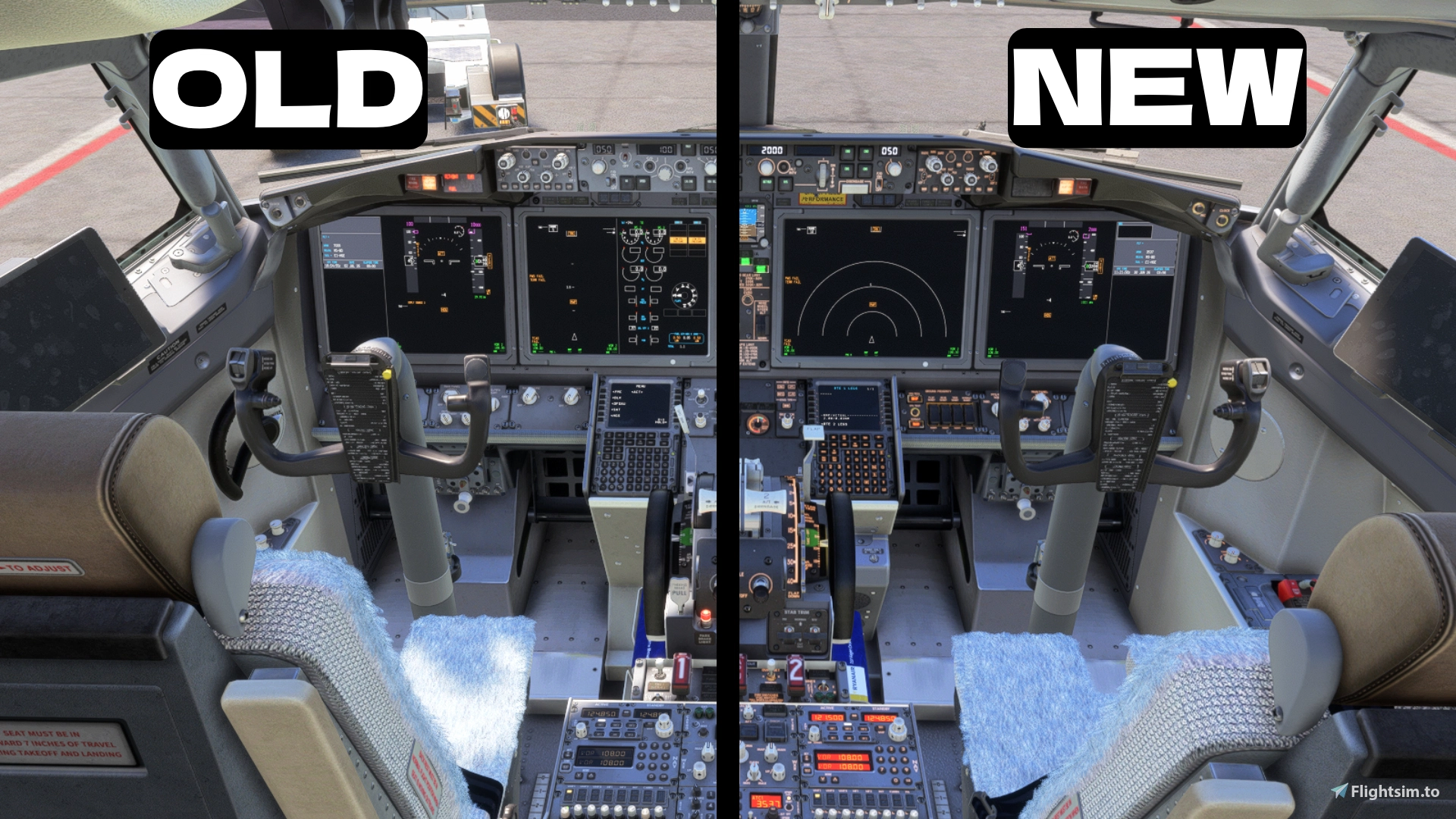
    Ever feel some panels in the iFly 737 MAX 8s cockpit is a little too Light Grey? Well I have...

    So here is my mod to help combat this, I have taken some of the textures that were at fault and turned down their brightness, exposure and saturation settings to give a more (realistic) look! This mod affects the following:
    Glare Shield Panel
    Center Pedestal
    Control Panels (including the FMC/CDU bezels and surrounding both FMCs buttons)
    C/FO Yokes

    2020 & 2024 INSTALLATION:
    --
    To install the new ones
    , either copy the Simobjects folder inside the new folder by hitting CTRL+C when clicking ONCE on the file or right clicking the folder and hitting copy, or you leave the file explorer tab open so you can SEE the Simobjects folder. Then go to your community folder where you have installed your iFly 737 MAX 8 and click into the file, then just drag and drop the Simobjects folder from your 1st explorer window into that folder or paste the Simobjects folder by clicking CTRL+V and hit Replace on the little window pop-up - this could show up to 7 times, don't worry this is normal for some machines!

    - This next step is recommended to do for 2020 and required for 2024.
    IMPORTANT!!! You will also see an MSFSLayoutGenerator, drop this INSIDE of the ifly-aircraft-737max8 folder and DRAG AND DROP the layout.json file ONTOP of the MSFSLayoutGenerator, it will bring up a CMD window and disappear after a quick second if it successfully completes!
    --

     Don't like them? Uninstall them by doing the EXACT same process as mentioned above but with the "old" folder, happy flying!

    And feedback? Reach out to me on discord - discord.gg/9RcUdjTwGg
    Want to subscribe to my YouTube? - youtube.com/@BenAviates 

    Thanks to Z0MB1XCAT, this WILL NOW work on MSFS2024, just select and download the MSFS2024 Version in the download options!

    If you get pink textures after installing either file, (annoying) but re-install your aircraft through IFLY Manager or copy over the old textures I linked, but I have fully tested this for MSFS2020 and MSFS2024 and is working!

    Comments(46)

    Log in to join the discussion

    Log In
    a

    about 12 hours ago

    Mod works very well at the time of posting this comment. Makes the plane just that much more fun to fly. Never thought a color change of my cockpit would make me love the MAX so much. W mod
    B

    about 9 hours ago

    Thank you very much for the support, it means a lot! Glad you can go enjoy the max more using my mod
    F

    3 days ago

    Thank you! We waiting an update for SP1 :)
    B

    about 9 hours ago

    SP1 update is in the works as I type this, aiming to update both versions very soon, and make this a drag and drop mod. Thank you for the support!
    K

    29 days ago

    I LOVE IT. I LIKE IT. I WANNA EAT IT........... BEAUTIFUL. GRACIAS, THANK YOU
    B

    about 1 month ago

    pinnkk textures >????????????????
    B

    29 days ago

    Just a copy and paste of a message I wrote to another person: I have tested for the latest updates with the iFly 737 Max 8 on both MSFS2020 and 24, I don't experience these issues with pink textures. Did you install the correct pack for the correct sim? Only way I could think something has gone wrong if you followed the installation correctly.
    i

    about 1 month ago

    Hi, thanks for for your job, but I have Pink textures !!!!
    B

    29 days ago

    I have tested for the latest updates with the iFly 737 Max 8 on both MSFS2020 and 24, I don't experience these issues with pink textures. Did you install the correct pack for the correct sim? Only way I could think something has gone wrong if you followed the installation correctly.
    T

    about 2 months ago

    It looks amazing. But I still think its too bright and should be a few tones darker still
    B

    29 days ago

    I think it depends on lighting and any external addons like reshade that change colours that affect this, when I tested without reshade the textures looked very dark, where as with my reshade profile it looks quite light grey.

    If you aren't using reshade though I do appreciate the feedback to make this mod better!
    a

    3 months ago

    Fantastic, but the magenta color on the displays is esxtremely intense and is really bothering especially during night, if you could fix that, thanks!
    B

    29 days ago

    Could you elaborate on magenta color on displays? Are you having pink textures on your screens in the cockpit as a result to installing the mod? I can't help you with little detail unfortunately, if you provide more or evidence then I can try my best to help!
    Z

    3 months ago

    Thanks so much for this mod ! Been wanting to do this myself for a very long time, and the grey textures of the aircraft made me not want to fly it. Great mod !
    B

    29 days ago

    Thank you! Looks like I beat you too it lol, enjoy the mod and keep those max 8 wings airborne!
    MSFS 2020MSFS 2024

    iFly 737 MAX 8 Darker/Realistic Cockpit Enhancement!

    This add-on provides a darker and more realistic cockpit experience for the iFly 737 MAX 8 by adjusting the brightness, exposure, and saturation of specific panels. The mod primarily affects the Glare Shield Panel, Center Pedestal, Control Panels, and C/FO Yokes. Installation instructions are included, and feedback is welcomed through Discord. This enhancement is designed for MSFS2020 and MSFS2024!

    Downloads2K
    Version1.1
    File Size34.13 MB
    Published4 months ago
    Updated4 months ago

    User Reviews

    5.0

    5 reviews

    5
    100%
    4
    0%
    3
    0%
    2
    0%
    1
    0%

    More Information

    Simulator
    MSFS2020/24

    Version History

    Updated Recall Tabs to appear darker.

    Related

    AviatesAir  TransAtlantic - BenAviates' Custom Airline for the Boeing 737-900ER

    AviatesAir TransAtlantic - BenAviates' Custom Airline for the Boeing 737-900ER

    AviatesAir TransAtlantic offers a custom airline livery for the Boeing 737-900ER, designed specifically for Microsoft Flight Simulator. The add-on features the airlines unique ICAO code, AVY, and a designated callsign for use during flights. Although not officially part of the VATSIM community, users can install the livery for immersive experiences in the simulator. Compatible with both MSFS2020 and MSFS2024, installation is straightforward by placing the extracted files into the community folder.

    by BenAviates

    0.0
    4K AviatesAir Cargo PMDG 777-F --- BenAviates Virtual Airline

    4K AviatesAir Cargo PMDG 777-F --- BenAviates Virtual Airline

    The 4K AviatesAir Cargo livery is designed for the PMDG Boeing 777-F, catering to those who prefer cargo flights. The add-on features an unofficial virtual airline registration with specific ICAO and callsign details. It is important to note that while using this livery on the VATSIM network, the aircraft may appear as a plain white model to other users. Installation is straightforward, requiring only the extraction of files into the community folder.

    by BenAviates

    0.0
    AviatesAir - BenAviates' Custom Airline for the Boeing 737-900ER

    AviatesAir - BenAviates' Custom Airline for the Boeing 737-900ER

    The AviatesAir Livery is a custom airline add-on for Microsoft Flight Simulator, designed for the PMDG Boeing 737-900ER. Created by a novice in livery design, this add-on features a fictional airline with its own ICAO and callsign. The livery includes modified cabin and cockpit textures based on existing assets, with clear notes on potential bugs and installation instructions provided.

    by BenAviates

    0.0