
Description
A standalone executable that transforms your mouse into a high-precision flight controller for MSFS 20/24. Features a real-time HUD overlay, SimConnect integration (Auto Mode-Taxi, Fly-By-Wire protection). JoxMouseYoke reads telemetry data from the simulator to assist your flight with smart protections, automated mode switching, and a visual information overlay
Key Features
Precision Control: Exponential sensitivity curves and deadzone adjustments allow for smooth center-stick handling and accurate maneuvers.
Smart Auto-Taxi: The application detects when your aircraft is on the ground and automatically switches input logic for easier taxiing.
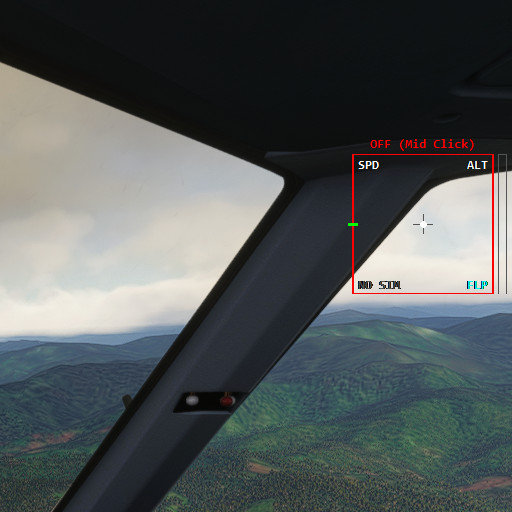
Visual HUD Overlay: A transparent, "Always-on-Top" display providing vital flight data directly on your screen:
Artificial Horizon (Pitch & Bank)
Speed (IAS), Altitude, and Vertical Speed
Gear, Flaps, and Parking Brake status
Real-time warnings (STALL, OVERSPEED) (set to false by default )
Fly-By-Wire Protection: Prevents excessive banking (max 60°) to maintain stable flight characteristics.
Smart Trim: Automatically assists in stabilizing the aircraft pitch during climbs or descents. (set to false by default )
Landing Rate Monitor: Detects touchdown quality and displays your vertical speed (e.g., "BUTTER" vs "HARD LANDING") .
Advanced Inputs:
Scroll Wheel: Controls Throttle.
Right-Click (Hold): Activates Manual Rudder mode for crosswind corrections.
Right-Click (Hold) + Scroll: Adjusts Elevator Trim precisely.
Middle-Click: Toggles the Yoke ON/OFF instantly.
⚙️ Installation & Usage
Install vJoy: Download and install the standard vJoy driver (configure Device #1 with X, Y, Z, RX, RY, RZ axes).
Run JoxMouseYoke: Simply launch JoxMouseYoke.exe. No installation required.
Press delete key for exit.
Configure MSFS: Unbind your mouse axes in the simulator settings and bind the vJoy axes to Aileron, Elevator, Rudder, and Throttle.
Included Config: A settings.ini file is included to customize sensitivity, HUD position, and toggle keys to your preference.
JoxMouseYoke - Precision Flight Control System with HUD
JoxMouseYoke is a standalone application that transforms your mouse into a high-precision flight controller for Microsoft Flight Simulator 20/24. It features an integrated HUD overlay, which provides vital flight data, and includes smart functionalities such as Auto-Taxi and Fly-By-Wire protection to enhance control during flight. With adjustable sensitivity and deadzone settings, users can achieve smooth handling, while additional commands allow for throttle control and rudder adjustments. The add-on offers an easy installation process, requiring the vJoy driver, with customizable settings to tailor the experience to individual preferences.


More Information
Version History
fixed: simconnect not properly load

Comments
Log in to join the discussion
Log InNo comments yet. Be the first to share your thoughts!