Flightsim.toFlightsim.to
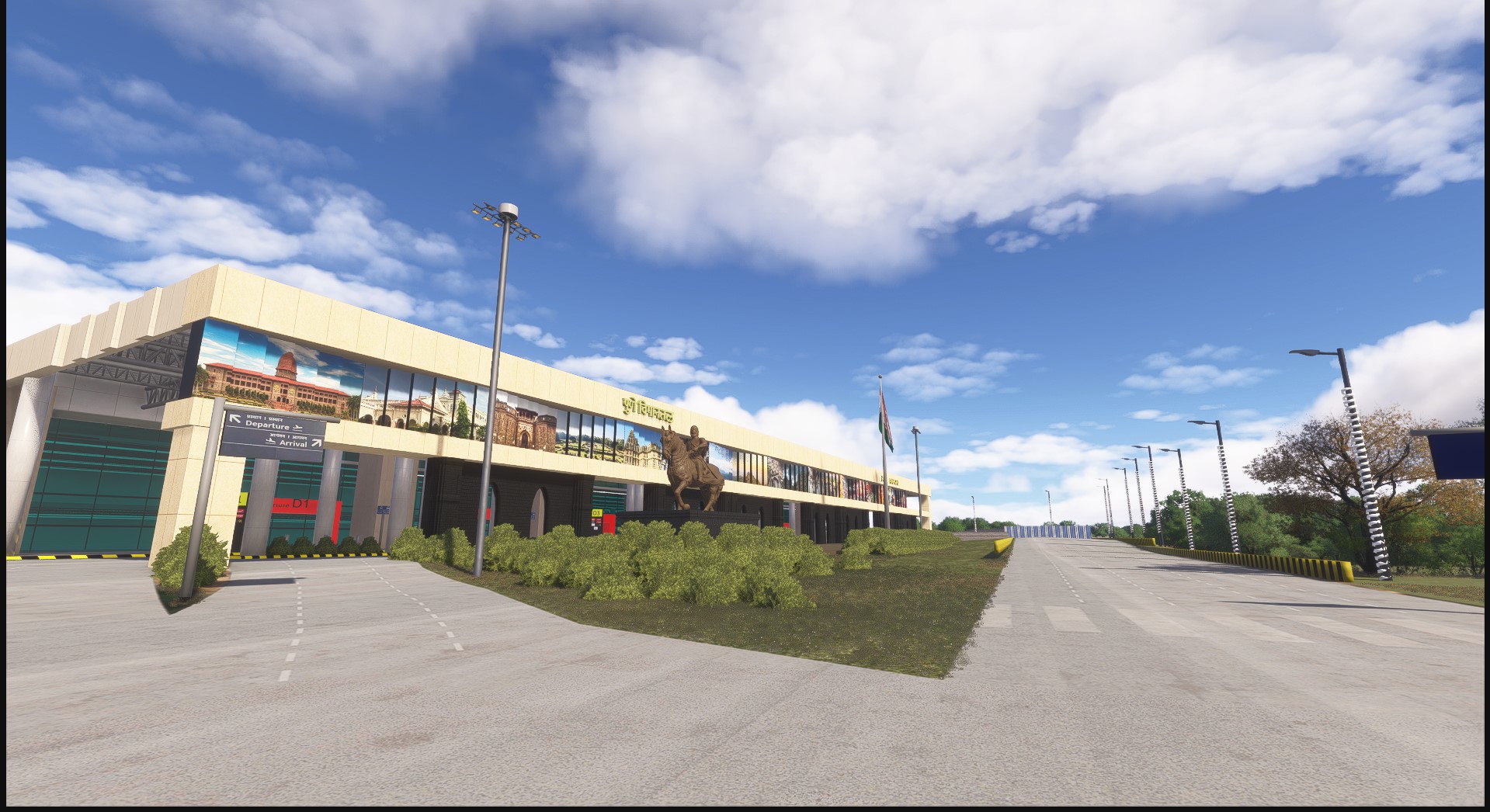
    VAPO - Pune International Airport - Image 1

    Description

    Pune Airport (IATA: PNQ, ICAO: VAPO) is an international airport and an Indian Air Force (IAF) base (called Lohagaon Air Force Station) serving the city of Pune and Pimpri Chinchwad, Maharashtra, India. It is located at Lohagaon, approximately 11 km (6.8 mi) northeast of the historic centre of Pune. The airport is the ninth-busiest airport by passenger traffic in India. The airport serves both domestic and international flights.

    This was a very requested airport by flightsimmers in india including me, so i decided to put my skills to work. Screenshots taken in medium-high settings msfs 2024.

    Installation

    You will have two options after clicking download - The main file(2020 version)  and the MSFS 2024. Chose according to your sim version and after downloading the archive, put the 'dhruvs17-airport-vapo-pune' folder in your community folder.

    Download GSX Profile - https://flightsim.to/file/102790/gsx-profile-for-dhruvsim-vapo

    Features 

    • Accurate terminal buildings including the old T1, the new T2 and the private jet hangar
    • All real life gates available 
    • Real life taxiways and taxiway markings
    • Realistic PBR ground textures
    • Fixed the deviation in ILS 28 for most aircrafts
    • Added accurate runway lights and Papi lights
    • Military aircrafts (Sukhois and Cargo aircrafts) parked in correct positions
    • Accurate ground makings
    • Added elevation before runway 28 like real life
    • Aerodrome is now green and grassy instead of dry like in default scenery 
    • Centre line of the parallel taxiway (P) is marked with a dashed white line just like real life, also mentioned in charts
    • Improved night lighting around the airport 
    • Realistic boundary to the airfield 
    • Real airline props scattered around the apron
    • Optimized for performance

    And i have also improved the scenery around the airport by adding real life noticable buildings of pune. you will notice the imporoved skyline while on final appproach to runway 28. To be specific areas like Wagholi, kharadi and Hadapsar mainly now have proper skyscrapers like real life. I added this because while landing in Pune, the skyline is very noticable but in msfs its really underwhelming. This issue is there with every city in india due to poor OSM data.

    Credits

    • 3d models converted to msfs
    • Ilyushin IL-76 - by helijah  https://sketchfab.com/3d-models/ilyushin-il-76-ab71a5f790f940798cc755246a7a8a7f
    • c130j - by Sofyan Kurniawan https://sketchfab.com/3d-models/c-130j-0ec8ffc5fa684077b3238a8c1dc77927
    • Embraer Phenom 300 - by Mixmamo.studio https://sketchfab.com/3d-models/embraer-phenom-300-private-jet-full-interior-ece5ca34e7074113b9ab7c33734e2d5d
    • Also big thanks to Atharva for helping and testing the scenery!

    Comments(64)

    Log in to join the discussion

    Log In

    about 1 month ago

    This works very well in FS24, however, there's a small problem - it's missing the taxiway bit that connects to RW28, which is a problem for ATC programs like BeyondATC (it made me go to RW10 and backtrack all the way to 28...). I've attached a screenshot, hopefully it helps!
    DhruvSimAuthor

    about 1 month ago

    Thanks for reporting, I'll fix the issue in the next update soon

    2 months ago

    Jetways not working ? any idea what to do?
    DhruvSimAuthor

    2 months ago

    I'll verify if jetways are working on my end, if not then i will fix it in the next update. Also, using some aircrafts might cause jetways to not work

    2 months ago

    Scenery is perfect but FSLTL or other AI addon aircrafts are not taking off after backtracking rnwy 10
    DhruvSimAuthor

    2 months ago

    Thanks, I will fix it in the next update

    3 months ago

    Amazing scenery but there is one issue that I am facing, I have GSX Pro and I had also installed the gsx config, due to some reasons I am not getting glass jetways (as shown in pictures), kindly suggest a solution, Thanks.
    DhruvSimAuthor

    3 months ago

    Thanks for reporting
    Currently i have used the default MSFS jetways for the airport, If you are on 2020 then you will see white opaque jetways instead of glass jetways which are only in MSFS 2024.

    I do have a big update planned for VAPO in which i will add custom jetways for both simulators

    4 months ago

    Thanks for the update!! Unfortunately, the 2024 branch still has the isolated parking issue. The main file although, works! Just the AI aircraft are taxiing to RWY 10 and then backtracking 28. seems some missing link there. They always taxi K -> P2 and backtrack 28, and don't use the main taxiway to reach 28.

    ATC(Beyond ATC) also advises me to do the same.
    DhruvSimAuthor

    4 months ago

    Thanks for reporting, will check on the issue
    DhruvSimAuthor

    4 months ago

    I have fixed the isolated parkings in 2024 version but i guess I will have to redo the taxiway network to fix the backtracking. I will do that in the next update since i am very busy with another project. Also with the elevation you mentioned earlier.

    4 months ago

    Sure, I know, I am following the topic on the MSFS forum. My Id is DrivingAddict07. Looking forward to it!

    Regarding taxiway, just check if a hotspot is missing from the taxiway connecting the runway. If that's it, then it'll save the redo! You can include an invisible hotspot for realism.

    4 months ago

    make one for Mangaluru and Coimbatore pleaseeeeeeeeee
    DhruvSimAuthor

    4 months ago

    Thanks for the suggestion! Right now I’m focused on finishing another airport, and after that I plan to work on more Indian airports like mangaluru n coimbatore

    4 months ago

    Looking forward to it!!!

    4 months ago

    This was much needed!
    May I please request for VECC? We do not have a good scenery for this one. Thank you! :)
    DhruvSimAuthor

    4 months ago

    Thanks! I have been getting lot of VECC requests lately, but currently i am fully focused on creating another indian airport, once that is compelete i will definitely consider making a proper VECC scenery!

    5 months ago

    thank you for this bro!!!!! Could I request if you could model VOMM (Chennai) and VOTR (Trichy), thank you!
    DhruvSimAuthor

    5 months ago

    Thanks for the suggestion! I am currently working on another indian airport, after that is compelete I will definitely consider VOMM and VOTR
    MSFS 2020MSFS 2024

    VAPO - Pune International Airport

    Experience a detailed representation of Pune International Airport (VAPO), an important hub in India featuring both domestic and international flights. This add-on includes accurately modeled terminal buildings, realistic taxiways and markings, and improved night lighting. Notable enhancements also cover the surrounding scenery and skyline, reflecting key landmarks of Pune for a more immersive flying experience.


    Downloads3K
    Version1.7.1
    File Size624.41 MB
    Published5 months ago
    Updated3 months ago

    User Reviews

    4.7

    7 reviews

    5
    71%
    4
    29%
    3
    0%
    2
    0%
    1
    0%

    More Information

    Simulator
    MSFS2020/24
    CategoryAirports
    Sub-CategoryIntl. Airports
    CountryIndia
    ICAOVAPO

    Version History