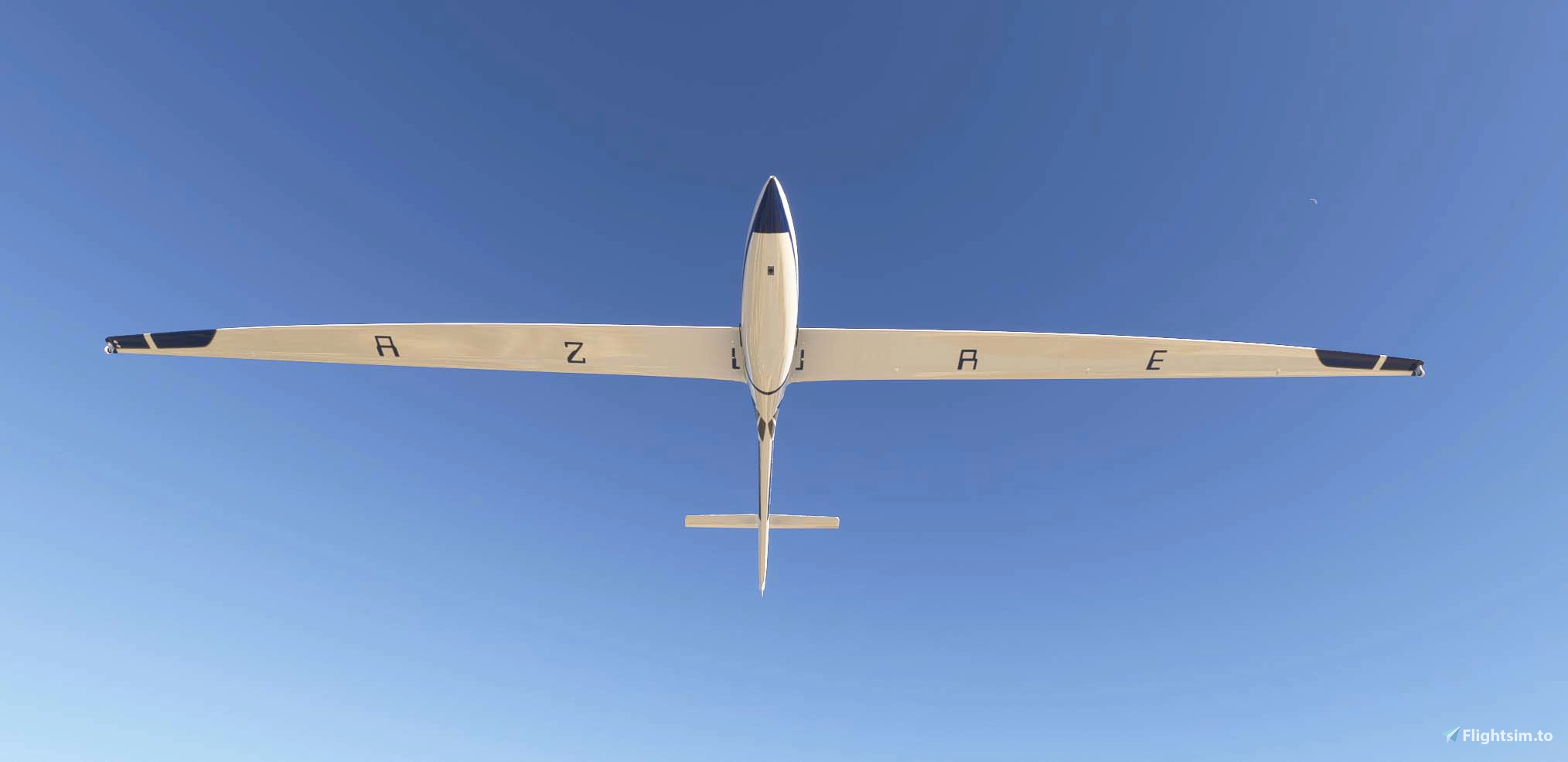
About this addon
Diana 2 and the tools around it represent over a year and a half of solo work — nights, weekends, and more hours than I can count. I’m one person, wearing every hat: 3D modeler, programmer, designer, tester, technical writer, and support team.
I’m proud of what this has become, and I’m committed to making it better. But I’m also human. There are things that aren’t perfect yet, features still on the roadmap, mistakes, and corners of Diana that need more polish. I know that, and I’m working on it every day — one fix and one addition at a time, in a way that I can realistically sustain long-term.
If you find something that’s broken or missing, please know it’s not for lack of care — it’s the reality of building something ambitious alone. A kind, specific bug report does more to move things forward than frustration ever will. I read everything, I take it all seriously, and your feedback genuinely shapes what gets built next.
If you are of the mindset that you are purchasing a perfected product that meets the highest levels of real-world precision and technical depth, this may not be the right product for you — although reaching that level is absolutely the long-term goal.
If you purchased and aren’t happy, I will gladly offer a refund — provided the product is uninstalled.
Thank you for flying with me. It means more than you know.
— Robi from 61tree Studio
Diana 2 for MSFS 2024 is developed with the kind permission of Avionic, the manufacturer of the real-world SZD-56-2 Diana 2 competition glider. LX9050 and SxHawk for MSFS 2024 are developed with the kind permission of LXNAV, the manufacturer of the real-world LX9050 and SxHawk units.
The Diana 2 (SZD-56-2) is a world-class competition glider brought to life in Microsoft Flight Simulator 2024 with authentic flight dynamics, cockpit instrumentation, and real-world performance data.
Installation
The 61tree Installer
- After purchase, you'll receive a serial number (FT-XXXXXXXXXXXX)
- Download the 61tree Installer (provided with your purchase)
- Open the installer and paste your serial in the FlightSim.to Purchase section, then click Activate
- Diana 2 appears as available — set your community folder and click Install
- Launch MSFS 2024 — Diana 2 is ready to fly
- Having issues installing? Try right clicking and running as administrator.
Security warnings — this is normal
Windows may show up to 4 warnings before the app opens. This happens because the installer is independently published and not enrolled in Microsoft’s paid code-signing program. The app is safe to run.
- “Windows protected your PC” → click More info → Run anyway
- “Allow this app to make changes?” → click Yes
- Browser download warning → click Keep or Keep anyway
- The installer only communicates with 61tree.com to verify your license.
Features List
- Avionics: LX9050 & SxHawk Navigation System
- Moving map with task legs, turnpoints, and waypoint guidance
- Task planning: build, load, and fly structured soaring tasks
- Final-glide calculator and route optimisation
- Pilot profiles with personalised units, audio, and display preferences
- Built-in flight recorder and logbook
- Polar, ballast, and weight-balance configuration
- FLARM traffic status display
- 16 language options — both written interface and spoken onboard computer voice
- Full variometer with audio, speed-to-fly, and thermal assistance
- Custom layout system — create, save, import, and export fully personalized instrument layouts to share with fellow pilots
- Continuous development — new features and updates added regularly
- GotFriends/B21 LX Suite — LX9070 navigation computer and V80 vario integration
- Trig TY91 / TY92 VHF COM Radio
- Trig TT21 / TT22 Mode S Transponder
- Authentic Flight Systems
- 5-position flap system (negative to full positive deflection)
- Full air brake / spoiler simulation for approach and descent control
- Water ballast system for cross-country weight optimisation
- In game aerotow launch support with the Rans S6S Tow plane by Flyboy Simulations
- 31 Glider Liveries
- Real-world competition schemes and fictional designs
- Fully repaintable base with custom livery support
- Cockpit & Visual Configuration
- Analog and digital front panel instrument configurations
- Adjustable cockpit glass tint
- Canopy cover
- Pilot Customization
- 3 wearable watch styles (simulator time and real local time)
- Adjusting watch time in simulator time, changes the simulator time
- The watch includes a full library of music genres with high-quality speakers for in-flight entertainment — import your own MP3 files to play through the watch
- 3 hat types with customizable hat logo
- 3 shirt types with customizable shirt logo
- 3 glasses types
- Onboard pet
- Onboard Systems (Tablet)
- Glider Health Monitor
- Real-time structural and systems health display via onboard tablet
- Bug Contamination System
- Progressive bug accumulation on leading edges affects aerodynamic performance
- Onboard bug cleaners to restore surfaces mid-flight
- Contamination level tied to flight conditions
- MH EDS O2D1 Oxygen System
- Simulated aviation oxygen unit with pulse demand emitter
- Cockpit oxygen content modelled in real time based on altitude, open windows, and vents
- If vents remain closed, cockpit oxygen depletes as the pilot breathes
- Demand and face mask operating modes
- Twitch + YouTube Chat Integration — Watch live chat from both platforms while you fly (great for VR)
- Onboard Games — For long cross-country flights
- Full Hotkey System — Customizable keyboard shortcuts for all features, accessible through the 61tree Installer app
- Regularly Updated Manuals — Comprehensive user guides for all instruments and features, accessible from the 61tree Installer
- Regular Updates — Diana and all of its features are regularly updated with more features in the works
Changelog
Updated the installer
User Reviews

dnicolet
VerifiedSep 24, 2026
such a wonderful glider. it's full of great little features and is such a joy to fly!
Ploeti
VerifiedAug 23, 2026
Ich bin gerade erst in der Kennenlernphase, aber schon jetzt absolut begeistert! Einfach Top!
SZD-56-2 Diana 2 Glider - MSFS24
The SZD-56-2 Diana 2 glider add-on for Microsoft Flight Simulator 2024 offers a detailed simulation of the real-world competition glider, developed with official permissions. It features authentic flight dynamics, comprehensive avionics including the LX9050 and SxHawk navigation systems, and a range of customization options for both glider and pilot. The package includes advanced systems such as a water ballast, oxygen simulation, and interactive cockpit instruments, along with 31 liveries. Continuous updates and detailed manuals are provided to support users and enhance ongoing development.

Instant digital delivery • Secure payment
Requirements
Additional Requirements
- Microsoft Flight Simulator 2024
- Windows 10/11 64-bit
More by this publisher

Details
- Category
- Aircraft
- Release Date
- Jul 22, 2026
- Last Updated
- Jul 27, 2026
- Reviews
- 2
- Compatibility
- MSFS2024