


Anyone who has spent a few years building up a Community folder knows that the flying is only part of the hobby. The other part happens in File Explorer: downloading a zip, extracting it, dragging the right subfolder into place, and then, weeks later, trying to remember whether the airport you just loaded into is still the latest release or three updates behind. With a handful of add-ons that is manageable. With a few hundred liveries, sceneries, aircraft and utilities, it becomes a chore that eats into the evenings meant for flying.
Starting today, that chore gets considerably smaller. 🔆 Flightsim.to Manager is a new, free Windows application for Microsoft Flight Simulator 2020 and Microsoft Flight Simulator 2024 that links your Flightsim.to account directly to your Community folder. It succeeds the previous Auto Installer, which was reserved for Premium members, and it opens the experience up to every Flightsim.to account holder.
Knowing What Is Out of Date
The core idea behind the Manager is simple: It compares the add-ons on your PC with what is currently published on Flightsim.to and tells you which ones have a newer version available. That check goes beyond the version number, so it also catches re-uploads where a creator fixed something without changing the version string, a case that has historically been easy to miss.
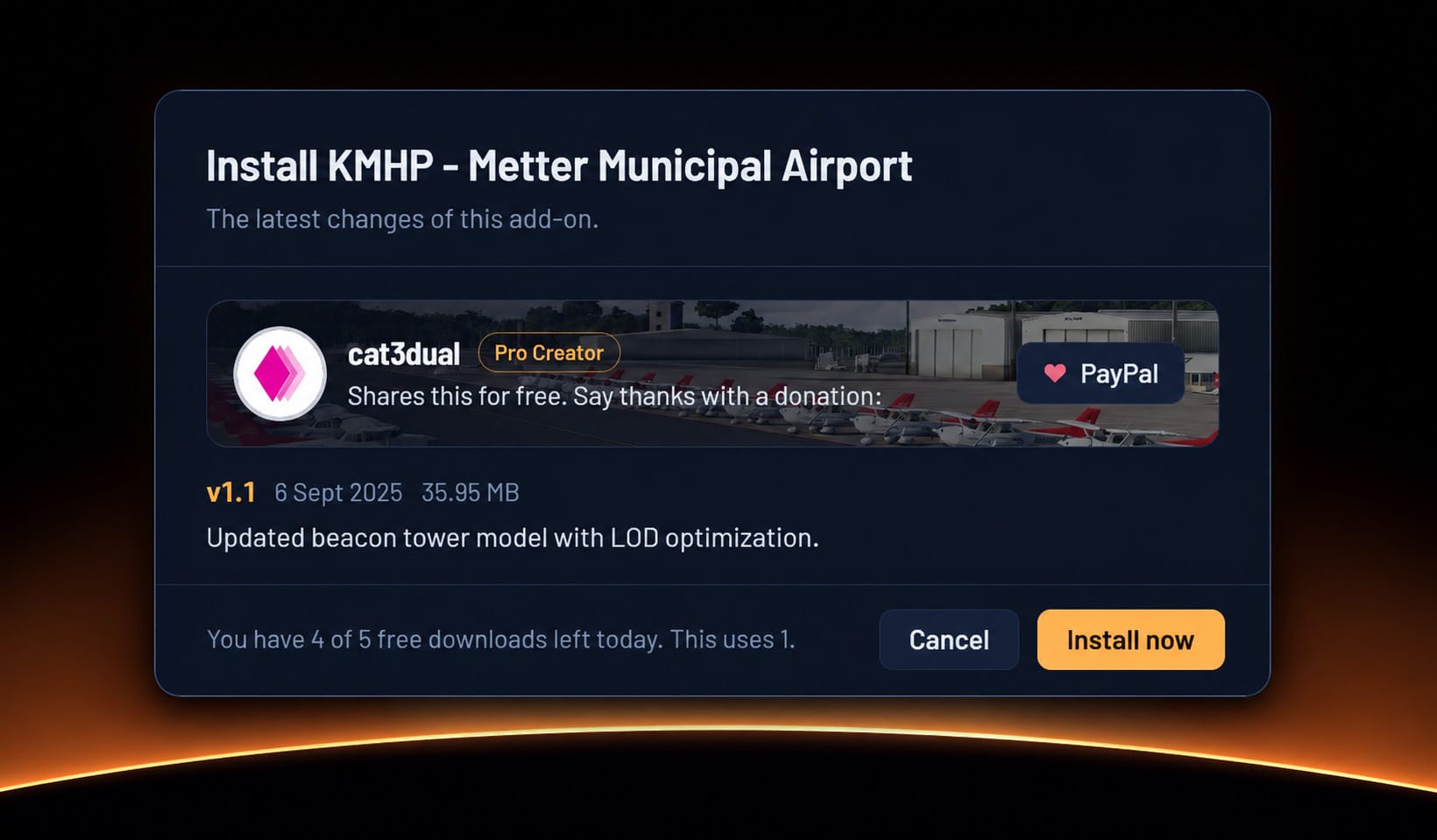
When an update is available, a single click is enough. The download, extraction and replacement of the old files all happen in the background. If you prefer to know what you are getting before you commit, you can read the changelog first, and if a particular release does not suit you, you can skip that version and stay on the one you have.
Your Library, One Click Away
Everything you have ever downloaded from Flightsim.to lives in your library inside the Manager, alongside your store purchases, ready to be installed again whenever you need it. That is particularly handy after a fresh Windows install, a move to a new drive, or simply when you want to revisit an add-on you removed some time ago.
The Manager does not replace the website. Browsing, searching and discovering new add-ons still happens on Flightsim.to as it always has. The difference is what happens when you find something you like: clicking the Install button on an add-on page now opens the Manager, which takes care of the download and installation from there. If you would rather keep doing things by hand, the regular manual download remains available exactly as before.
Profiles, Drives and a Tidier Setup
Beyond installing and updating, the Manager gives you more control over what the simulator actually loads. You can switch individual add-ons on and off and group them into profiles, so a setup focused on airliners, one for bush flying in the backcountry, and a lean configuration for VR sessions can each be activated in seconds. Nothing is deleted in the process; add-ons you are not using are simply set aside until you need them again.
If your system drive is running short on space, the Manager also lets you keep your add-ons on a different drive while the simulator continues to find them as usual. For anyone with a large collection and a modest SSD, that alone may be worth the install.
The app also recognises add-ons you installed manually before you started using it, so there is no need to rebuild your collection from scratch. Content from the official Marketplace is left completely untouched. Signing in happens through your browser, which means the Manager itself never sees your password.
Creators Front and Centre
A large part of the focus went into keeping the people behind the add-ons visible. Tools that automate installation can easily turn add-ons into anonymous files, and the Manager was deliberately built to avoid that. You can see who created what you fly, follow your favourite creators and spot their new releases on the home screen.

Most notably, each creator's donation links and supported methods are placed prominently both before and after the installation process. Every time you install or update an add-on, the option to support its author is right there, rather than tucked away on a profile page you might never visit.
Free for Everyone
Flightsim.to Manager is free for every Flightsim.to account. Free accounts can perform up to five installations or updates per day through the app, which covers the needs of many simmers on most days. Premium members get unlimited installations and updates, along with downloads at full speed and the usual Premium benefits. To celebrate the launch, and as part of the current Black Week promotion, new Premium members can get 25% off the 1-month and 3-month Premium plans with the code BLACKWEEK. The offer applies to new Premium members only and runs until 30 November.
A Note on This Early Version
Flightsim.to Manager is launching as an early version, so you may run into rough edges while it matures. If something does not work as expected, or you have ideas on how the app could be improved, you can share your feedback through the Flightsim.to feedback form. It is also worth knowing that the Manager may not recognise every add-on in your Community folder right away. There are a few reasons this can happen: not every add-on on Flightsim.to has been indexed yet, some creators have uploaded their files in a format the Manager does not currently support, and add-ons downloaded from outside Flightsim.to cannot be matched against the platform's database at all. Unrecognised add-ons stay exactly where they are and keep working in the simulator as usual; they simply will not show up for update checks until they can be identified.
Getting Started
You can download Flightsim.to Manager now at 🔆 flightsim.to/manager. Install it, sign in through your browser, and let it scan your Community folder; within a few minutes you should have a clear picture of what is current and what needs attention. And when the Manager shows you the creator behind an add-on you have been enjoying for months, consider taking a moment to support their work with a donation. It is what keeps the next update coming. Less time unzipping, more time flying.