Flightsim.toFlightsim.to
    REX AccuSeason Advanced Edition now available

    REX AccuSeason Advanced Edition now available

    Flightsim.to

    Author

    September 25, 2023
    Updates

    REX Simulations has released an exciting update for their popular product, REX AccuSeason. With the introduction of AccuSeason Advanced Edition, users can now enjoy a multitude of new features and improvements that further elevate the realism and visual appeal of their virtual environments. They developed AccuSeason Advanced Edition, which introduces a range of new features that enhance not only the vegetation but also the overall terrain and weather representation within the simulator.

    Terrain Coloring

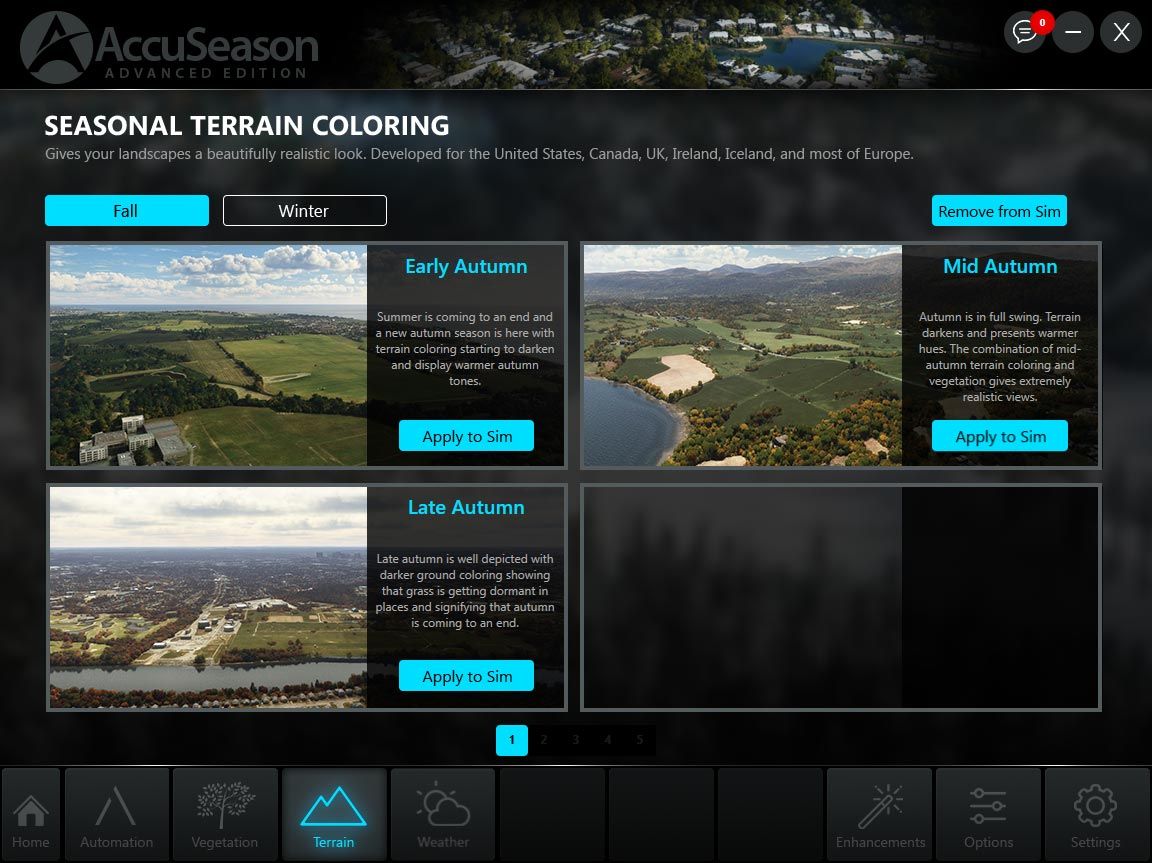
    One of the standout features of AccuSeason Advanced Edition is the addition of terrain coloring. This feature allows users to not only adjust the color of the trees but also modify the terrain to better match the environment outside. By seamlessly integrating the terrain coloring feature, REX has created a more cohesive and realistic visual representation of the world within the flight simulator. Currently, terrain coloring is available for regions such as the United States, Canada, Europe, the United Kingdom, Ireland, and Iceland, with plans to expand to more areas in the future.
    Weather Scenarios

    AccuSeason Advanced Edition takes weather representation to the next level by introducing a wide array of season-oriented weather presets. With over 38 options to choose from, users can select weather scenarios that accurately reflect the unique charm and challenges of specific climates during different times of the year.

    Enhanced Vegetation and Tree Types

    AccuSeason Advanced Edition goes beyond just adjusting the height and color of trees. REX has added new biomes, tree types, and other terrain features to better reflect the diversity of vegetation found in different regions of the world. For example, Aspen trees, known for their vibrant yellow hues during autumn, now grace the landscapes of Colorado, including popular destinations like Aspen, Telluride, and Breckenridge. Larch trees, which display stunning yellow and orange hues during the autumn season, can be found in the Cascade mountains of Washington and other northern areas of the United States and Canada.

    Lower Vegetation Density for Cities and Towns

    AccuSeason Advanced Edition introduces a new feature that allows users to adjust the density of vegetation in these areas. By reducing the vegetation density, the virtual urban environments become more realistic and harmonious, closely resembling their real-world counterparts.

    Resilient Coloring: Consistency in Visual Representation

    AccuSeason Advanced Edition addresses a common issue in flight simulation where vegetation may appear faded or discolored due to light ground textures or unnatural coloring in the underlying ground image. To combat this, REX has introduced resilient coloring, a user-controlled feature that ensures consistent vegetation coloring even in challenging visual conditions. With resilient coloring, simmers can enjoy a more visually pleasing and accurate representation of vegetation.


    Automation and Customization Modes: Tailoring the Experience

    AccuSeason Advanced Edition offers two distinct modes of operation: Automation and Customization. In Automation mode, the application automatically changes seasonal foliage on a weekly basis, providing a globally synchronized experience throughout the year. Additionally, with the Advanced Edition, users can now also change terrain coloring to match the seasons. On the other hand, Customization mode allows users to manually configure seasonal elements, such as foliage, terrain coloring, and weather scenarios, using a wide range of presets.

    Upgrading to AccuSeason Advanced Edition

    Existing customers of AccuSeason can upgrade to AccuSeason Advanced Edition free of charge. To upgrade, users can download the new update either through the AccuSeason application or by downloading the Advanced Edition from their account on the REX website. Further instructions of updating can be found here. If you haven't purchased REX AccuSeason yet, you can get a copy on the Flightsim.to Store.


    Comments

    over 2 years ago

    Yeah,if only it worked.The installation always leads to a failed licence error and forces you to install the old oneEDIT Now it works fine

    over 2 years ago

    Odd. Mine installed perfectly fine and I've been using it for a couple of days.

    over 2 years ago

    Make sure you're adding the code into the REX AXIS and seeing it appear on there as the "Advanced Edition" under Products. I ran into a similar issue and it seemed to resolve once I logged in using my Axis account info after updating it in AXIS.

    over 2 years ago

    It seems that now worked ok.One question,do i uninstall the standard one or not ?

    over 2 years ago

    I bought the original AccuSeason from Orbx. There's no option to update the original installation. There is a new product listing for this Advanced Edition but it says I need to purchase it. How do I go about this with Orbx? It should realize I purchased the original and let me install the new version free of charge. Thank you.

    over 2 years ago

    I had attempted to uninstall my current install of Accuseason, but the process froze and I had to reboot my system. When I was satisfied that my Accuseason had been uninstalled, I attempted to install the latest version, but that caused errors. Somehow I managed to get the previous version installed and working, but when I check for updates, it says I have the latest one installed?? How can I check my Accuseason install to see what version it is, and what is the number for the newest? Pete

    over 2 years ago

    I thougt that there's an new update available for AccuSeason Advanced Edition.... :(

    over 2 years ago

    Unistall product. Then open your file explorer, go on drive C:/ and search with word "Accuseason". Delete every file and folder it founds. There is some files left after unsistalling product in your "users/appdata/roaming" etc. folders. After doing this install new version.

    over 2 years ago

    Well, I had done all of that, except I had forgotten about the app data/roaming folders. As a result, I am sure that messed things up. Now, if I try to uninstall Accuseason, I get a popup error, and am not able to uninstall it via the Control Panel.

    over 2 years ago

    over 2 years ago

    If you uninstalled it first and then removed rest of files there shoudln't be anything left on your computer so you can perform clean install of "Advanced edition" and it should work just fine. You got error because there's nothing to uninstall.

    over 2 years ago

    The update doesn't work for me and I won't buy it again either.

    over 2 years ago

    I managed to uninstall everything and then install the newest version, but even though I entered the serial number from my REX account to register the new one, it is not being accepted. I submitted a help request, but no reply yet.

    over 2 years ago

    The installer should do that for you. The average user would have no idea to do this if you hadn't mentioned it. No offense.

    over 2 years ago

    Delete "profile.json" file located in the Documents/REX 7/REX AccuSeason Advanced Edition folder. Then try registering the product again using the right side of the application.

    over 2 years ago

    Hate to inform all, but AccuSeason Advanced was the culprit that caused my MSFS to CTD every time I flew after Sim Update 13. It does not like the new Sim 13 update, worked fine on the previous MSFS version. Take it as you may, but if you have this and you have the Sim 13 Update and you are having CTD issues, uninstall the AccuSeason Advanced App and its fold on your C Drive, do a Registry cleaner (CCleaner is fine for this), and lastly go into your MSFS Community folder and remove all files that start with "rexaccuseason". REX is going to have to fix this before I install it again.

    over 2 years ago

    CCleaner is fine for thisNo no no. CCleaner is not fine for anything.Also, "cleaning" the registry is not recommended, as it doesnt need "cleaning", and may cause issues.

    over 2 years ago

    Check if you have Documents/REX 6/REX AccuSeason/profile.xml - the serial is in there. For the order number search in your old e-mails. Amazing how little some software devs care about their existing customers, we are supposed to remember where and how we bought every piece of software. This should have been a seamless upgrade through OrbX Central.

    over 2 years ago

    Whats your opinion guys, are the REX one or the Bijan one better? Please tell me your experience :)

    over 2 years ago

    Works like a charm after following the installation manual.

    over 2 years ago

    CCleaner is spyware/malware, that's part of your CTD problem. Good luck getting that crap off of your system.

    over 2 years ago

    I can't see the one question that should be #1 in this thread. Graphics-wise is it better than Bijan's abandonware mod or not?

    over 2 years ago

    Like what others has said, CCleaner does more harm to your computer than good. You don't need to "clean" your registry. Especially for Win10