
Description
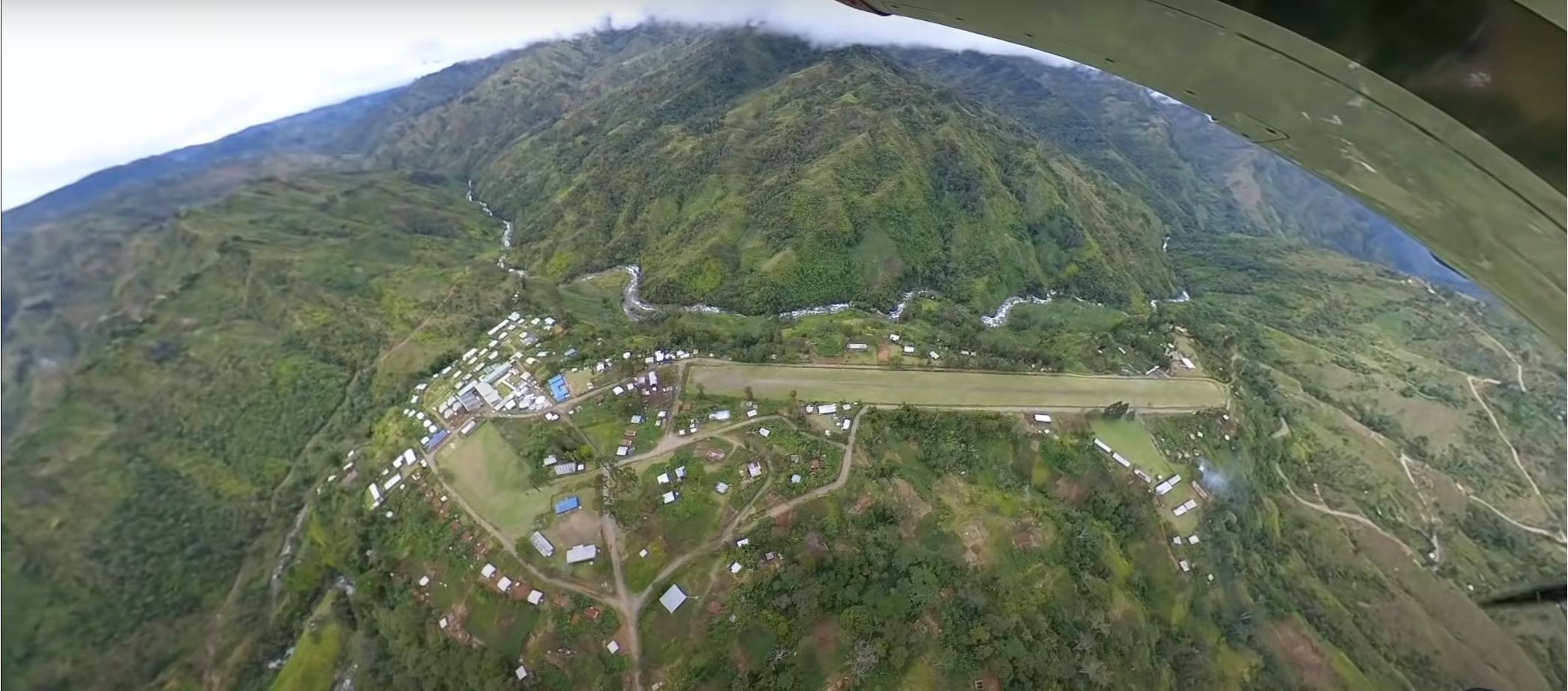
Kompiam is a small airstrip in Papua New Guinea with an ICAO code of AYAQ (used in MSFS as well). It is 810 Metres long by 50Metres wide and is constructed from stony grey gravel with patches of thin grass where the aircraft wheels do not run. It has a 3% slope from runway 23 towards 05, making it a one way runway with a right hand circuit. You land on 23 with the upslope helping slow the airaft, and take off on 05, with the downslope helping the take off. Although, I have configured the airstrip for one- way(land 23, take off 05), MSFS is indicating both 23 and 05 for take off on the world map, but regardless of your take off choice, MSFS should only provide 05 for take off
In real life, the runway has a max elevation of 4950ft, with the TDZ (TouchDown Zone) on runway 23 of approx 4800ft, making an incline difference of 150ft. My version has a max elevation of 5190ft and a TDZ of 5030ft, making the incline difference of 10ft, so, pretty close to real life incline.
Like in real life, when on the approach to land, carry out a RH Circuit. The idea is to start the downwind leg at approx 5800, and by the end, be at 5600ft. Carry out a right 180 degree turn until you line up with the three houses on the hill top. To assist, I have placed a large tree between the houses, which makes sighting a tad easier. Ideal, is if you are mid way with the tree height, slightly above the houses when passing over them on the left at approx. 5500ft. It is important you control the approach height and speed at this point, otherwise the final descent speed can get away from you, though, the sloping runway is pretty forgiving if carrying too much speed.
Kompiam appeared on 26/02/2021 in one of the Missionary Bush Pilot series where Ryan flew from Malumunda to Kompiam (some 53 nm) with four school childen.
This airstrip was already provided by MSFS, but was very basic and had two houses in the short final path for runway 23. I rebuilt the entire airstrip, including all vegetation, runway and the maintenance depot on the end of 23. To see the difference from the stock airstrip and mine, remove my file from your community folder and reload MSFS.
As in my last scenery(Lomagai) make sure you place my file, including the three sceneries below that contain some items in my scenery, into your community folder. I hope you enjoy it.
https://flightsim.to/file/4696/dave-s-crooked-library
https://flightsim.to/file/1923/mikea-at-assetpack
https://flightsim.to/file/5452/dave-s-3d-people-library
AYAQ Kompiam Papua New Guinea
Explore the remote airstrip of AYAQ Kompiam in Papua New Guinea, recreated with accurate details for a realistic flying experience. This add-on features a stony gravel runway with a unique slope, challenging pilots to perfect their approach and takeoff techniques. Discover the improvements made to the terrain and surroundings, enhancing the authenticity of this bush pilot destination. Join the Missionary Bush Pilot series and test your skills on the 810-meter runway, now enhanced for MSFS.


User Reviews
5 reviews
Location
More Information
Version History
I have changed the runway to a 'softer' version.
Related
AUJ Ambunti Papua New Guinea
Experience a realistic recreation of Ambunti airstrip in Papua New Guinea with this add-on. Explore the 720m long grass airstrip located next to the Sepik river, featuring a 1.8% upslope and unique runway conditions. Take off and land following the one-way operational procedures, and be mindful of obstacles and surroundings during your flights.
by por930
Mok, (AYMK) PNG.
Experience the challenging Mok (AYMK) Airstrip in Papua New Guinea - a unique 565m gravel runway with a 4.4% slope. Navigate the muddy patches and steep terrain for a thrilling landing and takeoff. Explore the surrounding area with left-hand circuit and nearby airstrips like Kompaim(AYAQ) and Hoskings(AYHK). Download now for a realistic bush flying adventure in Microsoft Flight Simulator.
by por930
lamo Lamogai Airstrip - PNG
Discover the Lamogai Airstrip in Papua New Guinea, a remote location surrounded by dense forest. This detailed MSFS add-on features a one-way runway, accurate terrain height, and nearby airstrips for a realistic flying experience. Explore the village houses, maintenance sheds, and unique landscape while experiencing the challenge of landing and taking off from this scenic airstrip.
by por930

Comments(16)
Log in to join the discussion
Log Inover 3 years ago
I test this Scenery from Mount Hagen with the Kodiak. I have NO CRASH but some FPS drops.
It woud be nice for a Cold&Dark parking spot here. Hopefully this place become a update
over 4 years ago
Is there a new version of this airstrip yet? Or a recompiled version that doesn't crash?
almost 5 years ago
I really like this place, fun bush flying into here from AYMH, alas though for SU5 I get CTD when landing here. Maybe you could recompile it :) ?
almost 5 years ago
Me too!😂
over 4 years ago
Hi guys. I have been away from flying for several months. Back now. And, yes, I had the same issue. I will try to repair it and re-issue it
over 4 years ago
OK, I have just revisited Kompiam and recompiled it for 1.20.6. I can land now with no issues. Kompiam requires some tidying up, so I will hopefully update the airstrip and re-release it next 2 weeks. I forgot how much fun it was negotiating these bush strips.
about 5 years ago
about 5 years ago
about 5 years ago
You are doing a great job though. Keep it up!!!
about 5 years ago
Recently, I created a rural airport, called 'warehouse' with one main runway that has many aprons and different surface combinations to work out various results. I also store different buildings and trees, shrubs and especially grasses, when I am setting out the next project list.
A problem I always face is being colour blind on red/green brown. So, when you see a "harsh brown", I obviously see something else. After 70 + years, I guess I am used to “my” colours. I need some of those fancy specs that correct colour?
about 5 years ago
Hope this feedback doesn’t discourage - we need lots of great strips for PNG. I’ll be keeping an eye on this one.
Edit: Star rating increased after revised version.
about 5 years ago
Thanks for the comments. I will change the 'harsh brown' colour to a softer look. The American school bus was not really serious, but a humorous attempt at indicating Ryan’s comments about being on a school bus run. This happened to be the only scenery object of a school bus I could find.
As you will see in my other comments, Kompiam is not your standard bush airstrip, (like the 3 excellent grass airstrips you mention by Milosanx), but quite a busy airstrip due mainly to the major district hospital, health facilities and schools. Being gravel based, I imagine it being pretty good in wet weather.
No discouragement at all. The SDK is still being put together, and with msfs updates, the SDK works some times and not others. The main Devs though, are trying to update the grass features, so that the grass looks more like grass and not a fernery.
People can look at my rendition and say not for them, and move on...or...have a go at building an airstrip themselves more to their taste.
about 5 years ago
about 5 years ago
Geoff
about 5 years ago
about 5 years ago
Thanks for the comments. The runway may look green from a distance, but the grass is very very thin in most parts not worn down by aircraft tyres. It basically has a stony grey gravel surface texture. I have uploaded a couple of pics of it. If you look at the video almost at the end, you will hear Ryan mention the surface, and see sections of it.
I plan to put out an update to the airstrip, trying to give it a light green top with very short grass, and grey gravel tracks and spots, especially in landing and turning areas. I will also soften the internal roadways, and runway edges.
I do not like the default natural look as it is often looks like I am landing/taking off in a fernery. A lot of tweaking is needed. I guess there is a difference to a bush landing area you happen to find, and a bush airstrip, supposedly maintained to some degree.
The internal roadways need to be fairly straight due to the heavy road maintenance machinery and used for the airstrip maintenance as well as surrounding dirt roads. This airstrip is pretty busy due to the hospital and schools in Compiam causing the airstrip to have a higher maintenance standard. Other smaller airstrips use push/walk behind/ride on mowers and many volunteers. This often means the strips are often just hacked out of the bush, and it tries to return to that state.