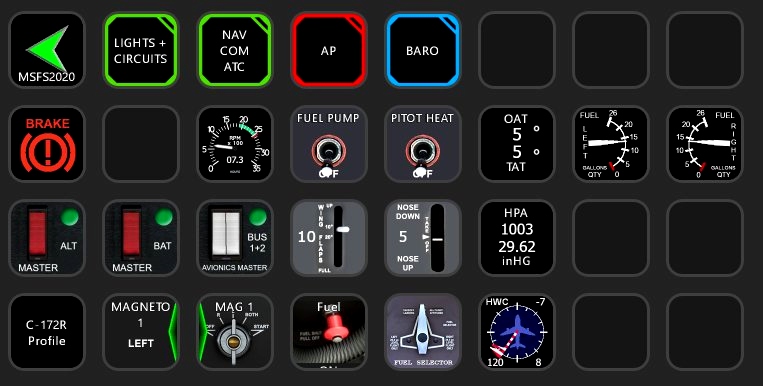
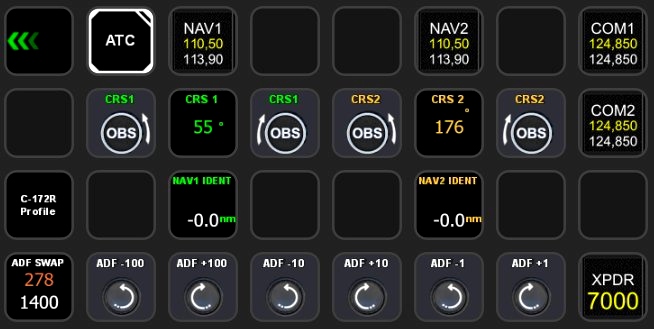
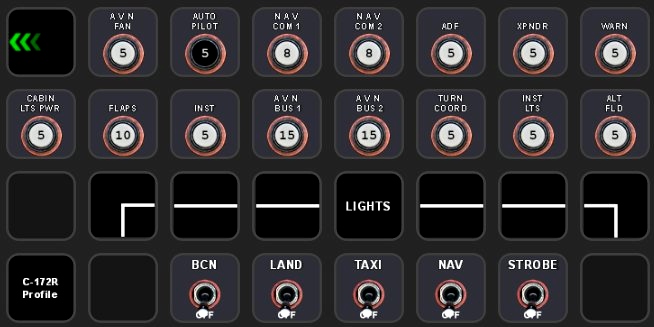
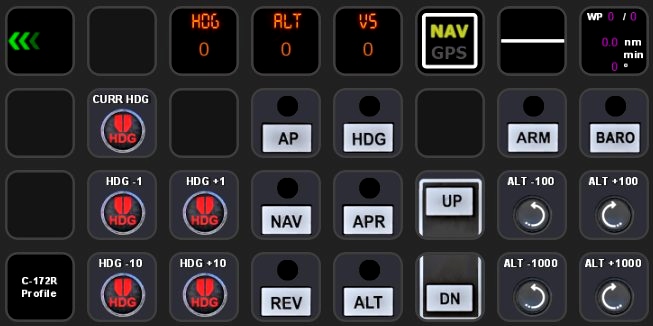
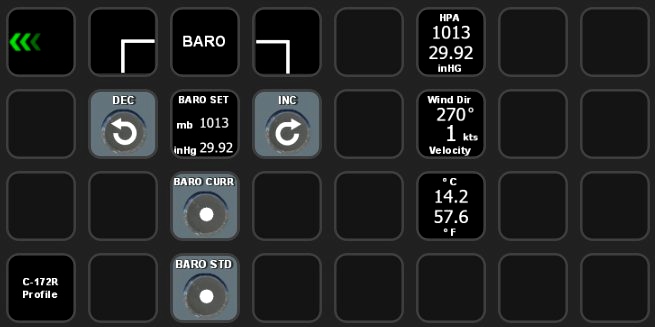
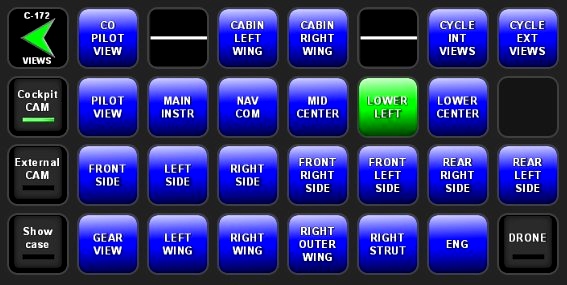
Description
C-172 Profile for Streamdeck XL (need LORBYs Axis And OHs SD plugin)
To run this you need to have AAOs plugin installed on your StreamDeck. Get it from here. Also get the FlightTracker Plugin. Some functions (like circuits etc.) only might work if you have the enhancement from WB-SIM (https://www.justflight.com/product/wb-sim-172sp-classic-enhancement).
It is for the XL version (32 buttons) ONLY!
Features in this profile:
- Main Page (almost everything fits on here)
- Lights and Circuits Page (only fully functional with the WB-SIM enhancement)
- Autopilot Page
- Baro Page
- COM/NAV/ATC Page
- Views Page
Tested and works with the Asobo Cessna 172 standard version (NOT the G1000 version). It might be possible that you have to adjust certain functions to your specific setup (especially Pilot View settings as this uses saved view on ALT-1). If help is needed just drop a line in the comments or join my discord server for support.
Installation:
First make sure that you have the AAO SD and the Flighttracker plugin installed. Import scripts C172.xml into AAO.
Then just double click on the profiles provided in this download
- Cessna172R.streamDeckProfile
- CESSNA 172 VIEWS.streamDeckProfile
If you find some bugs, need some help or have some suggestions just let me know and drop a comment. If you like this work then consider a small donation as this is a very time consuming work and will keep up the updates and further development.
Credit: Thank you for Guenseli for his awesome work. Usage and upload permition granted by the author!
StreamDeck XL Profile for Cessna 172 (Standard Version)
Enhance your cockpit experience with this StreamDeck XL profile designed for the Cessna 172 standard version. This profile features various pages for lights, circuits, autopilot, COM/NAV/ATC, and more. Compatible with Asobos Cessna 172 standard version, additional enhancements may be required for full functionality. Installation is straightforward, and support is available through comments or the creators Discord server.
Supporters
User Reviews
2 reviews
More Information
Version History
Changes in this update: - some script changes - fixed SIM Pause Button Erase old SD XL Profile and import new version.
Related

StreamDeck XL and SD+ Profile for FBW A320neo
Enhance your FBW A320neo experience with a comprehensive StreamDeck XL and SD+ profile. Enjoy features like Main page, Overhead Panel, MCDU, ECAM, and much more. The profile is tested and works with the latest FBW A320neo experimental version, offering customization options for specific setups. Easy installation process with detailed instructions provided for a seamless setup.
by ChrisG9111

StreamDeck XL and SD+ Profile for FENIX A3XX (incl. compl. Script package and FCU readouts and more)
Enhance your FENIX A3XX experience with this StreamDeck XL and SD+ Profile add-on, featuring a complete Script package, FCU readouts, and more. Access various cockpit functions such as the Overhead Panel, MCDU/DCDU, ECAM, and Internal Lights with this detailed profile. Compatible with the latest FENIX A320, this add-on offers a seamless integration for a more immersive simulation experience.
by Chris_PU_A320

StreamDeck XL and SD+ Profile for A330-900neo (Headwind)
Customize your flying experience with the Headwind A330-900neo StreamDeck XL and SD+ Profile. This feature-packed profile includes functions for Main Page, MCDU, ECAM, EFIS, COM/NAV, and more. Compatible with the latest version of Headwinds A330Neo, adjustments may be needed for specific setups. Join the Discord server for support and enjoy enhanced control over your aircraft systems.
by Chris PU A320

StreamDeck XL Profile for Cessna C-172 G1000 Version
A comprehensive StreamDeck XL profile for the Cessna C-172 G1000 version, tailored for pilots using the Asobo Cessna 172 Garmin 1000 model. Features include various pages such as Lights, G1000 PFD, MFD, AP, Baro, NAV, and COM/ATC. Ensure to have the required plugins installed for optimal functionality. Adjustment for specific setups may be necessary, with support available through comments or the creators Discord channel.
by ChrisG9111


Comments(12)
Log in to join the discussion
Log Inover 3 years ago
Great plugin and use of features in both the AAO and Flight Tracker plugins for the Stream Deck!
For anyone having trouble getting some of the controls like the glareshield and other dimmable lights working, here are some steps that worked for me:
1) Close Stream Deck Completely -- Right-click its system tray icon and choose "Quit Stream Deck". Its display should go to just a big Stream Deck logo.
2) In AAO -- Go to Tools > Port Settings for Web
3) Set the WebAPI Port to a number you want; changing it from the default 9080 seems to help. Try 8085, 9081 -- just something else if it's not working now.
4) Click "Apply"; this will automatically change the Stream Deck plugin's port setting and get it synced up with AAO. Don't restart the Stream Deck software yet!
5) In AAO -- Go to Tools > Set WebAPI Port for AAO Addons
3) In the window that pops up, you'll see a list of WebAPI plugins and devices -- at minimum it should list "Stream Deck Plugin" and "lorbysi-content-fippanel".
4) Do all the items in the list show the same port? Yes--Everything should be working. NO--Make sure all items have their box ticked, and then click the "Set Port" button.
5) Click "Apply" and then close the window.
6) Quit AAO completely.
7) Launch AAO and the Stream Deck software.
8) Launch MSFS and start a flight anywhere; you just want to be in the cockpit.
9) Open the menu, click the gear icon and make sure the in-game Lorby FIP is enabled. You might have to toggle it off and on to make the box appear -- when it does, it should have a white border, or the red border will momentarily show and then go white. You can then close the blank in-game FIP window. The Stream Deck and AAO scripting are now on the same port and can work together.
Now... if only the BVars for the overhead lights could be found, they could be scripted like the others and then all the lights in the 152 could be controlled! 😄
over 3 years ago
I'm trying your C172 Streamdeck profile which is very good. I am having one problem though. I can't get the Glareshield Lights and Pedestal Lights buttons working. The Radio Lights and Panel Lights do work however. I had tried to get the Glareshield Lights and Pedestal Lights working in the past and could not. They do work by turning the on screen knobs with the mouse. AAO plug in and scripts are all in place and up to date. Are these lights working for you?
over 3 years ago
I will check for it and let you know…
over 3 years ago
Version has now been fixed and update uploaded. Thanks a lot for the hint! It is very essential for me that users report any issues because it is impossible for me to check every function with every aircraft profile I have uploaded, everytime Asobo or someone else has published an update. In this way I can keep up….
Thanks again and enjoy my work!!!
over 3 years ago
The Int Lights buttons are not working.
https://forums.flightsimulator.com/t/axis-and-ohs-help-and-questions/196415/2116
over 3 years ago
Check the vars. If these are BVars make sure your AAO has connection to FIP. White frame around the window and that it is activated in the ingame panel. Everything should working fine, just updated yesterday. Which C172 are you using? Maybe try a different model…
over 3 years ago
I'm using the Asobo steam gauge C172. I will try what you said.
over 3 years ago
Desktop FIPS and Web FIPS are working. AAOS is receiving events from the Streamdeck buttons, but not the Int Lights buttons. I created a button to control cabin lighting and it works (LIGHT_POTENTIOMETER_1_SET). How do I check the vars as you mentioned?
over 3 years ago
Check in SD which script is assigned and check it in the AAO RPN editor if it works. Join my discord server for more/better support.
over 3 years ago
I'm on your Discord server but can't post until I complete some steps that are spelled out in another language. I can't translate it because it will not let me copy the text. I do have my Discord language set for English.
over 3 years ago
I am not aware that you have to do something first in order to post anything. What would that be? There a lot members from different countries on the server. None of them told me such….you should be able to join anytime and usually I get a note of who joined the server. Didn’t get any messages with your name though
over 3 years ago
I got the ingame FIP working. I had to open a port. I'm still not having any success with the int lights. I figured out the Discord thing. I had to scroll down to see all the rules so I could click OK.