
Description
There's currenly an issue with the PMDG aircraft which is unique to it. When the simulator is puased, it continues to allow fuel to burn. This also seems to be the same with the builtin pause at TOD feature. I'll be looking to relase a workaround in the enxt couple of days,
Instructions
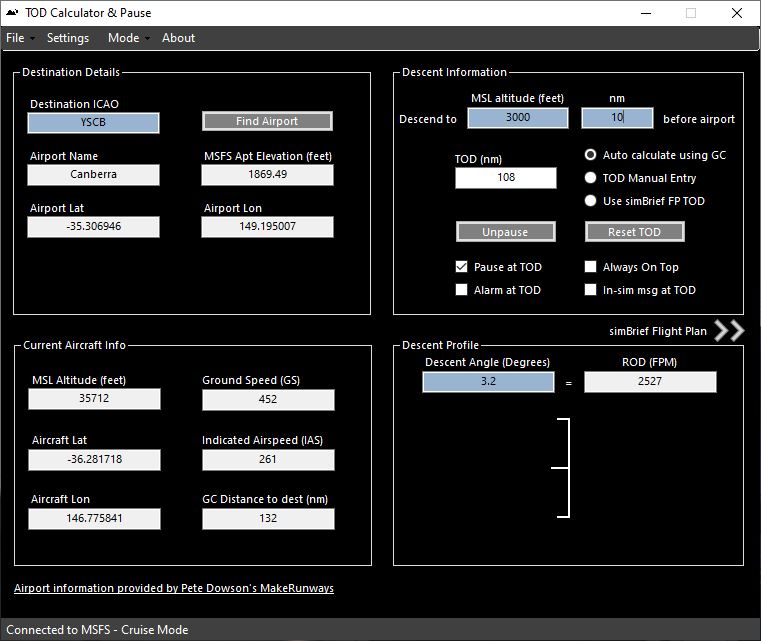
Welcome to the TOD calculator and Pause utility which will provide you with pause at the top of descent based on live metrics from the simulator and a descent profile based on a default glide angle of 3 degrees (however, you can modify this,) which is also based on live information from your simulator.
The utility is easy to use. It will auto connect to the simulator once it detects that it has started. It can be used either on your local machine or a remote machine that has Simconnect setup for networking. Please use the guides published with MSFS to achieve this if you haven't already. There are also plenty of good guides on Google.
Light blue text boxes indicate boxes that you can type in
White text boxes are there to provide additional information and context
There are three ways to achieve a TOD figure.
- Auto calculate using GC - This method auto calculates your TOD based on your great circle distance from your destination
- TOD Manual Entry - This method allows you to enter your own TOD distance
- Use simBrief TOD - This option sets the utility up based entirely on information in simBrief. (Provide your username in the settings menu.)
Auto Calculate Mode
Simply enter your destination ICAO into the 'Destination ICAO' box and click 'find airport.' This will populate the airport name, elevation, lat & lon of the airport used to calculate your great circle distance from the airport.
Next, enter the altitude you want to descend to in the MSL altitude box. Please note this is MSL, i.e. your altitude read from your aircraft after you have set your BARO pressure. As with real descent profiles, sudden changes in BARO pressure and/or ground speed will affect the descent profile and can make it seem to jump during drastic changes.
Finally enter how many nautical miles before your destination, you would like to arrive at your chosen MSL. Your TOD will then be calculated.
TOD Manual mode
Simply enter your destination ICAO into the 'Destination ICAO' box and click 'find airport.' This will populate the airport name, elevation, lat & lon of the airport used to calculate your great circle distance from the airport.
Finally, enter your TOD in the TOD box
simBrief TOD mode
Selecting this will populate the entire utility with information from your simBrief flight plan. As the TOD is predetermined, so therefore is the angle and rate of descent which is why this is all auto calculated, to execute as the simBrief flight plan intended.
NOTE: You must enter your simBrief username under the settings menu to allow simBrief mode to work.
If you click on the arrows on the right edge of the utility, it will extend to expose your simBrief flight plan.
Here you can:
- Delete waypoints you haven't passed yet (Remember to mirror in your aircraft FMS)
- Go 'Direct To' because you have passed a point, but it hasn't registered as passed in the utility (Remember to mirror in your FMS)
- Monitor the utilities progress through the simBreif flight plan
- Add altitude restrictions as per your STAR charts, for the descent phase
NOTE: The green bar denotes your progress and the waypoint you are heading towards at that moment. The distance column denotes how many nm it is to get to that waypoint.
The utility will automatically adapt to the changes, and these will be reflected in your VNAV descent path and distance to your destination.
All modes
The utility can be started any time before descent. Where a simBrief flight plan is being used, the utility will try to understand your current progress through the flight plan and put you at the correct point automatically.
Whilst on the ground your 'current aircraft info' will not populate. However, once you have taken off, this will instantly populate and form part of your TOD calculations.
Once you have reached your configured number of minutes before TOD (See settings menu,) the simulator will pause and the unpause button will highlight green. Clicking this button will unpause the simulator again.
NOTE: due to a bug in MSFS, you cannot unpause the simulator within the sim when paused this way. You must use the unpause button in the utility.
Once you have clicked the unpause button, your descent profile will become live and provide a recommended fpm descent rate and live progress against your descent path.
Should TOD pause accidently kick in too early, due to mistyping your MSL altitude or distance from airport, then you can click 'reset TOD' to put yourself back in 'cruise mode' and ensure TOD pause kicks in again when needed.
The other check boxes are:
- 'Alarm at TOD' which will sound 3 bleeps once TOD has been reached
- 'Always on top' which will ensure the utility always stays on top of all other windows
- 'In-sim msg at TOD' which will provide you with an advisory message in the simulator, when you have reached your TOD.
NOTE: You must have Assistance Options > Notifications > "Software Tips" enabled in the sim to see in-sim messages
Although 3 degrees is considered a reasonably standard descent angle for most aircraft, you can modify this when in Auto calculate mode, in the 'Descent Angle (degrees)' text box.
NOTE: in TOD Manual Entry and Use simBrief TOD modes, the TOD distance has been predetermined by either yourself or simBrief, respectively. Therefore, you will not be given the option for a custom descent angle as the utility must dictate this, to achieve the descent in the specified distance.
Menus
- Settings Menu - This is where you can save your simBrief username to allow you to use simBrief for your TOD figure and set the number of minutes you wish the utility to pause, before TOD is reached, Default is two minutes.
- Mode Menu - This allows you to reduce the window to show the descent profile only. In combination with the 'Always on top' checkbox, this will allow you to perch the utility in the corner of the sim and take up minimal room.
Finally, this utilises Pete Dowson's Runways.xml generated by his MakeRunways utility. I've included a Runways.xml for the vanilla version of MSFS. If you have installed add-on airports that didn't exist in MSFS before, you may want to run Pete's utility for yourself and once it's finished, copy the Runways.xml into the root directory of TOD calculator and Pause and replace the existing one.
That's it!
Have fun!!!
Thanks to.....
Thanks to Pete Dowson as it actually uses his Runways.xml generated by his MakeRunways utility for airport information
Known Issues
- You cannot unpause within the simulator once the utility has paused at TOD. This must be done using the unpause button within the utility
- The aircraft must be following the simBrief plan in its entirety for the utility to be able to track your progress properly. This includes SIDS & STARS. Please note at the time of writing, the FlyByWire A320 'custom flight management system' feature (Experimental version) is still under development and therefore not all waypoints are currently extracted from the simBrief flight plan, or when selecting a SID/STAR. These need to be entered manually when this occurs however, this will change over time. Also, some distances to waypoints in the FlyByWire A320 aren't always accurately represented. I'm sure future development will resolve these issues.
- The aircraft must pass within 5nm of the waypoint for it to move onto the next. Should you pass close to the point, but not close enough, you can use the 'Direct To' feature to advance the utility in-line with the FMS.
- Manipulating waypoint in the flight plan after the descent phase has begun has some undesired effects. Probably best not to do this for now......
- When in always on top mode on the same machine as your simulator, it will cause an FPS hit of around 5FPS. This is not unique to this utility, this happens no matter what window you have open in front of your simulator screen, including Windows Explorer, so there's nothing I can do about this.
Frequently Asked Questions
TOD Calculator & Pause
Enhance your flight planning with the TOD Calculator & Pause utility, designed to provide you with precise pause settings at the top of descent based on live simulator data. Whether you prefer auto-calculation, manual entry, or simBrief integration, this versatile tool offers a seamless experience. Stay informed with real-time progress updates, descent profiles, and customizable features for an optimized flight simulation journey.


User Reviews
18 reviews
Version History
* Added the ability to see you simBrief flight plan and manipulate it by deleting waypoints and a 'direct to' function * Added the ability to add altitude restrictions to the descent phase of your flight plan * Resolved a bug which caused incorrect GC distance calculations with some regional country settings * Refined cursor response across the interface * General code improvements * Removed the MSL altitude box from the TOD manual mode, as it's not required when thinking through the logic
Log in to join the discussion
Log InComments(100)
8 months ago
8 months ago
10 months ago
11 months ago
10 months ago
"Auto calculate using GC - This method auto calculates your TOD based on your great circle distance from your destination"
12 months ago
about 1 year ago
over 1 year ago
Thanks
over 2 years ago
over 2 years ago
about 3 years ago
about 3 years ago
about 3 years ago
about 3 years ago
over 3 years ago
Installed on my new computer but it doesn't work, it do not recognize any ICAO codes. Is the app tested with Windows 11?
over 3 years ago
This is an awesome program. No 737 pilot should be without it. I finally managed to slow my aircraft down enough to get a stable approach. Thank you
over 3 years ago
Does this still work with the latest sim update and is this project dead?
almost 4 years ago
Hello there,
First of all I would like to thank you for the excellent work
I can open and change the values in the application, but the diamond that illustrates in the descent profile window does not appear.
Am I doing something wrong?
Please could someone help me?
almost 4 years ago
found the problem, the option "Pause at TOD" must be activated
here is a suggestion, if possible for the next version remove the mandatory option "Pause at TOD" activated for the diamond to appear.
almost 4 years ago
Looks like the iniBuilds A310 shares the same issue as the PMDG where fuel continues to burn when paused