
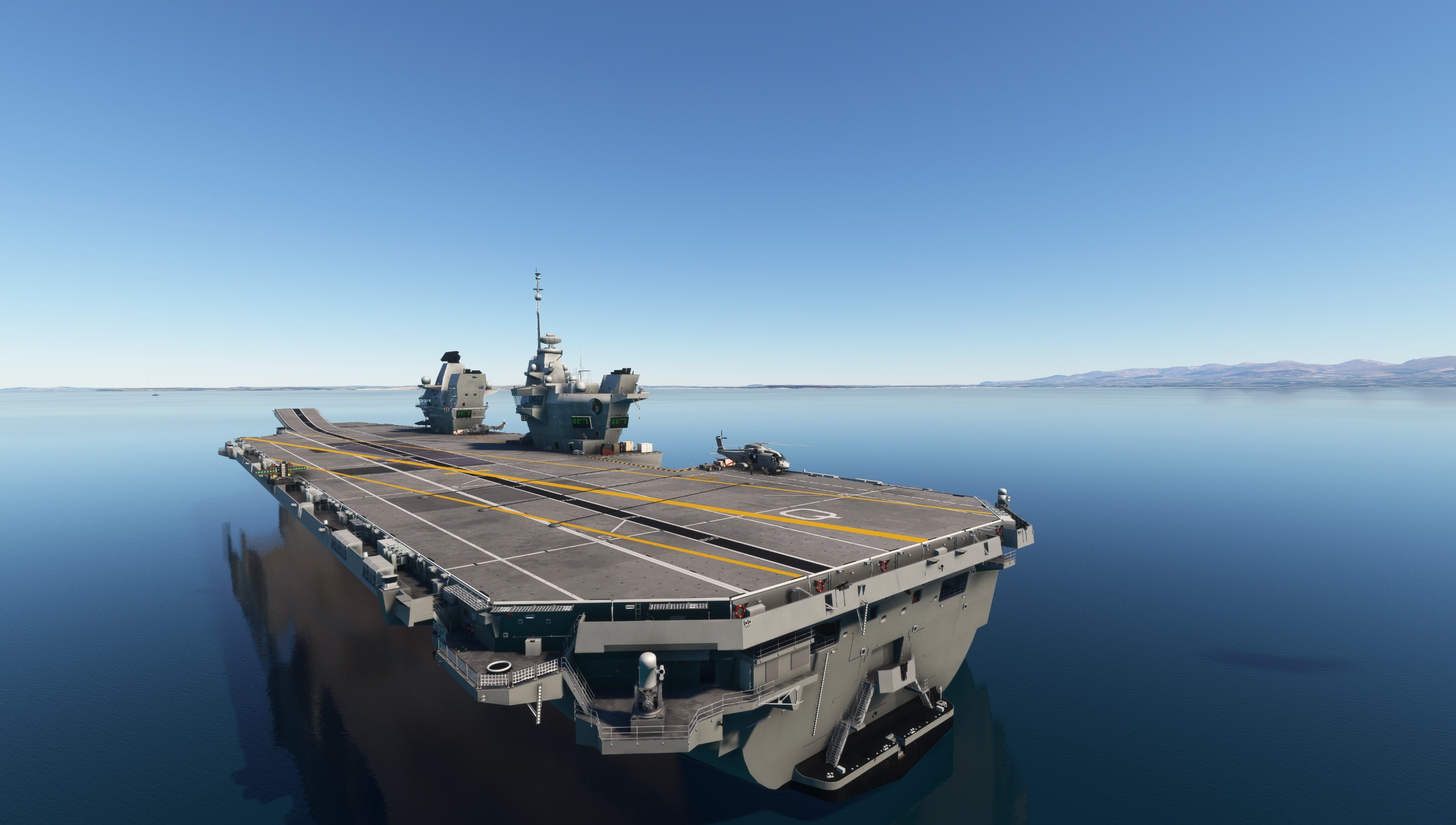
Description
This is the proposed CATOBAR Upgrade of the HMS Queen Elisabeth.
https://news.usni.org/2023/06/08/u-k-considering-adding-catapults-arresting-gear-to-aircraft-carries
NOTE: This is a DEMO Version, please consider purchasing on SIMMARKET or Flightsim.to store:
https://secure.simmarket.com/ansmedia-hms-queen-elisabeth-carrier-catobar.phtml
https://store.flightsim.to/product/hms-queen-elizabeth-carrier-catobar-conversion-project-ark-royal
NOTE ON CATOBAR AND CARRIER FUNCTIONALITY: REQUIRES ANSMEDIA TOOLBAR
Toolbar needs to be open to detect when you have caught a cable and is used for all other carrier functionality.
Features:
- High Quality Carrier Model with Transparent Bridge Windows, assortment of Animations and Static Objects
- Catapults and Arrestor Wires for CATOBAR Operations Via toolbar (
- Animated Spinning Radar Dishes
- Living Deck with Animated Carrier Crew doing an Assortment of Tasks (WIP).
- Working Elevators
- Full Night Lighting
- Own Toolbar to Control Carrier Functions (ANSMedia Toolbar)
- Switchable Runway Lights Angled/Straight, Default Straight
- Bridges have Interiors and Animated Crew
- Working ILS's with Glideslope
- FLOLS Optical Landing System
- Animated Deck Crew
- Circling Merlin AEW (Currently without the Crowsnest Radar yet).
- Own In-Game Catapult and Arresting gear Scripts operated via ANSMedia Toolbar App
- Fallback "Fake Arrestor" Script via ANSMedia Toolbar App
- Toolbar Catapult and Arrestor App work with any Carrier
- Assortment of Landable Escort Ships: 2xType45 Destroyer, 2xType 31 Frigate, 1xTideclass 1xAstute
- Ability to toggle Futuristic CATOBAR modifications via the toolbar
Features Exclusive to PAID Version:
- More Locations Added Constantly
- Fully Navigable Hangar (WIP)
- Discord Role for Access to Daily DEV Builds
- Custom Animated Persona/Avatar on the Carrier by Request (Limited Space, first come, first Serve)
ILS Features:
- All Static Locations are featuring 3x ILS Frequencies:
109.95Mhz Angled Approach (Arresting Wires) - Course 350
- 110.95Mhz Straight-In Approach (STOVL Rolling Landing) - Course 36
Static Locations (Included in DEMO):
- QE01 English Channel
- QE02 Persian Gulf
- QE03 RAF Valley AB
- QE04 Cayman Islands
- Full List of Current and Planned Locations Available on Wiki (LINK)
Paid Only Locations
- QE05 Santa Barbara
- QE06 Gdansk Bay
- QE07 Falklands
- QE08 New Zealand
- QE09 Tokyo
- QE10 RNAD Coulport (docked)
- QE11 Venice
- QE12 Perth
- QE13 Bodo, Norway
- QE14 Hawaii
- QE15 Norfolk
- QE16 Lossiemouth
- QE17 Iceland
- QE18 Rosyth (Docked)
- QE19 Culdrose
- QE20 Barbados
Planned Features:
- PAID ONLY: Hangar is currently WIP. Models and textures are not final
- Animated arrestor wires
- Launch Crew
- PAID ONLY: Helicopter hangars for escort Frigates and Destroyers with aircraft parking locs to spawn in on.
- PAID ONLY: More Locations TBA as i go (Feel free to submit proposals on Discord or via support email)
- Missions
- PAID ONLY: Moving Ships
Installation:
Unzip the contents into your Community Folder (when updating, it is best to delete the folder first)
Please consider a small Donation: DONATE
Support:
YouTube Link: https://www.youtube.com/channel/UCFYet0eAk3unty42z_ZPrWw
HMS Queen Elizabeth Carrier CATOBAR Conversion (Project Ark Royal) DEMO
Experience the proposed CATOBAR upgrade of the HMS Queen Elizabeth with this mod. Features include catapult and arrestor wires, ILS frequency of 109.950Mhz, and static locations in the English Channel and Persian Gulf. Simply unzip the contents into your Community Folder to enjoy this conversion project.



User Reviews
10 reviews
Version History
Changed default state to CATOBAR (Ark Royal Modification) Disabled. Added Sea Ceptor to Type 45 model Reworked Tide class night lighting
Related
BA113 - Saint Dizier Airbase LFSI
Explore the BA113 - Saint Dizier Airbase LFSI add-on for Microsoft Flight Simulator, featuring a detailed virtual representation of the airbase with 3D modeled buildings and static devices. Enjoy a photorealistic panel integrated using the MSFS SDK, with continuous updates planned based on gathered information and MSFS modifications. This freeware scenery is a collaborative effort with acknowledgments to various contributors for their support and assistance.
by fafa_2021
Dog Bone Lake - BONE, Nevada USA
Explore Dog Bone Lake (BONE, Nevada, USA): a custom-made location designed for cargo drops using the C-17 as part of the Virtual Air Forces Red Flag exercise by Destroyer.
by nickb007
RAF Coltishall
RAF Coltishall is a simulation add-on for Microsoft Flight Simulator that recreates the former Royal Air Force base, specifically during the 2003/04 period when it housed the Jaguar force. While the scenery is a work in progress and not yet fully complete, users can still operate from the base. Future updates are planned, and although designed for MSFS2020, it may function in MSFS2024, pending further testing.
by DaleRFU
BA133 - Nancy Ochey Airbase
BA133 - Nancy Ochey Airbase is a meticulously crafted add-on for MSFS 2024, replicating the airbase as accurately as possible based on available data. The scenery features fully modeled 3D buildings and includes static aircraft, along with a photorealistic panel created with the MSFS SDK. Future updates are planned to enhance the base with additional structures and improvements based on ongoing research and modifications to MSFS.
by fafa_2021
Log in to join the discussion
Log InComments(40)
10 days ago
about 3 hours ago
22 days ago
about 3 hours ago
6 months ago
6 months ago
1: The lights are just amazing
2: You modeled the interior(s) of the bridge(s) and gave it some flavor with active screens. That and the circling heli's just give that tiny extra something, immersion wise
And that's *without* having access to the hangar yet since I just have the demo version till next week. Which the hangar also has movable doors, something else Miltech left out on their carriers.
6 months ago
6 months ago
Also I did notice you have Diego Garcia planned as a location, just FYI Supercarrier Pro has something there too; maybe check they don't conflict/overlap before setting the final location.
TBH it might be cool to have a kind of 'joint fleet' thing with both mods active
6 months ago
6 months ago
6 months ago
6 months ago
OK thanks for your fast answer. Now, the lights work perfectly. I am positive, the link did not appear on your page yesterday, now it does. May be a refresh problem! I continue monitoring your excellent work!
6 months ago
The catapult and arrestor code is built into the toolbar - hence why it's a dependency. We do not use the msfs built in arrestor system as it's buggy ( Especially when you're trying to release the cable after you have stopped).
It requires the toolbar to be open atm for arrestors to work because of the way they are implemented.