
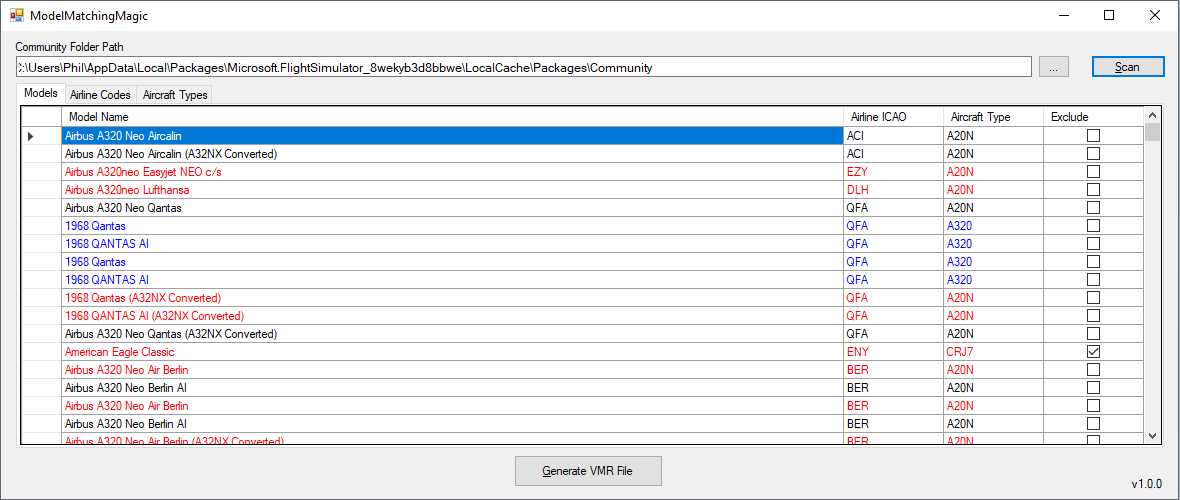
Description
Model Matching Magic is a program that can scan your MSFS2020 Community folder for aircraft liveries, and generate a custom .VMR file for use in vPilot's custom model matching setup. It can also handle creating model matching rules that allow a number of callsigns to match to a set of liveries (eg. BAW and SHT callsigns match to a set of British Airways liveries) and creates rules to match aircraft types that have specific liveries to another type (eg. A319, A320, A321 matching rules to match to a common A20N livery). The application has a number of configuration options that should allow to craft a setup to your particular liking, but also comes with a set of defaults that should generate a reasonable VMR file for those that don't want to tweak too much.
Installation
- Download the latest release .zip file
- Extract the ModelMatchingMagic folder to a location of your choice (or if upgrading, just extract the individual files over the top of a previous install, to keep all your settings)
- Run the ModelMatchingMagic.exe file from the installed location (and optionally, create a shortcut to this .exe file)
Operation
- (First run only) Locate your Community folder in the input box at the top of the screen
- Press the "Scan" button to start scanning your community folder
- Review the scanned results, by default, only liveries that have a valid airline code and aircraft type will be included in the generated .vmr file
- Click on the column header for "Aircraft Type" to sort, and review entries that are blank or invalid. The value can be entered/edited if need be.
- Click on the column header for "Airline ICAO" to sort, adn review entries that are blank or invalid. Again, values can be entered/edited here. For some models/liveries, such as GA aircraft, you may leave this field blank and just untick the "Excluded" column, if it doesn't make sense to match it based on an airline code.
- Press the "Generate VMR" button to create your custom .vmr file. It will be called ModelMatchingMagic.vmr and it will be saved in the same directory as the .exe file is located.
- Go to your vPilot settings and either replace your other custom .vmr files or add your new ModelMatchingMagic.vmr to the list of custom rule sets.
- Enjoy (hopefully) a better model matching experience in MSFS2020 (note: that at this only generates the matching rules file, the result may not be 100% in the sim, if there are issues with liveries not loading properly, etc)
Check out the YouTube video above or use the link below for a great explanation of the above operation and for further customization that is possible.
https://www.youtube.com/watch?v=0cvfG5Sh06U
Credits
A big thanks to British Avgeek and his channel members for the motivation to create this, and for all the effort in testing, providing feedback and comments to help develop this to where it is today.
Feedback
If you have any feedback or experience issues with this, please don't hestitate to comment below.
Enjoy!
Model Matching Magic
A program that scans your MSFS2020 Community folder for aircraft liveries and generates a custom .VMR file for vPilots model matching setup. Create rules for callsigns matching liveries and aircraft types matching specific liveries. Customize your setup or use default settings for a seamless experience.
Content Removed
This file has been removed due to a rule violation and is currently not available.



User Reviews
41 reviews
Version History
- Fix for a bug where certain content in the livery "aircraft.cfg" file would cause an error to be reported
Comments for this addon are closed.
Comments(160)
over 5 years ago
Great work over the last few months mccarl. It's a great program with plenty of options for us to make tweaks to the rule set.
Thanks for all your work and love the program - I'm sure everyone else will too!
For a full tutorial and guide check this out and I hope it helps
https://youtu.be/0cvfG5Sh06U
about 2 years ago
Windows 10, version 1607 and later opens for longer path, but apparently it must be enabled in the app. Not sure why this has popped up now. It's possible MS changed something. Is this something that can be fixed?
over 2 years ago
The program used to work but as of a few months ago it doesnt.
over 2 years ago
almost 3 years ago
about 3 years ago
over 3 years ago
anyone else noticed that copy/paste or multi line action is not possible? doing it one line at a time for a large library makes it difficult to use
over 3 years ago
Hey there! Thank you so much for your effort!
Question: Can you provide a more detailed insight on how "SIZE" is affecting the Model Matching? Thank's!
over 3 years ago
For those of you that are using IVAO MTL as of April 16 2023 these are the aircraft you need to exclude.
A5, B06, B2, DC3, F22, F5, F70, HAR, K35R, PC6P, R22, R44, T38,UH1 ,V22, VL3, ZZZV, ZZZZ
Any of the above packages does that thing that causes Model Matching Magic to error.
almost 3 years ago
like this:
(ModelMatchRule CallsignPrefix="AAH" TypeCode="A320" ModelName="B732AAH//B733AAH" /)
over 3 years ago
Please add an option to prioritise aircraft type over airline, or better yet add aircraft type groups so we have control over what models can be substituted for another.
over 3 years ago
Great tool, but I have so many models that have to be edited and doing that one by one is someting... I just can' do. I would be sitting there pressing the same buttons for hours. If you could implement a way to set multiple enties that would be great!
almost 4 years ago
Hi mccarl1978,
Are the McDonnell MD80 series and MD11 from IVAO MTL models compatible with Model Matching Magic and Vatsim ?
about 4 years ago
If you have problems finding the VMR file then check your temp folder I founded it there.
about 4 years ago
Does the VMR file only affect matches done to planes spawned from vpilot/vatsim? Or does it also affect planes from msfs' "live traffic", "ai traffic" and/or AIG TC? When not on vatsim, I'm having troubles with msfs "live traffic" showing up with wrong livery matches although the airlines are installed in AIG and working with AIG TC and vatsim (could be Ryanair as an example, where I can see "live traffic" has identified is as ryanair in LittleNavMap, but livery chosen/shown is Delta for some weird reason).