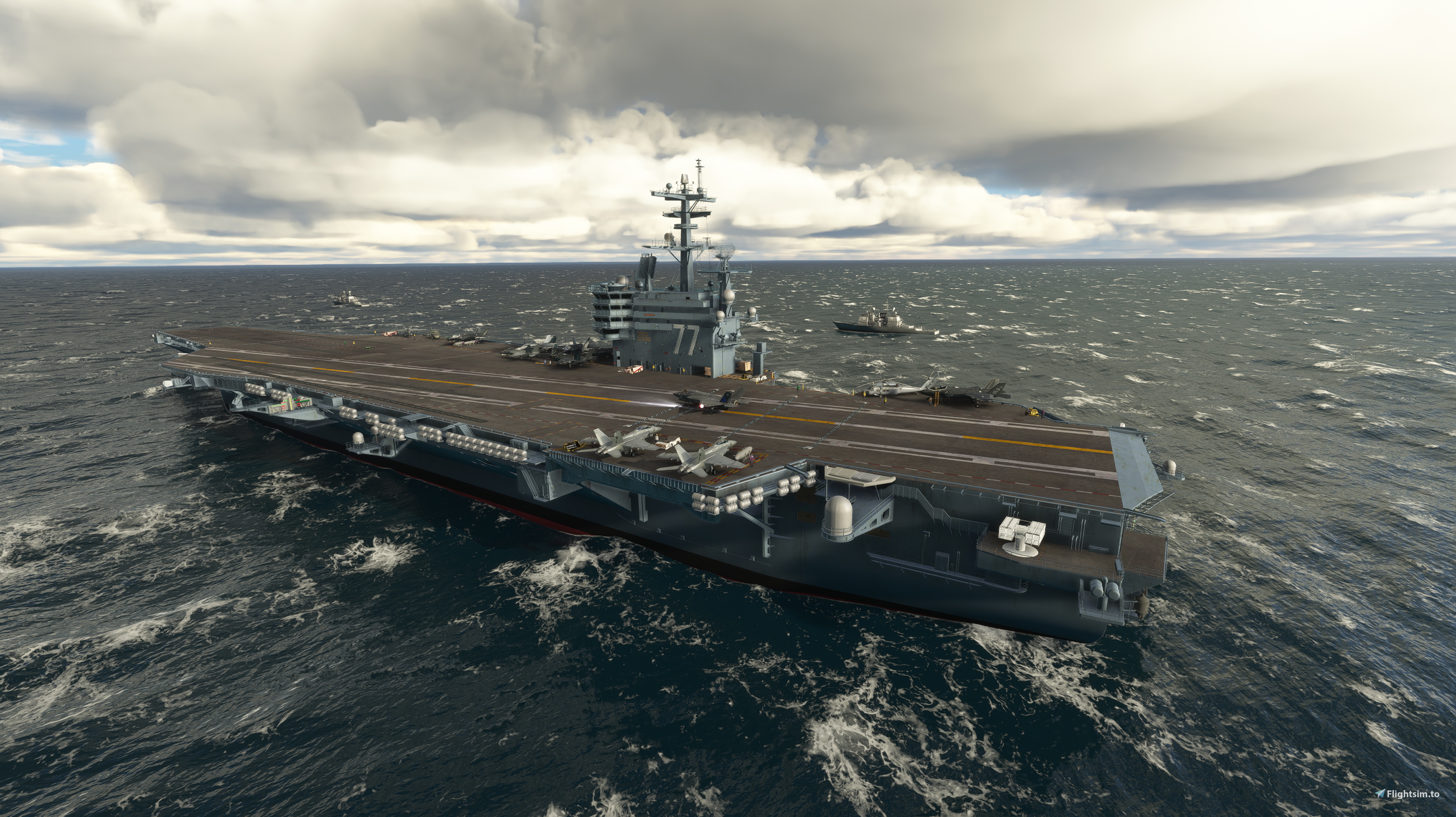
About this addon
USS George H.W. Bush (CVN-77) is the tenth and final Nimitz-class supercarrier of the United States Navy. The carrier entered operations in 2009 and it currently operates from its homeport in Naval Station Norfolk, Virginia.
We created a very detailed representation of USS George H.W. Bush functional with any aircraft on MSFS.
FEATURES
- Incredible level of detail on the modeling of the CVN-77 USS George H.W. Bush Carrier, with full PBR texturing.
- Functional catapult and arrestor system, with selectable launch speed and stop time according to the aircraft. This feature works with any payware or freeware aircraft, from a fighter jet to a B747.
- 7 spawnable static locations around the Earth
- Additional landable ships, such as Frigates, are placed around the carrier.
- Static Aircraft, including the F-35 and the F/A-18
- Animated radars
- We will add any location you want for FREE! Email us with the coordinates, and we will place an aircraft carrier in that location for no additional cost.
- NEW ON V1.2: Functional MSFS Default Arrestor Cable System (Only with compatible aircraft such as the F/A-18)
LOCATIONS
Out of the box, the product includes 7 static, spawnable locations. This means that the carriers do not move (MSFS limitation), and flights can be started from the carrier. The carrier will be visible as a starred scenery on your MSFS map. We have created custom ICAOs for the different locations:
- UGB1: Port of Origin (Norfolk)
- UGB2: South of Key West
- UGB3: Sea of Japan
- UGB4: Persian Gulf
- UGB5: South Mediterranean Sea
- UGB6: Gulf of Aden
- UGB7: South China Sea
CARRIER LAUNCHER SOFTWARE (Catapult and Arrestor)
We include with the product access to our fully functional SimConnect kinematics software to simulate the catapult and arrestor dynamics on an aircraft carrier. It is compatible with any aircraft you have installed, from Cessnas to Fighter Jets.
The tool can be downloaded for free here (you must own a valid copy of the carrier):
https://flightsim.to/file/23748/miltech-carrier-launcher-software-catapult-and-arrestor
Catapult:
Run the Carrier Launcher software (shortcut on your desktop)
Launch MSFS and place any aircraft on the aircraft carrier. Taxi to any of the catapult locations.
Connect the Carrier Launcher software to your sim by clicking "Connect"
Select your takeoff speed, or type your own.
Set parking brakes and maximum thrust. Click on "Ready to Launch"
Release parking brakes and see your aircraft quickly accelerate to the selected speed.
Arrestor
Make sure your Carrier Launcher is connected to the sim (if not, click "Connect")
Select the full stop time, or type your own. The faster the aircraft, the shorter the full stop time it is. For example, for a fighter jet, a 1s full stop time is ideal.
Click on "Extend Tailhook" and land normally. The aircraft will decelerate quickly. Assist with braking as required.
LIMITATIONS
Our product currently has a few limitations to take into consideration due to the current state of MSFS's SDK.
- Carriers are all static objects. We have no plans to make them move since this is not possible with MSFS's SDK. Airports have fixed coordinates.
- The carriers have uncontrolled ATC. There is an ATC frequency for each, but these work as an uncontrolled airport (UNICOM). AI traffic does not visit this airport anyways.
- PAPI/VASI/OLS are not functional.
- Crash Detection must be off at all times, otherwise, you might have issues using the product.
NEW ON V1.2:
- Improved texturing
- Improved carrier clutter, tugs, and personnel on deck
- Animations added
- Default MSFS Arrestor cable system - only for compatible aircraft, such as the F/A-18.
- Improved performance and LODs
- Improved night lighting
Changelog
v1.2 - Improved texturing - Improved carrier clutter, tugs, and personnel on deck - Animations added - Default MSFS Arrestor cable system - only for compatible aircraft, such as the F/A-18. - Improved performance and LODs - Improved night lighting
Terrain Fixes
The elevation of all ships was adjusted.
F-16 have been changed to F/A-18s
User Reviews

jurgenm1947
VerifiedJan 16, 2024
Can you locate my carrier to the following location please. 50.7969916398359, -0.27324334014708823
FreddyMortensen
VerifiedNov 9, 2021
Just a small comment here considering all the slightly grumpy remarks below 8) I bought this product when it was released and yes as stated in comments here it had a couple of cosmetic flaws at first but they were fixed very fast. The product is now imho pretty perfect. I sent a message to the creator about one of the cosmetic flaws and got reply almost at once with info about the fix. Top notch support. I have both the Hard Deck carriers and the freeware ones found on this site and the Miltech carrier just is in another league detail wise. If you want some carrier landing practice this is the one to get! Blue skies :-)
USS GEORGE H. W. BUSH (CVN-77)
Experience the detailed USS George H.W. Bush (CVN-77) supercarrier in MSFS with functional catapult and arrestor system, multiple spawnable locations, and additional landable ships. Enhance your carrier operations with the new v1.2 update featuring improved texturing, animations, and default MSFS arrestor cable system compatibility.

Instant digital delivery • Secure payment
Requirements
Additional Requirements
- Microsoft Flight Simulator
- We recommend at least 6GB of VRAM.
Details
- Category
- Scenery Enhancements
- Release Date
- Oct 28, 2021
- Last Updated
- Oct 10, 2022
- Reviews
- 2
- Compatibility
- MSFS2020
- Country
- United States