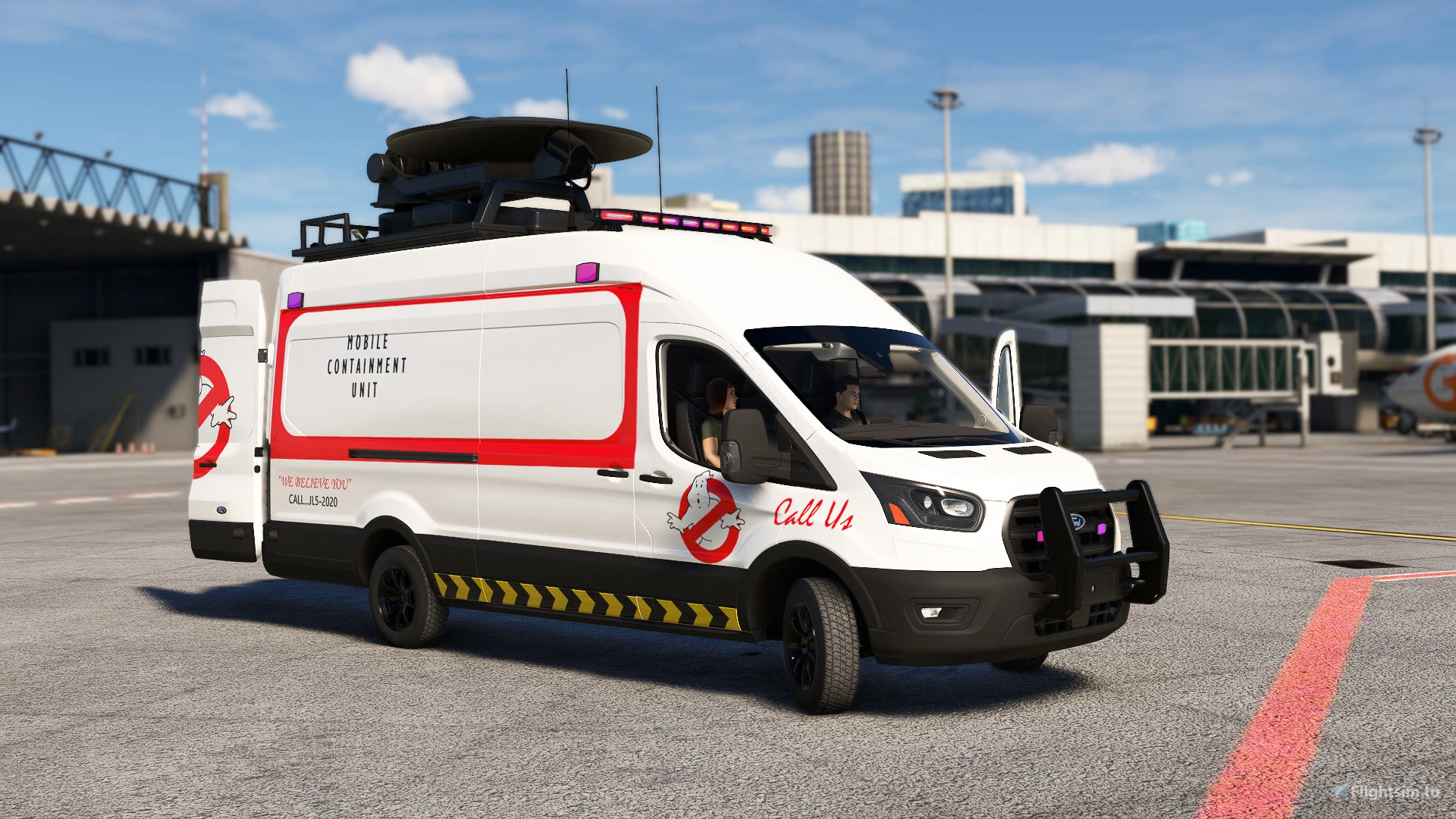
About this addon
Get ready for a new adventure! The Transit Cargo for Microsoft Flight Simulator has just arrived! With its imposing presence and interesting list of features, this van is much more than a simple in-game vehicle - it's an enjoyable driving experience for players who prefer joystick control.
The vehicle will come with a total of 20 liveries available since launch and more on the way, and with it you will have the opportunity to customize your gaming experience according to your preference, making parts such as the bumper grille visible, or changing the material of the bumper, like bumper on plastic black or painted, in addition to choosing between factory or custom rims. From special liveries inspired by real-world shipping companies and factory colors to designs inspired by animated series like Scooby-Doo, there's something for every taste and style.
There are also five payload types selectable via the payload menu, allowing you to transport a variety of essential items across roads and airports. Your hand-drawn driver and passenger add an extra layer of authenticity, providing an immersive gaming experience.
There is extra work for animations, where details like the front, side and rear doors, as well as windows, are all animated. There are also emergency lights available, which add authenticity to your nighttime adventures.
Try it!
Available now for purchase, this is your chance to explore the virtual world of Microsoft Flight Simulator in a different way.
IMPORTANT:
When starting with the A-Team, Airport Police and Metropolitan Police livery versions, the vehicle starts with a standard rim, without active emergency lights and without a bumper grille. This is not a defect, the vehicle just starts the simulation in its original state. To make them visible, simply activate these items in the panel.
The driving experience is based on other player-controlled vehicles developed by Marine RM, with improvements that will be updated on other vehicles available in stores.
But it is important to emphasize that driving land vehicles in a flight simulator is a leisure task, and therefore, do not expect physics realism, as there are limitations in the development of this type of vehicle yet.
The Transit Van will soon be updated with more liveries and features such as improved sounds and a better drive system
All animated functions can be activated via the car dashboard - doors, windows, emergency lights, changing bumper color, etc. The functions are labeled by name and are very easy to find.
I recommend using the game's default joystick and control settings - the experience will be quite easy this way.
RESOURCES:
- Easy Key Cold Start
- Improved physics
- Broadcast Antena Animations
- Functional display with GPS
- Detailed interior
- Start anywhere in the world at ground
- Night and emergency lights
- Different paints in the livery menu
- Add or remove people and cargo via the payload menu
- Sounds
- Friendly fps
HOW TO INSTALL:
- Locate the Microsoft Flight Simulator installation folder
- You need to find and open the folder called "Community"
- Copy the folder "marinerm-transit-cargo" you just extracted to the Community folder.
- Start the game and the "Marine RM Transit Cargo" will be in its hangar ready to drive!
HOW TO PLAY:
- Thrust lever controls the pedal for acceleration, Wheel brakes to stop the vehicle
- Yoke to control the steering wheel left and right - not the rudder. Therefore it is necessary to make sure Settings > Assistance Options > Auto Rudder > On
- Flaps control the broadcast antena animations. Use the central panel to activate or deactivate functions such as: front and rear hitch, logo, emergency lights, sunroof or travel rack, among other things depending on the version chosen.
DOCUMENTATION: https://www.roprodaudiovisual.com/transit-cargo
User Reviews

Pharohx
VerifiedJul 7, 2026
NOT REALY IN SCALE.. TOO BIG.. VERY UNCLEAR HOW TO CHANGE THE CONTENTS IN THE VANS STORAGE AREA. IF SPAWNED BY THE DEVMODE, HAS THIS ANOYING FEMALE PASSENGER THAT SEEMS IMPOSSIBLE TO REMOVE.. MODEL IS GOOD, EXECUTION IS NOT
AdrianT7
VerifiedOct 4, 2025
Brilliant van
Transit Cargo
Introducing the Transit Cargo add-on for Microsoft Flight Simulator! Explore a new driving experience with this versatile van featuring 20 liveries, customizable parts, and 5 payload options. Enjoy animated details like doors and windows, and immerse yourself in the world of virtual transportation. Accessible now with more updates on the way!

Instant digital delivery • Secure payment
Requirements
Additional Requirements
Minimum system requirements for Microsoft Flight Simulator 2020
- CPU: Intel i5 9600K
- RAM: 16 GB
- OS: Windows 10 64 bit
- VIDEO CARD: NVIDIA GTX 1050 Ti
- PIXEL SHADER: 5.1
- VERTEX SHADER: 5.1
- DEDICATED VIDEO RAM: 2GB
- STORAGE: HDD
More by this publisher



Details
- Category
- Aircraft
- Release Date
- Feb 28, 2024
- Last Updated
- Feb 29, 2024
- Reviews
- 2
- Compatibility
- MSFS2020/24