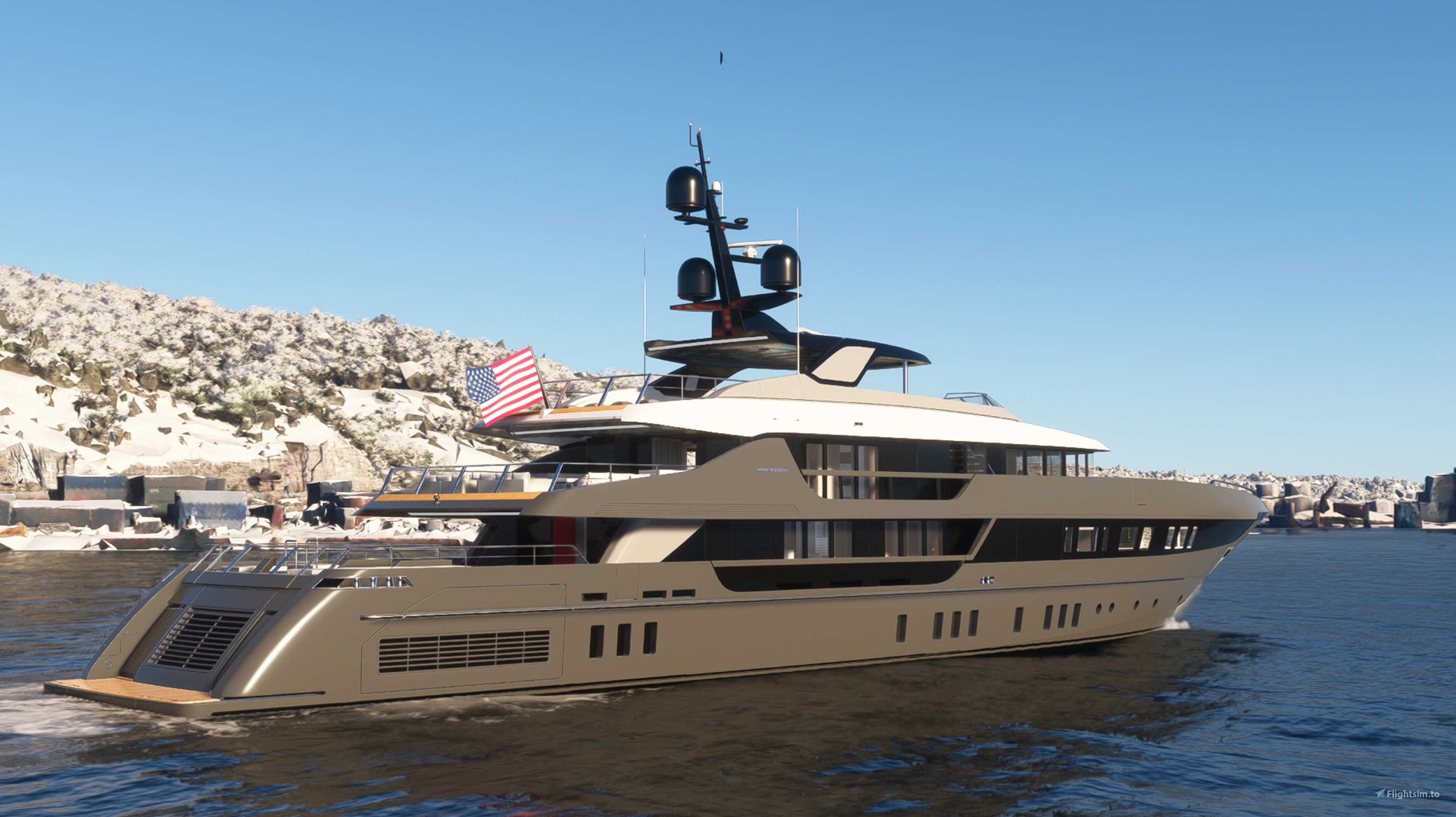
About this addon
Explore the 7 seas. That’s the big goal when you choose the 52Steel Superyacht for Microsoft Flight Simulator. You’ll have at your disposal a large, highly detailed yacht with 4 decks, 2 elevators, 8 en suite bedrooms, kitchen, dining room, animated pool, library, cinema and conference area, barbecue, sun deck and private crew room with kitchen and laundry. It’s massive, elegant and imposing, with 15 animated flags at your disposal and 13 liveries to choose from.
The Superyacht was inspired by the Sanlorenzo 52Steel class of luxury yachts and has technical specifications compatible with it, with a few exceptions for better compatibility with the game. The ship has a command bridge with interactive panels such as GPS, a panel for controlling functions such as autopilot, lights and a panel for selecting the animated flag on the mast. The ship has a pier for docking (controlled by flaps) and its autopilot can be switched between HDG and GPS NAV modes. The ship can be turned on and off using the ignition key on the panel. The ship also has blue underwater LED lights for nighttime decoration, and thanks to the elevators, it is possible to walk around the entire ship and access all decks with the avatar. The elevators are automatic, without the need for interaction and travel one floor at a time. The ship has reflective lights on the main mast and navigation reflectors in a narrow waterway for challenging navigation.
RESOURCES:
- Easy Key Cold Start
- Improved navigation physics
- Functional display with GPS
- 15 custom flags
- animated pool
- Water balance
- Start anywhere in the world over water
- Night lights
- The water trails instantly when on the move
- 13 different paints in the livery menu
- Add or remove people via the payload menu
- Custom sounds
- Friendly fps
HOW TO INSTALL:
Locate the Microsoft Flight Simulator 2020/2024 installation folder
You need to find and open the folder called "Community"
Copy the folder "marinerm-52steel-superyacht" you just extracted to the Community folder.
Start the game and the "Marine RM 52Steel Superyacht" will be in its hangar ready to sail!
HOW TO PLAY:
Start the game anywhere in the world on the water or seaplane track, click the ignition key to start the ship engine, PRESS THE UP/DOWN KEY ON THE JOYSTICK TO REMOVE THE ANCHOR, put the engine at 100% and wait a few seconds for the boat to start moving. Water trails start with the slowest speed you are on. The boat does not have a reverse motor. Use the elevator UP command to move your boat backwards.
Use the aileron controls to turn left and right. The rudder controls simulate axial movement control and do not activate the steering wheel animation, only the aileron control activates the steering wheel animation, as it is the main control method.
There is a tablet on the center panel with functions such as Floodlight, to turn on or off the underwater LED lights, Flag, which turns on or off the nighttime illumination of the flag, NAV Lights, to turn on or off the navigation lights and spotlights, AP Disengage, to turn off the AP after it has been activated, AP Heading and AP GPS NAV to activate those corresponding driving modes. The panel on the left side shows the number of flags available for use on the ship. The flags mostly correspond to the default distribution language of Microsoft Flight Simulator.
IMPORTANT: JUST AS YOU WOULD NOT DO IN REAL LIFE, DO NOT GO OUT IN THE SEA WITH WAVES HIGHER THAN 30 KNOTS (55 KM/H) AT THE RISK OF CAPSIZING THE BOAT AS IT WOULD HAPPEN IN REAL LIFE.
DURING THE SIMULATION, THE SINKING OF THE BOAT IS NOT DRAMATIC AND UNEXPECTED EFFECTS MAY OCCUR CAUSED BY THE SIMULATION ENVIRONMENT ITSELF AND NOT BY A PRODUCT DEFECT.
MSFS 2020/2024 does not have a realistic drift in the water, so navigation is still imprecise in several aspects. Do not expect extreme realism - the focus of this add-on is to provide a visual and enjoyable experience for those looking for alternatives to flying. Each instrument on the boat, livery and modeling was made with great care, affection and attention to detail to meet the highest commercial standards that MSFS and other markets demand, but for several other reasons that go beyond the developer, sailing with boats in MSFS is a challenge that is not always pleasant. Always keep in mind that everything was done to ensure that you have the best possible experience despite the limitations.
Check out the website for documentation and support: https://www.roprodaudiovisual.com/superyacht
Changelog
Added new headlights Added new autopilot navigation system
- Fixed autopilot system
- Updated internal and external sounds
User Reviews

Fly987
VerifiedSep 9, 2026
⭐⭐⭐⭐⭐ **Absolutely beautiful yacht!** This is one of the most impressive boats I have experienced in **Microsoft Flight Simulator 2024**. The level of detail is excellent, both inside and outside. The interiors, multiple decks, elevators, animated pool, lighting and small details really make the yacht feel alive. I especially enjoy being able to explore the different decks and all the details around the yacht. The GPS navigation and autopilot are also great additions and make the experience much more enjoyable. **One question for the developer: Is there a Walkaround mode in MSFS 2024, and if so, how can I activate it directly from the yacht's helm?** I would really like to be able to leave the helm and walk around the yacht without having to use another method. The yacht looks fantastic and it is a really enjoyable addition to **MSFS 2024**. Great work, Marine RM! I hope to see more yachts like this in the future! 🚤🌊

Rastaman
VerifiedJul 11, 2026
This is a great product that deserves to be updated. Some observations that should be taken care of: - The pier should have its own button on the bridge console instead of binding it to the flaps as it works inconsistently. - If you hit the right arrow button on the controller a boat horn sounds but the boat will get completely out of the water with no way to put it back to its normal position. - There's no way to add people on the boat despite being an advertised feature - US flag appear backward on one side. - Unfortunately the developer doesn't seem to care. EDIT: Added one star since this product has been recently updated

Xhergio
VerifiedDec 11, 2025
Visually, it is exceptional, both inside and out. However, the autopilot only works properly below 12 knots; above that, it loses its course. Furthermore, if the wind is very strong, it starts to spin around. And it is absolutely necessary a way to turn on and off the interior lights of the boat.
ghost.pilot
VerifiedSep 24, 2025
Really nice model and textures, but I don't understand how to activate the anchor and pier as I don't use an Xbox controller. When you say "This ship has a system monitor with function to display default Joystick control configuration with assigned functions." I don't understand what you mean by that. Where can I find this system monitor?
slaptrap
VerifiedSep 10, 2025
Great details! I can see a lot of love and care was put into this and it functions well for its purpose. I'm no mega yacht expert, but as a fellow yacht appreciator I appreciate works like these especially when no one else is making these. Keep making boats! 👍
nolimits972
VerifiedAug 18, 2025
j'ai acheté ce produit hier et je n'ai pas le tableau de bord gauche comme dans la vidéo du coup je ne peut pas activer les options est-ce normal?
24745226
VerifiedJul 14, 2025
The cockpit glass is unclear, and when comparing the moving camera to the exterior and interior of the glass, the glass distorts the vision, as if the aperture is open and out of focus.The hydrodynamics code has been optimised, which is greatly affected by wind; it is recommended to adjust the wind resistance and side area to approximately 0.
SpiritOfMemphis9
VerifiedJul 5, 2025
We finally have a boat w/ working gps autopilot, the flags and the pool are amazing, everything works well thanks for the great work

NickTandyS75
VerifiedJul 4, 2025
Nice boat!! The navigation system is great, you can navigate via GPS or HDG and the flags are very good, good work!

PHOENIX1997
VerifiedJul 4, 2025
Amazing!! The elevators are awesome, the navigation system and autopilot work very well. The flags are animated and look very good too, but there are only 15 options. Maybe some future update will include other flags. Keep up the good work!
nextgenner
VerifiedJul 4, 2025
I appreciate the potential here, but the execution is lacking. Maybe Flight Sim is not ready for ships. If you have any winds at all, the vessel is impossible to control. Can't keep heading, etc. For me, sailing in zero wind is not realistic, so I find this product to be unusable.
Although I am saddened by your frustrating experience, I cannot help but disagree with your comment, as there are MANY people around the world who use the boats regularly without any problems. The boat has AP, good steering, and a unique and personalized system. I can send videos of people using it: https://youtu.be/JavwUFY2rMs?si=Uu37jVtBm7Zqnqm0 https://youtu.be/Yu7iwu7Bkeo?si=n4MXylk5jOwL2p3l And there is a FAQ on my website guiding your simulation configuration to use the boats: https://www.roprodaudiovisual.com/superyacht Please follow the FAQ in detail and then post a fair comment, as it is frustrating for a developer to work almost 7 months on a project to receive comments that do not match reality, since the product works well.
FlightAdmiral
VerifiedMay 23, 2025
Good concept but have several issues, 1st the auto pilot does not work it just spend the yacht in circles, I had to use a 3rd party auto pilot called NAUTI PILOT u can download for free on this site Flightsims and it works great, try to upload passenger via the passenger menu nothing happens, on the bridge view the engine sound like a clunking junk up car, the American flag on port side correct on the starboard its backward the blue water night lights are horrible not clear and crisp like my Yachts in FSX, In saying this Ilike most of the ships you put out as i have purchases many of them but a little time in perfection go a long way, Un Like your cruise ships windows at night horrible white undefine unrealistic, I did a repaint to make their night texture more realistic, l love to purchases your big Icon of the Sea CruiseShip when available but please take a little time on texture and effort to make it more realistic, I am a pilot and a sailor thank you for your efforts
Superyacht 170ft
The 52Steel Superyacht add-on for Microsoft Flight Simulator offers a detailed, 170-foot virtual yacht featuring four decks, interactive elements, and a range of luxurious amenities. Includes eight en suite bedrooms, an animated pool, and a command bridge with GPS navigation. With 15 animated flags and 13 different liveries, this yacht allows for unique customization. The add-on emphasizes visual enjoyment and includes various interactive controls, although it operates within the limitations of the simulators water physics.
Instant digital delivery • Secure payment
Requirements
Additional Requirements
- Operating System: Windows 10 with the latest update
- DirectX: Version 12
- Processor (CPU): AMD Ryzen 5 2600X or Intel Core i7-6800K
- Video Card (GPU): AMD Radeon RX 5700 or NVIDIA GeForce GTX 970, both with at least 4 GB of VRAM
- RAM memory: 16 GB
- Storage: 50 GB of available space
- Internet Connection: Minimum bandwidth of 10 Mbps
More by this publisher

Details
- Category
- Aircraft
- Release Date
- May 10, 2025
- Last Updated
- Jun 22, 2026
- Reviews
- 12
- Compatibility
- MSFS2020/24