About this addon
The seven seas of the virtual world of Microsoft Flight Simulator have gained a new exploration vehicle: Walk entire Super Tanker, a Type 56 Suezmax class ship measuring 274 meters long and more than 50 meters high made of pure steel. The ship was designed to transport crude oil and its capacity exceeds 1 million barrels on mainly long-haul routes.
The ship is formidable and despite its size you can control it at sea without difficulty, as the steering controls are optimized for joysticks on Desktop and Xbox platforms. The ship has a command bridge fully modeled and detailed according to real-world ships of its class, with functional GPS and tablet to control functions such as high beams, anchors from buoys and a crude oil transfer system from SPM buoys. .
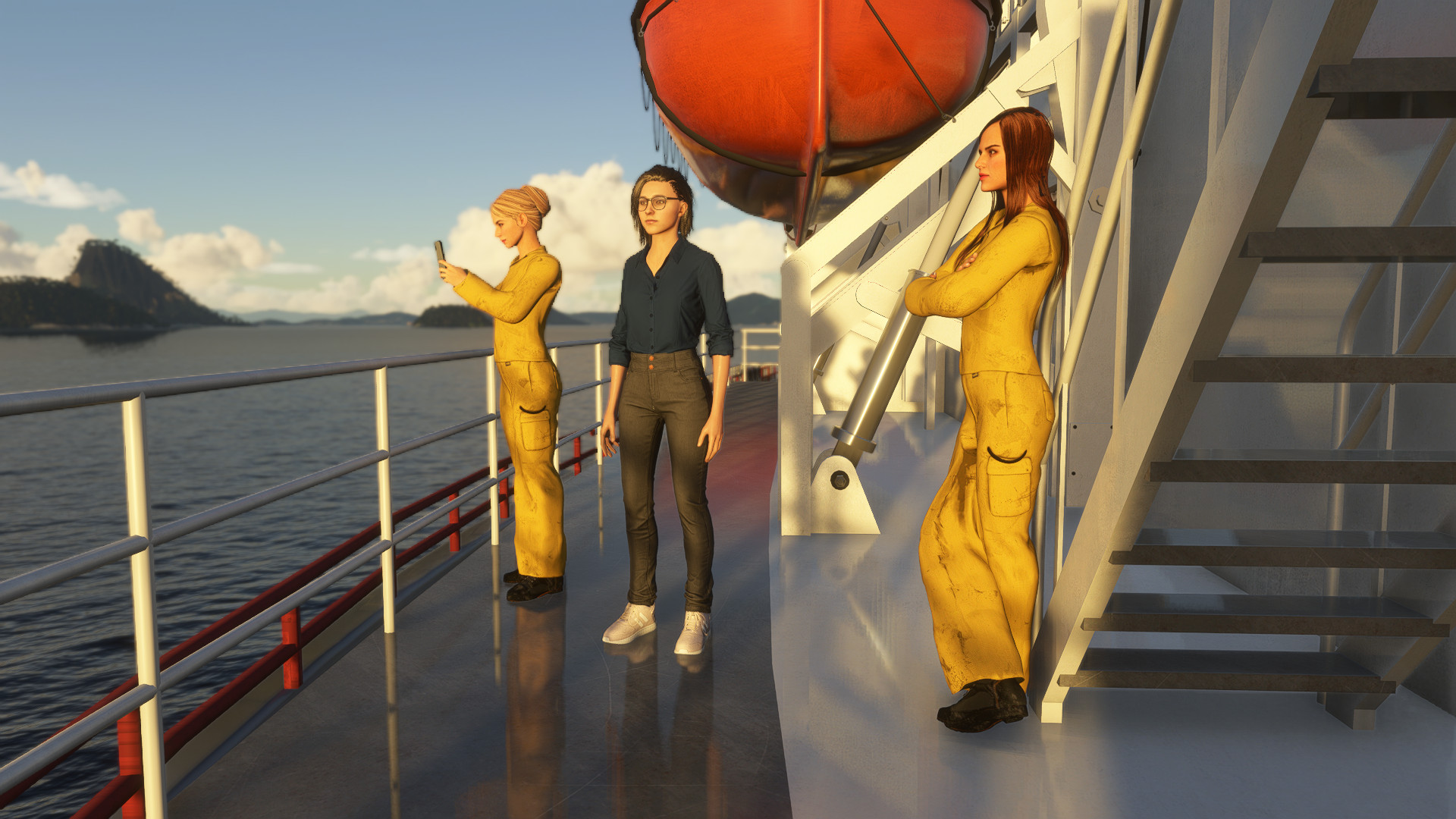
Still on the subject of detail, the entire exterior of the ship was carefully modeled, recreating the smallest details while respecting an acceptable FPS limit for a pleasant simulation. You will have at your disposal 17 liveries from real-world companies, some of which operate the Suezmax ship in reality, and others are adaptations of other classes. There are also working crew modeled with a high level of detail on the upper deck in poses representing various activities.
If you are looking for a highly detailed ship for pleasant sailings in different ports or marine regions around the world, this vehicle was made for you.
There are a good number of liveries available on a ship that behaves well in all weather. It is possible to activate anchors or SPM buoys after turning off the engines and it is recommended to activate the active pause to take a closer look at the crew on deck.
Try it!
RESOURCES:
- Multifunction Tablet
- Easy Cold Start
- Improved navigation physics
- Functional displays with GPS and navigation
- Detailed interior
- Start anywhere in the world over water
- Night lights
- 17 different paints in the livery menu
- Sounds
- Friendly fps
HOW TO INSTALL:
- Locate the Microsoft Flight Simulator installation folder
- You need to find and open the folder called "Community"
- Copy the folder "marinerm-tanker-ship-suezmax" you just extracted to the Community folder.
- Start the game and the "Marine RM Tanker Ship" will be in its hangar ready to sail!
HOW TO PLAY:
Start the game anywhere in the world on the water or seaplane track, put the engine at 100% and wait a few seconds (10 to 15 seconds for full engine functionality) for the boat to start moving. Water trails start with the slowest speed you are on. The boat have a reverse engine.
Use the aileron controls to turn left and right. The rudder controls simulate axial movement control moving the ship sideways to the left or right and do not activate the steering wheel animation, only the aileron control activates the steering wheel animation, as it is the main control method.
Use the multifunction tablet to activate lights and other boat functions, such as mooring and SPM oil transfer and this controls are only available when the boat is turned off.
In MSFS 2024 your character will spawn in the oil transfer engine room, in the middle of the ship. Walk forward, turn right into the hallway and go up the stairs at the end of the hallway to reach the ship's deck. It is possible to walk around the entire ship.
Ship control has been optimized to represent enjoyable gameplay. In this sense, the ship's acceleration, its maximum speed (established at 30 knots to facilitate those operating long-distance transfers) and turning capacity were designed for those who want to have fun, despite having in their hands a ship fully detailed and modeled as in the real life. The current water physics is not suitable for a high-level simulation for vessels although there is the intention that this will be worked on when there is an improvement in the game's physical capabilities.
Use the power lever to control acceleration or reverse and the left and right aileron controls to make course changes. It is possible to use the aileron up and down to accelerate the ship over short distances, as well as use the rudder to move the ship laterally to facilitate operation in ports, docks or regions with restricted maneuvering, but keep in mind that the limits water/ground conditions defined by the Flight Simulator environment cause false grounding in seaplanes or any type of water vehicle - as well as passing under bridges or navigating in cities with photogrammetry - this is not a product defect.
Use the support email to speak directly to me about questions, suggestions or any problems, there is a Discord channel for those who want to share more about ships and boats in Microsoft Flight Simulator and there is an FAQ on my website for additional questions.
Changelog
- New autopilot system - New effects - New onboard radar
- Added capacity to walk entire ship
- Added support for MSFS 2024
- Fixed glass propeties - Fixed headlights type
User Reviews

ebbsy2
VerifiedAug 24, 2026
i have to support boat which works well in ms2024,but I'm unable to get the tanker to perform, maybe update 6 broke the tanker. Its not working as advertised firstly it spawns me at the helm and I'm unable to walk any part of the ship and the slightest bit of swell just sends the tanker off coarse.no documentation comes with the ship and there's no sound
Catalina29
VerifiedApr 28, 2026
I’ve just bought this cruise ship. As I don’t usually use a gamepad, but prefer a joystick and my keyboard, it took me a while to figure out which controls correspond to the D-pad and the X button on the gamepad. To lower the flaps, press ‘flaps decrease’ and then ‘flaps decrease’ again for a virtual dock. Press ‘flaps increase’ to raise them. To switch the navigation lights and the spotlights under the flight deck wings on and off, press ‘brakes’. Engine Forward/Reverse control linked to the elevator axis. Steering wheel Starboard/Port control linked to the aileron axis. However, I haven’t yet figured out how to stop the engines. The foghorn is activated when bound to ‘gear out’ and ‘gear up’ If you can't hear it, I suggest replacing the sound files for ‘marinerm-tanker-ship-suezmax’ and ‘marinerm-cruise-liner’ with those from ‘marinerm-support-boat’

92203
VerifiedMar 10, 2026
I absolutely love this. It looks brilliant in the sim, parked up next some of the high resolution off shore platforms in the north sea makes for a brilliant screenshot - especially in 4K. Is it perfect in terms of sound and maneuverability ? Definitely not, but to be fair to the dev. this is flightsim not shipsim. Good fun product :)
B45Tornado22
VerifiedJan 11, 2025
Taken as "a model" with to simulate the world around us, it is a very good tool, if not perfect. It was indeed exciting to capture the feel of such a vessel. Navigation, while not controlled by an auto pilot, was made fairly interesting by using the flight planning tool and then steering into the nav line. At he price performance ration, I felt it was acceptable and I give great credit to this, the third upgrade since my purchase. It might weeks to traverse a route but that's the reality of this model and its simulation! I rate this three stars for immersion into a phenomenally immense scale, it's levels of detail, and enabling me to have quite a bit of fun with it so far. I add a star for keeping it upgraded over time. I'd no idea how much of an effort it is to plan and conduct a voyage with an immense vehicle such as this!
Pascal2041
VerifiedDec 12, 2024
Sadly not a good Product. I really REALLY wanted to like this but i just cant, there are no sounds, the Ship handels terribly (even with the correct settings as shown on the website) you literally cannot go a straight line as it constantly swerves from left to right. The exterior model is good tho.

DaisyMower
VerifiedSep 3, 2024
Likes: the exterior is well modelled with nice liveries. It is maneuverable and the fact it can travel at twice the top speed of a real-life tanker is an advantage in the sim. Dislikes: No sound, not even a horn!. The textures on the instruments in the bridge could be better, imho Will give it a 4 star rating if the sound issue gets sorted.
Nachtvalk
VerifiedAug 8, 2024
Outstanding tankervessel detailted, powerfull with various liveries. A joy to sail the seas and oceans in msfs. Really a must have!
Super Tanker
Explore the virtual seas with the Type 56 Suezmax "Super Tanker" add-on for Microsoft Flight Simulator. This highly detailed ship offers realistic controls, 17 liveries, and functional features like GPS and a crude oil transfer system. Perfect for sailing in various ports and marine regions, it provides a unique and immersive nautical experience.

Instant digital delivery • Secure payment
Requirements
Additional Requirements
- CPU: Intel i5 9600K
- RAM: 16 GB
- OS: Windows 10 64 bit
- VIDEO CARD: NVIDIA GTX 1050 Ti
- PIXEL SHADER: 5.1
- VERTEX SHADER: 5.1
- DEDICATED VIDEO RAM: 2GB
- STORAGE: HDD
More by this publisher

Details
- Category
- Aircraft
- Release Date
- Jul 28, 2024
- Last Updated
- Apr 11, 2026
- Reviews
- 7
- Compatibility
- MSFS2020/24