About this addon
iniBuilds A350 Stream Deck Profile
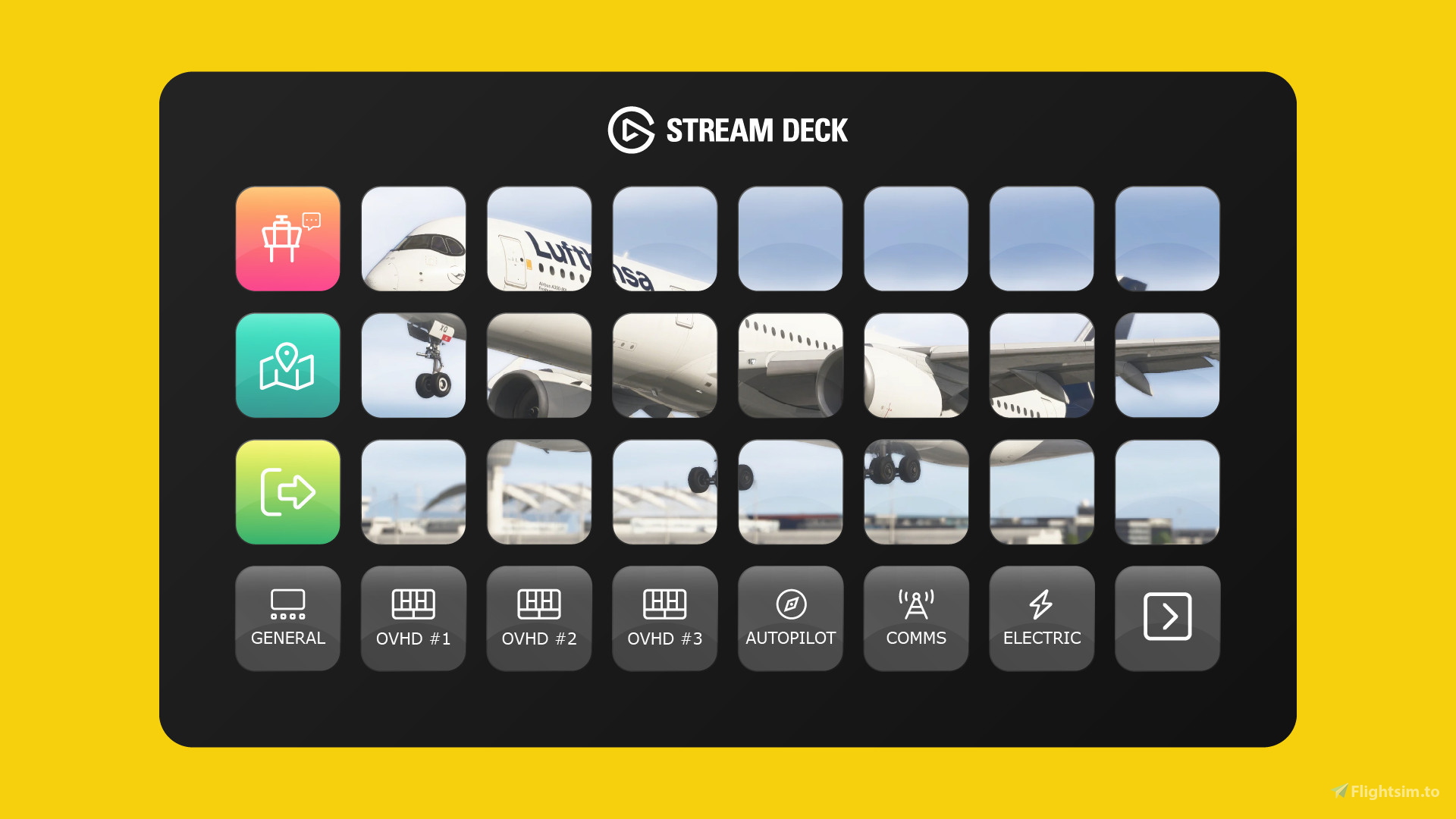
Experience the very best of Flight Panels with our iniBuilds Airbus A350 Stream Deck Profile for Microsoft Flight Simulator 2020 & 2024. With a staggering 29 pages and 700+ custom designed, pre-programmed and fully interactive buttons that match the look of the aircraft, you can control cockpit systems, buttons, dials and switches directly from your Stream Deck for the ultimate immersive experience.
Key Features
Home Screen, General (frequently accessed controls), Overhead Panels (i.e. Hydraulics, Electrical, Air, Calls, Fire, Maintenance), Ground Services (i.e. Doors, Airport Services, Maintenance, ATIS, Aircraft Health), EFIS/Autopilot, Communications, Navigation, Internal/External Lighting, WXR/TCAS, MCDU, ECAM, Pre-Flight/Walk Around Mode and much more.
Available Product Versions
This product is offered in both 32 and 15 key versions. The 32 key profiles are compatible with the Stream Deck XL and Stream Deck Mobile for iOS and Android devices, while the 15 key profiles are designed for the Stream Deck MK.2 and Stream Deck Mobile for iOS and Android.
Installation of our profiles is extremely quick and simple. Once purchased, you’ll be provided with an installer that will automatically install and configure all of the necessary software. Need help? Our friendly team is on hand via email, live chat and Discord.
About Flight Panels
Our mission is to become an integral part of any Microsoft Flight Simulator setup, through the creation of professional, highly detailed, modern and consistency designed Stream Deck profiles, which maximise the immersive experience of Microsoft Flight Simulator. Our focus on user design, user experience and product research, backed by regular product updates and dedicated industry leading support - is there to provide our community with the confidence that a key part of their Flight Simulator setup will be regularly updated and supported.
Frequently Asked Questions
Q: Do you provide regular product updates?
We regularly update our Stream Deck Profiles to include new features, functionality and bug fixes and we're delighted to provide these free of cost, for the duration of the products lifespan. Announcements are also published on our Discord server and Release Notes are available on our product updates blog.
Q: What if I need support?
We provide free industry leading support by email (support[at]flightpanels.io), Discord and Live Chat (available on the bottom right hand corner of each webpage). On average, we respond to support requests in less than 15 minutes!
Q: How are your products installed?
Installation is performed through the Flight Panels All-In-One Installer, which automatically installs and configures third party applications (FSUIPC7, PilotsDeck, .NET Runtimes etc.) to make installation a breeze.
Q: How is the product licensed?
This product is for personal and home use. For commercial use and/or where used to generate revenue (directly or indirectly) a commercial license is required. Please contact support[at]flightpanels.io for further information.
Q: How can I keep up to date with the latest news?
Blog: https://flightpanels.io/blog/news
Product Updates: https://flightpanels.io/blog/product-updates
Support Portal: https://support.flightpanels.io
Instagram: https://instagram.com/flightpanels
Threads: https://threads.net/flightpanels
Discord: https://flightpanels.io/discord
Changelog
Release Notes: https://flightpanels.io/blogs/product-updates/multi-product-updates-september-2026-1
Release Notes: https://flightpanels.io/blogs/product-updates/multi-product-updates-july-26-1
Release Notes: https://flightpanels.io/blogs/product-updates/multi-product-updates-june-2026
Release Notes: https://flightpanels.io/blogs/product-updates/multi-product-updates-april-2026-1
Release Notes: https://flightpanels.io/blogs/product-updates/multi-product-updates-march-26-1
User Reviews

HeppoPeppo
VerifiedAug 9, 2026
The Buttons work, but the 15 Key Version is not compatible at all with the Stream Deck Classic or as mentioned the Stream Deck Mk.2. The Layout ist just cursed. DO NOT BUY !
humbug1873
VerifiedNov 15, 2025
"Installation of our profiles is extremely quick and simple." ... and then NOTHING happens. NOTHING is showing up on my Streamdeck ... Well ok not exactly nothing. My payment was successfully processed. DO NOT BUY
Philboyuser1000
VerifiedMay 26, 2025
works very well with my small (15K) Stream Deck. so much fun to push all the buttons via the Stream Deck instead of doing it the mouse.
Stream Deck Series: iniBuilds Airbus A350
The iniBuilds Airbus A350 Stream Deck Profile enhances Microsoft Flight Simulator 2020 & 2024 with a comprehensive control interface. Featuring 27 pages and over 630 custom buttons, it allows users to manage various cockpit systems intuitively from a Stream Deck. Available in both 32 and 15 key versions, this add-on is designed for simplicity in installation and regular product updates. Key features include access to overhead panels, ground services, and flight instrumentation, providing an immersive simulation experience.

Instant digital delivery • Secure payment
Requirements
Additional Requirements
- Microsoft Flight Simulator 2020/2024 (Steam or Microsoft Store)
- Stream Deck XL and/or Stream Deck Mobile for iOS and Android
- The aircraft referenced in the product description
More by this publisher
Details
- Category
- Miscellaneous
- Release Date
- Apr 7, 2025
- Last Updated
- Sep 9, 2026
- Reviews
- 3
- Compatibility
- MSFS2020/24