About this addon
rksoftware – SPOTTY27 v2.0
An Easy-to-Use Camera, Map and Replay Tool for Microsoft Flight Simulator 2024
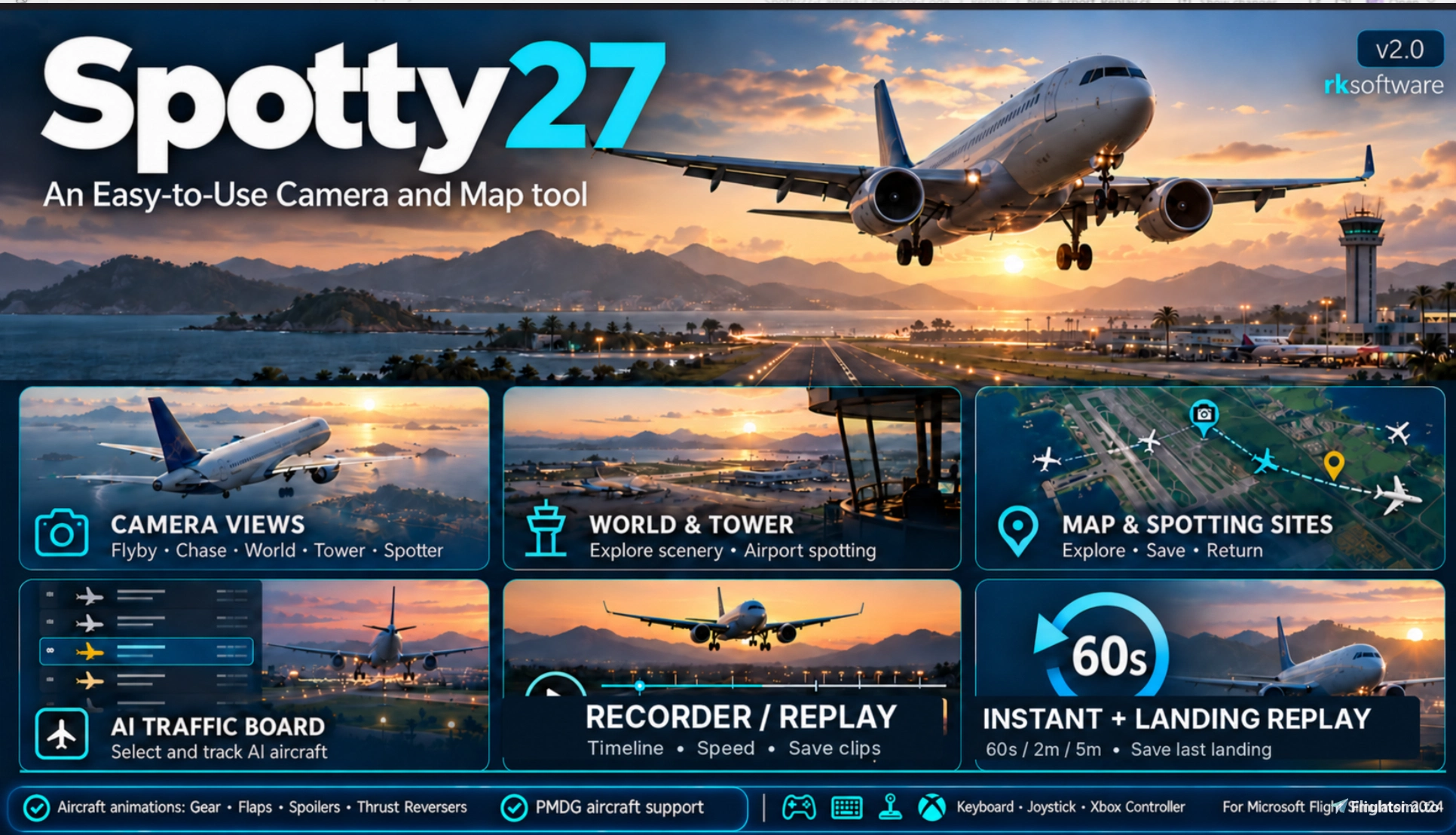
Take your Microsoft Flight Simulator 2024 experience to a new level with Spotty27, an easy-to-use camera, aircraft spotting and replay utility.
Create cinematic aircraft views, explore airports and scenery, track live AI traffic, and relive your best flights and landings with the new recording and replay features.
Whether you're an aviation enthusiast, aircraft spotter, flight simulator content creator or simply enjoy watching your aircraft from different perspectives, Spotty27 offers an easy and enjoyable way to experience MSFS 2024.
Main Features
CAMERA VIEWS
- Flyby – Watch aircraft flying past from cinematic viewpoints.
- FlybyO – Enjoy automatically changing cinematic flyby sequences.
- Chase – Follow aircraft from adjustable camera positions.
- World – Explore scenery and airports with a freely positioned camera.
- Tower / Spotter – Watch landings and departures from automatic airport Tower views or your own saved spotting locations.
NEW! RECORDER / REPLAY
Record and replay flights using your own aircraft or selected AI aircraft.
- Record up to 10 minutes of aircraft movement using a continuous rolling buffer.
- Save and load recordings for later playback.
- Adjustable playback speeds from 1/4X to 8X.
- Timeline controls, pause and looping.
- Replay using Spotty27's cinematic camera views or the default MSFS camera for user aircraft.
- Reproduce landing gear and flap animations on supported aircraft, including the PMDG B737.
NEW! INSTANT REPLAY
Never miss a memorable flight moment!
- Continuously records your latest 60 seconds, 2 minutes or 5 minutes.
- Replay your recent flight with a single click.
- No separate recording window required.
- Ideal for reviewing approaches, landings and other flight maneuvers.
NEW! AUTOMATIC LANDING REPLAY
Relive your landings from different camera perspectives.
- Automatic landing detection and optional replay.
- Adjustable recording time before and after touchdown.
- Replay your most recent landing whenever you want.
- Save landings with the aircraft name and date for future viewing.
MOVING MAP & AI TRAFFIC
- Interactive moving map with aircraft positions.
- Select and follow user or AI aircraft.
- AI Traffic Board displaying nearby aircraft and flight information.
- Save your favorite airport spotting locations.
- Automatic and customizable Tower camera positioning.
EASY CONTROLS
- Simple, intuitive interface.
- Keyboard shortcuts and configurable global hotkeys.
- Joystick and Xbox controller support.
- Compatible with Microsoft Flight Simulator 2024.
More Than Just a Camera Tool
Spotty27 combines cinematic camera views, live traffic observation, scenery exploration and flight replay in one application.
Fly. Watch. Record. Replay. Enjoy!
Developed by rksoftware for Microsoft Flight Simulator 2024.
User Reviews
No reviews yet. Be the first to share your experience!
Spotty27
Spotty27 is a utility for Microsoft Flight Simulator 2024 offering cinematic camera views, aircraft spotting, and flight replay functions. It allows users to record and replay their own flights or AI aircraft with adjustable playback controls. Features include multiple camera modes, automatic landing replays, and an interactive moving map with AI traffic tracking. The tool supports simple controls, keyboard shortcuts, and is compatible with various controllers.

Instant digital delivery • Secure payment
If you have purchased Spotty26 on Flightsim.to before, you are eligible for a discounted price on this product. Please note that the special upgrade price is only valid for the account used to purchase the mentioned product. If in doubt, contact Flightsim.to before making your purchase. Refunds will not be provided for user error.
Requirements
Additional Requirements
- MSFS2024
More by this publisher


Details
- Category
- Utilities
- Release Date
- Nov 10, 2026
- Last Updated
- Nov 12, 2026
- Compatibility
- MSFS2024